
Known Participant
February 3, 2026
Answered

wie hindere ich Absätze daran, aneinanderzukleben

  • February 3, 2026
  • 3 replies
  • 40 views

Hi Community,

ich habe ein neues Dokument erstellt, in dem die Absätze aneinanderhängen. Das heißt, die letzte Zeile eines Absatzes (oder 2, je nach Umbruchoptionen) klebt an den beiden ersten Zeilen des nächsten Absatzes (oder nur 1).
Umbruchoptionen habe ich alle durch, ich kann damit lediglich wählen, wie viele Zeilen aneinanderhängen. Es ergeben sich unschöne leere Flächen am Spaltenende, für die noch Text vorhanden wäre.
Verkettungen gibt es nicht, harter Zeilenumbruch ist selbstverständlich gewählt.
Bei "klebenden" Überschriften hilft es, diese mit hartem Zeilenumbruch in eine neue Zeile zu schieben und die darüber zu löschen. Bei größeren Absätzen hilft es nicht.

Gibt es eine Option der Absatzformate, die ich nicht berücksichtigt habe?
Das Problem taucht erstmals so renitent nach einem Update auf (InDesign 21.2 x64), nach ca. 25 Jahren Arbeit mit InDesign …

Ich hoffe, jemand von Euch klugen Köpfen hat eine Idee.
LG, Birgit
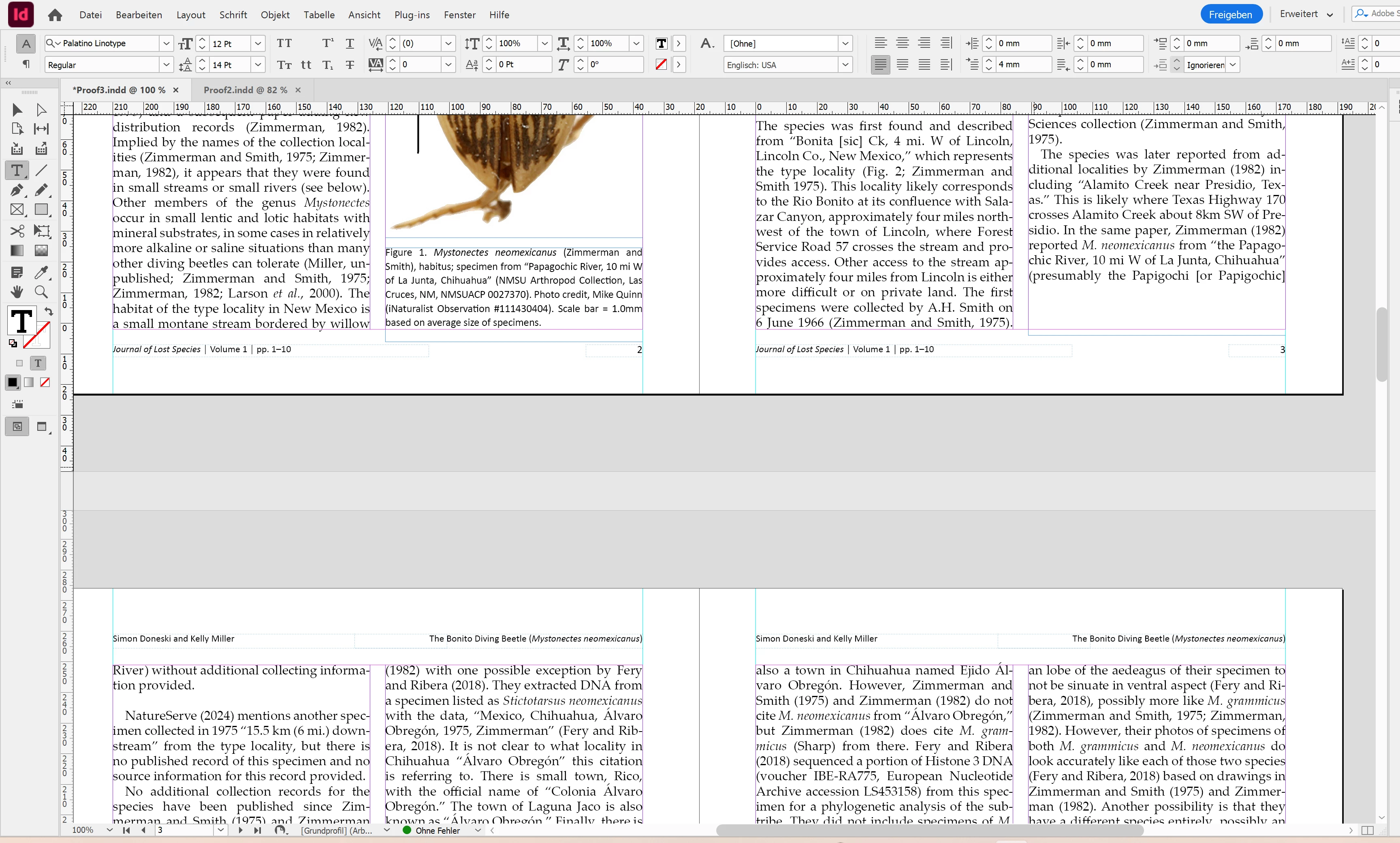
Hier sieht man, dass auch eine Leerzeile nicht hilft, den gesamten Absatz auf die vorherige Seite zu ziehen, obwohl Platz vorhanden ist.


    Correct answer Eugene Tyson

    What you’re describing is classic Keep Options behaviour, not a line-break issue.

    If a paragraph (or the one before it) has Keep with Next set to 1 or more lines, InDesign will refuse to break the paragraph across a column or page — even if there is clearly enough space. That’s why you’re seeing the last line(s) of one paragraph “stuck” to the first lines of the next, and why adding blank lines or hard returns doesn’t help.

    A few key points to check:

    Body text should never have “Keep with Next” enabled
    That option is intended for headings only. If it’s applied to body text even via a nested or inherited style paragraphs will cling together and create those ugly gaps at the bottom of columns.

    Use “Keep Lines Together” instead (sparingly)
    For body copy, if you want to avoid widows and orphans:

    Enable Keep Lines Together

    • Set At Start / End to something reasonable (e.g. 2 lines)
    • Do not use “All Lines in Paragraph” unless absolutely necessary

    Headings: Keep with Next = OK, but be conservative
    For headings:

    “Keep with Next: 1–2 lines” is usually enough

    Avoid stacking multiple heading styles that all keep with next that compounds the problem

    Blank lines don’t override Keep Options
    A blank paragraph is still just another paragraph. If the surrounding styles have keep rules, InDesign will obey those rules regardless of visible space.

    If you want consistent vertical rhythm, use the Baseline Grid
    If your goal is even column endings rather than forced paragraph movement:

    Align body text to a Baseline Grid

    Keep paragraph spacing controlled via Space Before/After, not empty lines

    In short:

    • Headings > Keep with Next (minimal)
    • Body text > No Keep with Next
    • Widow/orphan control > Keep Lines Together (start/end)
    • Page consistency > Baseline grid

    3 replies

    Known Participant
    February 3, 2026

    Hi both,

    thanks a lot for your quick and helpful responses!

    I use Keep with next (2 lines) for decades now. ;o) And initially here, too. That’s why I got nuts when it didn’t work. Then I tried all the other options, alone and in several combinations. And several times came back to Keep with next. 

    And now it worked! I don’t think a fresh start of InDesign was the gamechanger, because this problem existed yesterday and again today. However, probably user error. 

    With your help I’m now sure about these options. In between I helped myself by character spacing of some previous paragraphs to fill the column. But I wanted to solve this problem.

    Dave Creamer of IDEAS
    Community Expert
    Community Expert
    February 3, 2026

    For headlines, you should use Keep with Next Lines set to 1. This will eliminate the need for hard line breaks. (Don’t click the checkbox by Keep with Previous--that has nothing to do with Keep with Next Lines.)

    For body text, you should use Keep Lines Together set to 2. You don’t need any Keep with Previous or Next settings. 

    For headlines 1 line is as good as 2 if your body text is required to have 2 lines at the beginning.


    Now, this will still create a “rag bottom” depending on how the text flows. There are no auto settings for that problem. You can do one of the following: edit the text to shorten or lengthen some paragraphs; resize the graphics to reflow the text; or track some paragraphs with short last lines to tighten them up and reflow text.

    (Technically, you can feather the columns vertically, but I would avoid that for most publications.)


    David Creamer: Community Expert (ACI and ACE 1995-2023)
    Eugene TysonCommunity ExpertCorrect answer
    Community Expert
    February 3, 2026

    What you’re describing is classic Keep Options behaviour, not a line-break issue.

    If a paragraph (or the one before it) has Keep with Next set to 1 or more lines, InDesign will refuse to break the paragraph across a column or page — even if there is clearly enough space. That’s why you’re seeing the last line(s) of one paragraph “stuck” to the first lines of the next, and why adding blank lines or hard returns doesn’t help.

    A few key points to check:

    Body text should never have “Keep with Next” enabled
    That option is intended for headings only. If it’s applied to body text even via a nested or inherited style paragraphs will cling together and create those ugly gaps at the bottom of columns.

    Use “Keep Lines Together” instead (sparingly)
    For body copy, if you want to avoid widows and orphans:

    Enable Keep Lines Together

    • Set At Start / End to something reasonable (e.g. 2 lines)
    • Do not use “All Lines in Paragraph” unless absolutely necessary

    Headings: Keep with Next = OK, but be conservative
    For headings:

    “Keep with Next: 1–2 lines” is usually enough

    Avoid stacking multiple heading styles that all keep with next that compounds the problem

    Blank lines don’t override Keep Options
    A blank paragraph is still just another paragraph. If the surrounding styles have keep rules, InDesign will obey those rules regardless of visible space.

    If you want consistent vertical rhythm, use the Baseline Grid
    If your goal is even column endings rather than forced paragraph movement:

    Align body text to a Baseline Grid

    Keep paragraph spacing controlled via Space Before/After, not empty lines

    In short:

    • Headings > Keep with Next (minimal)
    • Body text > No Keep with Next
    • Widow/orphan control > Keep Lines Together (start/end)
    • Page consistency > Baseline grid
    Dave Creamer of IDEAS
    Community Expert
    Community Expert
    February 3, 2026

    @Eugene Tyson Your post wasn’t there when I started typing! 

    David Creamer: Community Expert (ACI and ACE 1995-2023)
    Community Expert
    February 3, 2026

    @Dave Creamer of IDEAS 
    Of course - crossover happens all the time - no worries - the screenshots are good visual help too. 


    All good info. Have a good day 😁