

dublove
Legend
July 18, 2025
Question

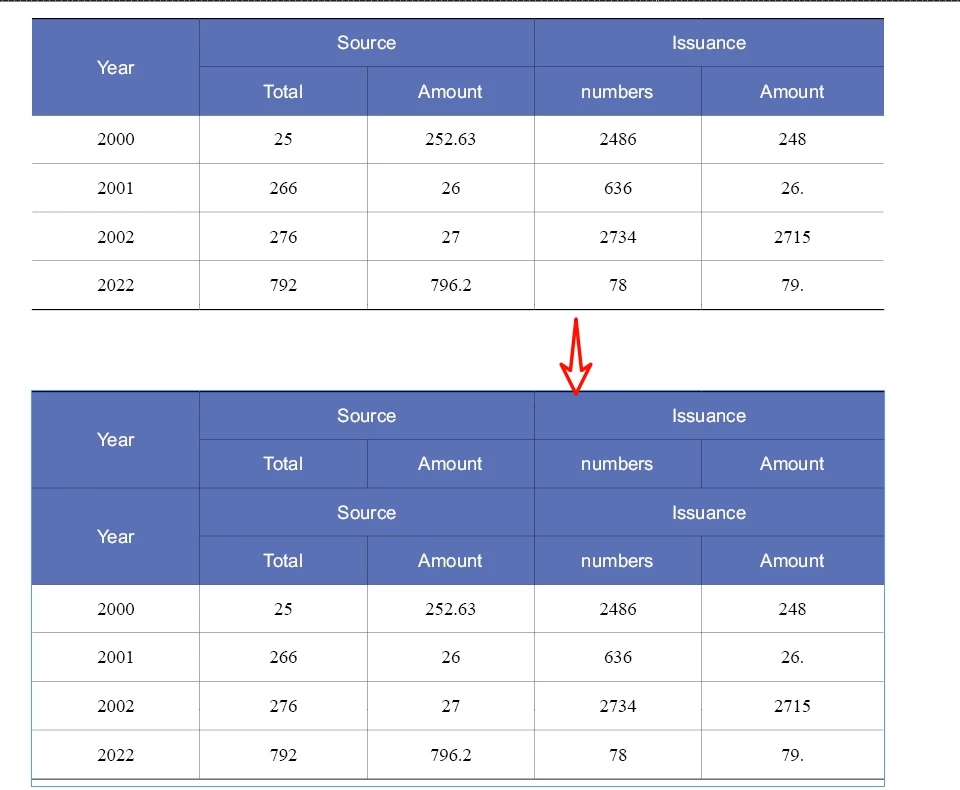
With script, How to duplicate header rows that have "cross rows and columns"?

  • July 18, 2025
  • 1 reply
  • 992 views

The original script doesn't seem to work anymore?

function dupeTopRow(t){
    var newRow = t.rows.add(LocationOptions.BEFORE, t.rows[0]);
    var newCell = newRow.cells
    var lr = t.rows[1].cells
    for (var i = 0; i < newCell.length; i++){
        newCell[i].properties = lr[i].properties;
    };  
}
 

1 reply

m1b
Community Expert
Community Expert
July 18, 2025

Hi @dublove can you test this function. It will probably need some improvements, but is a good start I think.

- Mark


/**
 * @file Duplicate Selected Table Rows.js
 * 
 * Example of `duplicateRows` function.
 * Select one or more table cells, then run script.
 * It will duplicate the rows of the cell(s) you selected.
 *
 * @author m1b
 * @version 2025-07-19
 * @discussion https://community.adobe.com/t5/indesign-discussions/how-can-i-accurately-perform-a-table-header-row-conversion-operation-with-a-script/m-p/15295606
 */
function main() {

    var doc = app.activeDocument;

    var sourceRows = getRows(doc.selection[0], undefined, true);

    if (0 === sourceRows.length)
        return alert('Please select some table rows and try again.');

    var newRows = duplicateRows(sourceRows);

};
app.doScript(main, ScriptLanguage.JAVASCRIPT, undefined, UndoModes.ENTIRE_SCRIPT, 'Duplicate Rows');

/**
 * Duplicates `sourceRows`. The new rows
 * are added before the source rows.
 * @author m1b
 * @version 2025-07-18
 * @param {Array<Row>} sourceRows - the rows to duplicate.
 * @returns {Array<Row>} - the new rows.
 */
function duplicateRows(sourceRows) {

    var table = sourceRows[0].parent;

    // add a temporary structural column at the start
    table.columns.add(LocationOptions.BEFORE, table.columns.item(0)).unmerge();

    var indices = [];
    for (var r = 0; r < sourceRows.length; r++)
        indices[r] = sourceRows[r].index;

    // make new empty rows
    var newRows = []
    for (var r = 0; r < indices.length; r++)
        newRows.push(table.rows.add(LocationOptions.BEFORE, sourceRows[0]));

    // unmerge newRows
    for (var r = 0; r < newRows.length; r++)
        newRows[r].unmerge();

    // update source row references
    for (var r = 0; r < indices.length; r++)
        sourceRows[r] = table.rows.item(indices[r] + newRows.length);

    // duplicate spanning
    for (var r = 0; r < sourceRows.length; r++) {

        var sourceRow = sourceRows[r];
        var colSpans = sourceRow.cells.everyItem().columnSpan;
        var rowSpans = sourceRow.cells.everyItem().rowSpan;
        var span;
        var advance = 0;

        // column spanning
        while (span = colSpans.shift()) {

            if (span > 1)
                newRows[r].cells.item(advance).merge(newRows[r].cells.item(advance + (span - 1)));

            advance++;

        }

        // row spanning
        advance = 0;

        while (span = rowSpans.shift()) {

            if (span > 1)
                newRows[r].cells.item(advance).merge(newRows[r + (span - 1)].cells.item(advance));

            advance++;

        }

    }

    // update new row references
    for (var r = 0; r < indices.length; r++)
        newRows[r] = table.rows.item(indices[r]);

    // match the cells
    for (var r = 0; r < sourceRows.length; r++)
        for (var c = 0; c < sourceRows[r].cells.length; c++)
            newRows[r].cells.item(c).properties = sourceRows[r].cells.item(c).properties;

    // remove structural column
    table.columns.item(0).remove();

    return newRows;

};

/**
 * Returns the merged rows of a given row.
 * @author m1b
 * @version 2025-05-01
 * @param {Row} row - the target row.
 * @param {Function} [isUnique] - private function to check for uniqueness.
 * @returns {Array<Row>}
 */
function getMergedRows(row, isUnique) {

    isUnique = isUnique || uniqueChecker();

    var rows = [],
        rowIndex = row.index,
        table = row.parent;

    if (isUnique(row.index))
        rows.push(row);

    // 1. check for spans going down from this row
    var cells = table.rows[rowIndex].cells;
    for (var i = 0; i < cells.length; i++)
        for (var j = 0; j < cells[i].rowSpan; j++)
            if (isUnique(table.rows[rowIndex + j].index))
                rows.push(table.rows[rowIndex + j]);

    // 2. check for cells in earlier rows that reach into this one
    for (var r = 0, testRow; r < rowIndex; r++) {

        testRow = table.rows[r];
        span = testRow.rowSpan;

        if (r + span - 1 < rowIndex)
            continue;

        for (var j = 0; j < span; j++)
            if (isUnique(table.rows[r + j].index))
                rows.push(table.rows[r + j]);

    }

    rows.sort(function (a, b) { return a.index - b.index });

    return rows;

};

/**
 * Given cells, returns the cells' rows.
 * @author m1b
 * @version 2025-07-19
 * @param {Cell|Cells|Array<Row>} cells - the cells to get rows from.
 * @param {RowTypes} rowType - the desired row type.
 * @param {Boolean} [includeMergedRows] - whether to include merged rows (default: false).
 * @param {Table} [table] - the rows' table.
 * @param {Function} [isUnique] - private function to check for uniqueness.
 * @returns {Array<Row>}
 */
function getRows(cells, rowType, includeMergedRows, table, isUnique) {

    var rows = [],
        isUnique = isUnique || uniqueChecker();

    if (!cells)
        return [];

    if ('function' === typeof cells.getElements)
        cells = cells.getElements();

    if (
        'Array' === cells.constructor.name
        && cells[0].hasOwnProperty('cells')
    ) {
        // to handle the case of expanding an array of rows to include merged rows
        for (var i = 0; i < cells.length; i++)
            rows = rows.concat(getRows(cells[i].cells, rowType, includeMergedRows, table, isUnique))

        return rows;
    }

    if (
        cells.hasOwnProperty('cells')
        && cells.cells.length > 0
    )
        cells = cells.cells;

    if (
        !cells.hasOwnProperty('0')
        || !cells[0].hasOwnProperty('parentRow')
    )
        // can't get rows from `cells`
        return [];

    var table = table || cells[0].parent;

    while (
        'Table' !== table.constructor.name
        && table.hasOwnProperty('parent')
    )
        table = table.parent;

    for (var i = 0, row; i < cells.length; i++) {

        spanLoop:
        for (var j = 0; j < cells[i].parentRow.rowSpan; j++) {

            row = table.rows[cells[i].parentRow.index + j];

            if (
                undefined != rowType
                && rowType !== row.rowType
            )
                continue spanLoop;

            if (includeMergedRows)
                rows = rows.concat(getMergedRows(row, isUnique));

            else if (isUnique(row.index))
                rows.push(row);

        }

    }

    return rows;

};

/**
 * Returns a function that, given a String, will
 * return true if that String has not been seen before.
 *
 * Example:
 *   var isUnique = uniqueChecker();
 *   if (isUnique(myThing))
 *     // do something with myThing
 *
 * @author m1b
 * @version 2025-05-01
 * @returns {Function}
 */
function uniqueChecker() {

    var unique = {};

    return function (str) {

        if (unique[str])
            return false;

        unique[str] = true;
        return true;

    };

};

Edit 2025-07-19: added check for undefined cells in getRows function.

dublove
dubloveAuthor
Legend
July 18, 2025

If it's already a table header, it will report an error.
Nothing else found.

Still want to be able to execute scripts with table headers already present.

Because sometimes the table header already exists, but I still need to add rows at the top or at the end.