Apr 21, 2017 3:47 AM UTC
Answered

Word count in Indesign

Hi all,

How to get the word count in Adobe Indesing? At present i paste content in word to do this.

Thanks

    This topic is closed to new replies. Start a new post to keep the conversation going.
    amaarora
    amaaroraCorrect answer
    Inspiring
    Apr 21, 2017 3:50 AM UTC

    Hi,

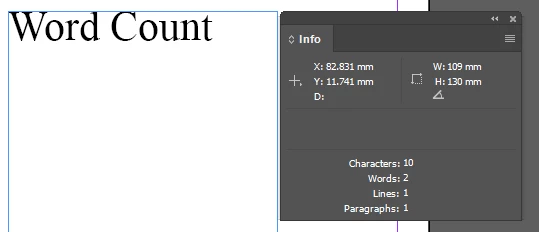
    Open the info panel (F8) from the windows menu. Select the desired content (entire frame, or only some of the text) to get the required parameter count.

    -Aman

    13 replies

    kenk69230275
    Participant
    Dec 14, 2017 5:14 PM UTC

    Here's a workaround that's more accurate than doing a search & replace for the space character. Export an InDesign document as a PDF. Open the PDF in Adobe Acrobat. Export as a Word document. Open in Word and select Word Count from the Tools menu. The number of words appears in a dialogue box.

    I tested both methods. I had a document with 3942 words but the search & replace method only showed 3009 spaces.

    Translate
    Onpo1nt
    Participant
    Dec 14, 2017 5:33 PM UTC

    Thanks

    Translate
    amaarora
    amaaroraCorrect answer
    Inspiring
    Apr 21, 2017 3:50 AM UTC

    Hi,

    Open the info panel (F8) from the windows menu. Select the desired content (entire frame, or only some of the text) to get the required parameter count.

    -Aman

    Translate
    Apr 21, 2017 3:58 AM UTC

    Thank you a lot

    Translate