This topic has been closed for replies.

8 replies

SumitKumar
Inspiring
July 22, 2021

Sorry All, I was little busy with my assignment so could not respond on time.
I am really sorry, I can not share file becuase this is my office document.

Problem solved: Previous applied languate is "English:US" and then I applied "No Language" and again applied "English:US", and issue resolved.

But I could not get why this happened?


Regards,

Sumit


-Sumit
Community Expert
July 22, 2021

If that's the case - you might want to try using File>Export and choose IDML.

Then open the IDML file in InDesign.

Once you have this - save it as an InDesign file as a new file name - new version number or something similar.


IDML is a good way to eradicate corruption that may have crept in - like this scenario.

SumitKumar
Inspiring
July 22, 2021

Thank you Eugene, I will so it too.

quote

If that's the case - you might want to try using File>Export and choose IDML.

Then open the IDML file in InDesign.

Once you have this - save it as an InDesign file as a new file name - new version number or something similar.


IDML is a good way to eradicate corruption that may have crept in - like this scenario.


By @Eugene Tyson


-Sumit
Peter Spier
Community Expert
Community Expert
July 21, 2021

Is there a language assigned to the text?

Jumpenjax
Community Expert
Community Expert
July 21, 2021

I just encountered this today. It turned out I had tabs set for a section above and the copy I imported had tabs set from word. So maybe check that senecio?

Lee- Graphic Designer, Print Specialist, Photographer
Community Expert
July 21, 2021

Hi Sumit,

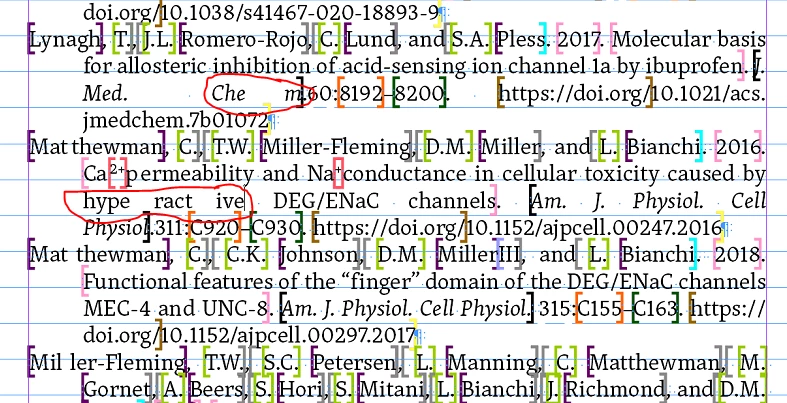
you can see this also at the beginning of the paragraphs with:


Mat thewman
Mat thewman
Mil ler-Fleming


It would help to post an InDesign document, a single page with that text frame.

Just put it on Dropbox or a similar service and show the download link.

Could be a bug.


Thanks,
Uwe Laubender

( ACP )

SumitKumar
Inspiring
July 22, 2021

Yes these words are destroyed also.

-Sumit
Community Expert
July 21, 2021

Looks like someone has put a space between the letters - and the text is justified so its spacing it out accordingly.

Hard to know without showing Type>Show Hidden Characters - can you post a screenshot with these turned on?


SumitKumar
Inspiring
July 21, 2021

Please zoom and see, hidden character is visible.

-Sumit
Community Expert
July 21, 2021

I see - sorry was on my phone - checking it on the laptop - interesting one. 


Community Expert
July 21, 2021

Hi Sumit,

either hyphenation is turned off or the heavy XML tagging does not allow for hyphenation and is "destroying" text composition.

What is the paragraph composer by the applied paragraph style? Is it the “Adobe World-Ready Composer”? Then try to change that to the "Adobe Paragraph Composer" or the "Adobe Single-line Composer".


Regards,
Uwe Laubender

( ACP )

Derek Cross
Community Expert
Community Expert
July 21, 2021

Have a look at the justification – you may have selected "Justify all lines". 

Legend
July 21, 2021

Can you share a link to your InDesign file? It's going to be hard to see what's happening here without examining the file directly.