


Participant
July 8, 2026
Question

Words missing in text added to an InDesign document using "Place"

  • July 8, 2026
  • 5 replies
  • 48 views

We use File > Place… to add text (.docx) to InDesign documents.

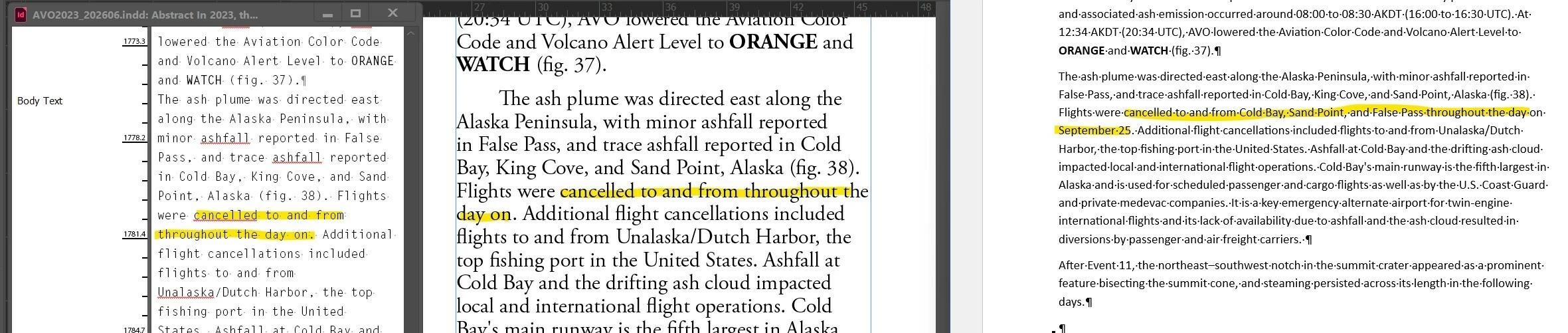
Words in the .docx file are missing in the StoryEditor version and the InDesign file (see screenshot).

What tool in InDesign can be used to link/import unformatted word documents without altering the original?
 

    5 replies

    Abhishek Rao
    Community Manager
    Community Manager
    July 20, 2026

    Hi ​@alaskarocks,


    Sorry for the delay in getting back to you.

    I hope the suggestions shared by the experts to isolate the issue with the source Word document have helped resolve the problem. I wanted to check if you're still experiencing the issue of missing words when placing the .docx file into InDesign. If the issue persists, please let us know, and we'll be happy to investigate further and assist you accordingly.


    Looking forward to your update!

    Abhishek

    Joel Cherney
    Community Expert
    Community Expert
    July 8, 2026

    Upon review, I think I should have started with this: “The problem isn’t in InDesign; it’s in the Word doc. Fix the Word doc, and it should import correctly.”

    Additionally, I should have ended with: “if none of the above helps, post a Word file with the one paragraph with the missing words, and we’ll figure it out.

    rob day
    Community Expert
    Community Expert
    July 8, 2026

    Hi ​@alaskarocks , Also, does it happen if you save a .doc (not .docx) from word? Should be File > Save As > Browse > select Word 97-2003 Document (*.doc)

    Joel Cherney
    Community Expert
    Community Expert
    July 8, 2026

    The resolution isn’t quite high enough to see the details in the third pane - which is either a screenshot from Word or a photo of the printout? The highlight is human-looking enough that I can’t tell. But if you open up that file in Word and look at those place names, I suspect that there is a fine dotted line under the entire phrase with the place-names (if you have Show Paragraph Marks enabled). I doubt that they’re set to “hidden,” which can cause this behavior in InDesign. You can check that by selecting the disappearing place names in Word and going to the Fonts dialog (control + d) and checking if the “Hidden” box is checked, close to the bottom of the dialog. 


    But if it’s not that, it’s some other bit of MS Word auto-text functionality. If you click on the place names once in Word, I bet one of those smart contextual pop-up buttons will display. When I encounter one bit of problem text in Word like this, I tend to just copy the paragraph to the clipboard, and then convert the contents of the clipboard to plain text. I sometimes do this by just pasting into an empty Notepad window and re-copying, but I also have a tool called PureText which allows me to use a keyboard shortcut to “sanitize” the clipboard. 


    If you have many instances of these drops, you might have less work to do if you save RTF out of Word to place; my recollection is that RTF didn’t support any of those MS Word auto-text hassles. 

    kglad
    Community Expert
    Community Expert
    July 8, 2026

    post this in the id forum, https://community.adobe.com/indesign-669


    and change your title slightly to avoid a duplicate post error.