Inspiring
March 19, 2026
Question

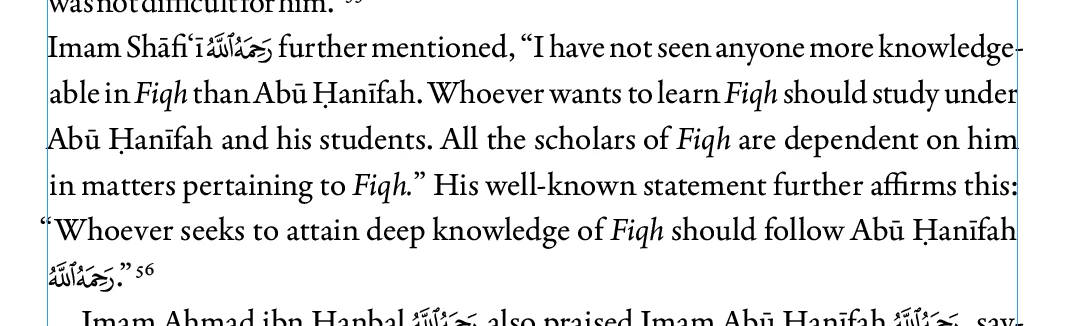
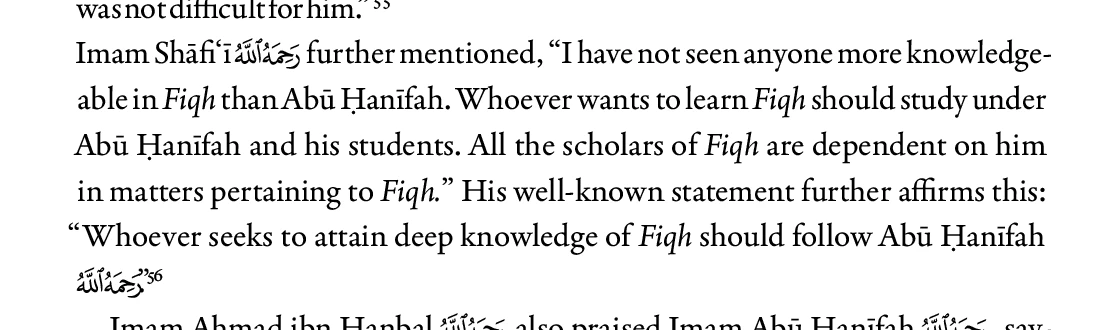
World Ready Paragraph Composer Causing Squashed Last Line with Footnotes

  • March 19, 2026
  • 5 replies
  • 73 views

The last line which has a footnote number ending in it is squashed.

I noticed that this happens when i apply the World Ready Paragraph Composer.

When i apply the normal Adobe Parapgraph Composer it goes back to normal.

I need the World Ready Paragraph Composer as there are many paragraphs with Arabic in it.

Does anyone know why this happens and the solution?


World Ready Paragraph Composer
Adobe Paragraph Composer
​​​​​​


    5 replies

    Inspiring
    March 21, 2026

    attached is a sample of the doc. 


    When I  was creating this sample to upload, I deleted a lot of the book, I noticed that the squashed text disappeared in some of the places.

    In this doc, the paragraph that ends with my friends is squashed on the last line

    Joel Cherney
    Community Expert
    Community Expert
    March 21, 2026

    I have a potential solution for you - but it might induce reflow throughout your document. I downloaded your test doc, but was unable to find the KFGQPC font. Fortunately, that doesn’t matter for our analysis, as the “my friends” line with the composition problem has no Arabic in it.  


    I looked at the Document History as Mike suggested, and found that your file was started in version 20.4, and was updated to version 21.1 in September of last year. I think that such file updating works for many users, but I usually work in complex scripts (like Arabic or Burmese) and have found that the text composition engine can change significantly between versions, and those changes can result in weird text flow issues. Furthermore, if you have a frame that you created and filled with text in version 20.4 and then open that file in 21.1, and do not edit the frame, then the frame will continue to render according to 20.4 rules, until you make changes to the frame, at which point it will re-render, sometimes with errors. 


    My global suggestion for you - for all users of non-Latin scripts in InDesign - is to never update your document by simply taking your old INDD and opening it in the latest version of InDesign. You are much better off either a) continuing to work in one version of InDesign, no matter how many years you continue to use the same document, or b) exporting IDML from your old version of InDesign, opening that with the new version, with the expectation that you’re going to have to proof the entire document due to the likelihood of text reflow due to changes in the underlying text composition engine. 


    What I did to resolve your compressed “my friends” issue was this: I made a single change to the paragraph. That caused the paragraph to re-render with the text composition engine in 21.2. All I did was add a space to the paragraph, which causes the entire story to change how it is composed:


    Since you have already clearly been working on this 20.4 file in 21.1 for a while, I would suggest that you make some updates. Firstly, update your InDesign 2026 to the latest version (21.3, I believe) right away. (Also update your 2025 install to 20.5.2, while you’re at it.) There were quite a few bugs in 21.0 and 21.1 that you wil want to avoid. After that update, you should force the text to recompose with the Recompose All Stories command (Command+Option+/) to force all stories in your document to redraw. This will lead to text flow changes throughout your document. You might also consider exporting to IDML and reimporting, which should force your stories to be recomposed according to 21.3 rules, and also clear out other potential document corruption.

    Mike Witherell
    Community Expert
    Community Expert
    March 19, 2026

    Based on Dirk’s comment, did you know you can explore the Document History of an open InDesign file by clicking on Help > then Cmd/Ctrl + click on About InDesign which takes you to a lot of metadata info including the Document History? This might provide a clue.

    Mike Witherell
    Joel Cherney
    Community Expert
    Community Expert
    March 19, 2026

    I’ve not seen this exact issue in the past, but in similar situations the workaround I’ve used to insert some kind of RTL control character character (e.g. a zero-width non-joiner, marked as English language) right before the period. 


    Have you by any chance already tried changing the preference for “Enable Legacy Character Shaping Engine” in Prefs → Advanced Type? 


    Also, I’d like to second Dirk’s suggestion that you post an InDesign file, even if it’s just that one paragraph.

    Abhishek Rao
    Community Manager
    Community Manager
    March 19, 2026

    Hi ​@Summayah5FC7,


    Thanks for sharing the details. I tested this on InDesign 21.2 on Windows 11 (Arabic version), but I wasn’t able to reproduce the issue on my end. Could you please help with a few more details as the expert suggested, such as the InDesign version, OS version, whether you’re using properly defined paragraph or character styles, and if any character style might be affecting the last line? Also, please confirm whether this happens only in a specific file or across all documents, as that will help narrow things down.

    In the meantime, you can try resetting InDesign preferences manually by following the video at the bottom of this article: https://helpx.adobe.com/indesign/using/setting-preferences.html and let us know if that makes any difference.


    Looking forward to your update.

    Abhishek

    Legend
    March 19, 2026

    I recently learned there can be differences when the document was create in an ME version versus western version, somewhere deeper than the typical ME settings. Haven’t yet further investigated, but when there are differences I’d first ask for a copy of the .indd itself.

    Mike Witherell
    Community Expert
    Community Expert
    March 19, 2026

    What version of InDesign?

    What version of which operating system?

    Are you using and applying properly-made paragraph styles?

    Are you able to see whether a character style is interfering with it?

    Mike Witherell