
Participant
October 3, 2018
Answered

Would like to change Hyphenation Default settings in InDesign?

  • October 3, 2018
  • 2 replies
  • 630 views

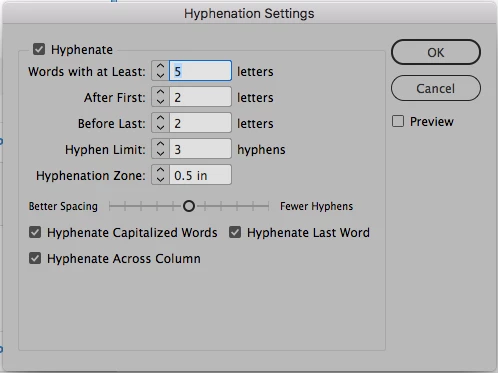
I rather not to hyphen words but if used, I would like it to be kept to the minimum. How to change once for all the settings to my liking? Thank you for your help and best regards, Manuella
This topic has been closed for replies.
Correct answer Bill Silbert

With no document open access the Hyphenation Settings dialog through the Paragraph Panel pull-down menu.

After you've changed the settings quit the program to solidify it as the program default.

2 replies

Bill Silbert
Community Expert
Bill SilbertCommunity ExpertCorrect answer
Community Expert
October 3, 2018

With no document open access the Hyphenation Settings dialog through the Paragraph Panel pull-down menu.

After you've changed the settings quit the program to solidify it as the program default.

Participant
October 3, 2018

Done! Thank you.

Bill Silbert
Community Expert
Community Expert
October 3, 2018

Happy to help.

Kanikas
Legend
October 3, 2018

Moving to InDesign