Participant
March 26, 2020
Answered

Writing an InDesign script to identify users

  • March 26, 2020
  • 5 replies
  • 3026 views

Our office has multiple users who often work on the same InDesign files at various times.  We are trying to figure out a way to create a footer, variable text box, or something that we can place in our InDesign documents, that will identify the Mac user/ InDesign username of the person who last saved the file.  I've played around with various scripts and finally found one that will at least add a variable text option (which we then added to a text box) for the InDesign username.... however, the username did not automatically update when the file was opened by another user, even when he had the same script installed on his computer.


Please note:  I am very new to scripting, and have only attempted to learn it to resolve this specific issue.  (I have, however, spent the last few days researching this and trying to find a solution.)
This topic has been closed for replies.
Correct answer Kasyan Servetsky

You can do this using this startup script:

#targetengine "Kasyan"

var eventListener = app.addEventListener("beforeSave", rememberLastUser, false);     

function rememberLastUser(event) {
	try {
		var doc = event.parent;
		doc.metadataPreferences.author = app.userName;
	}
	catch(err) {}
}

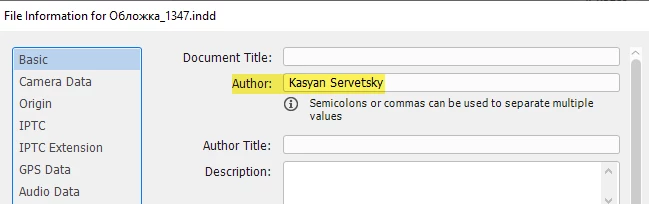
It inserts the user's name into the author field before the document is saved.

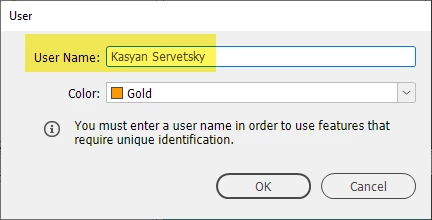
User name

File info dialog box

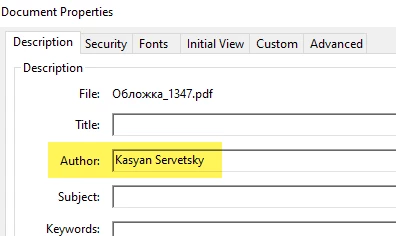
Also, the name goes to an exported PDF file

Of course, you can use another field in metadata.

Hope it helps.

— Kas

5 replies

Inspiring
March 27, 2020

Hi. I know you've found a solution, but another route would be to have an intermediary check-in/check-out system for users based in, say, a Filemaker or other database. Filemaker is quite scriptable and comes with networking built-in. The meta info could be inserted from Filemaker, and/or Filemaker could also keep the info so that anyone on the network could see who worked on which documents at what time, keep statistics, time worked, etc.

Participant
March 30, 2020

I appreciate this advice.  However, this is a small company and I think they prefer we don't purchase additional software unless it's completely necessary.  I will definitely do some research on Filemaker and keep it in mind for the future, in case our scripting endeavors don't fix the issues.


Everyone's help is very much appreciated.

Kasyan Servetsky
Kasyan ServetskyCorrect answer
Legend
March 27, 2020

You can do this using this startup script:

#targetengine "Kasyan"

var eventListener = app.addEventListener("beforeSave", rememberLastUser, false);     

function rememberLastUser(event) {
	try {
		var doc = event.parent;
		doc.metadataPreferences.author = app.userName;
	}
	catch(err) {}
}

It inserts the user's name into the author field before the document is saved.

User name

File info dialog box

Also, the name goes to an exported PDF file

Of course, you can use another field in metadata.

Hope it helps.

— Kas

Community Expert
March 27, 2020

Hi Kellewisphoto,

you can get the name of the logged-in user with:


// On Windows:
$.getenv("USERNAME")


//On Mac OS X:
$.getenv("USER")


and then, if you like, set InDesign's app.userName value to its result.

Note: If you trash InDesign's preferences or cache ( I did not try this ) the value of userName is set back to its default string "$ID/Unknown User Name".


Regards,
Uwe Laubender

( ACP )

Community Expert
March 27, 2020

Hi Kellewisphoto,


by default, after installing InDesign, app.userName is a string like that ( from my German InDesign ) :

"Unbekannter Benutzername"

This is equal to: "$ID/Unknown User Name".


This user name usually is not equal to the user name a user is logged-in to the computer.

I cannot see that InDesign is storing the computer's user name to a document.

So you cannot trace an InDesign document back to its creator, the logged-in user.


Did every of your InDesign users define the InDesign user name?

Menu: File > User…


Regards,
Uwe Laubender

( ACP )


Legend
March 27, 2020

Hello Kellewisphoto,

Can you please post the script your testing\modifying, also what OS are all the users on....Mac based?.....PC based?


Regards,

Mike

Participant
March 27, 2020

Mike,

I haven't even found a script that I'm able to modify yet.  (Very much a beginner in scripting.) I'm tinkering with Applescript and all of the ones I've downloaded so far are... well, not Apple.  We're all using Macs here.

This is vastly out of my realm of expertise, but I'm trying to creatively problem-solve, and maybe learn something new while I'm at it.

Jongware
Community Expert
Community Expert
March 27, 2020

Mike means the script that you are using now – the one that doesn't work. Maybe we can figure out why it doesn't if you show it.