regorC
Participant
April 18, 2017
Answered

X bar (mean symbol)

  • April 18, 2017
  • 5 replies
  • 8569 views

Hi

I can't find the x-bar (mean symbol) in Indesign.

Anyone know how to locate this symbol in glyphs?

(Indesign CC 2017)

Thanks,

Roger

    This topic has been closed for replies.
    Correct answer vinny38

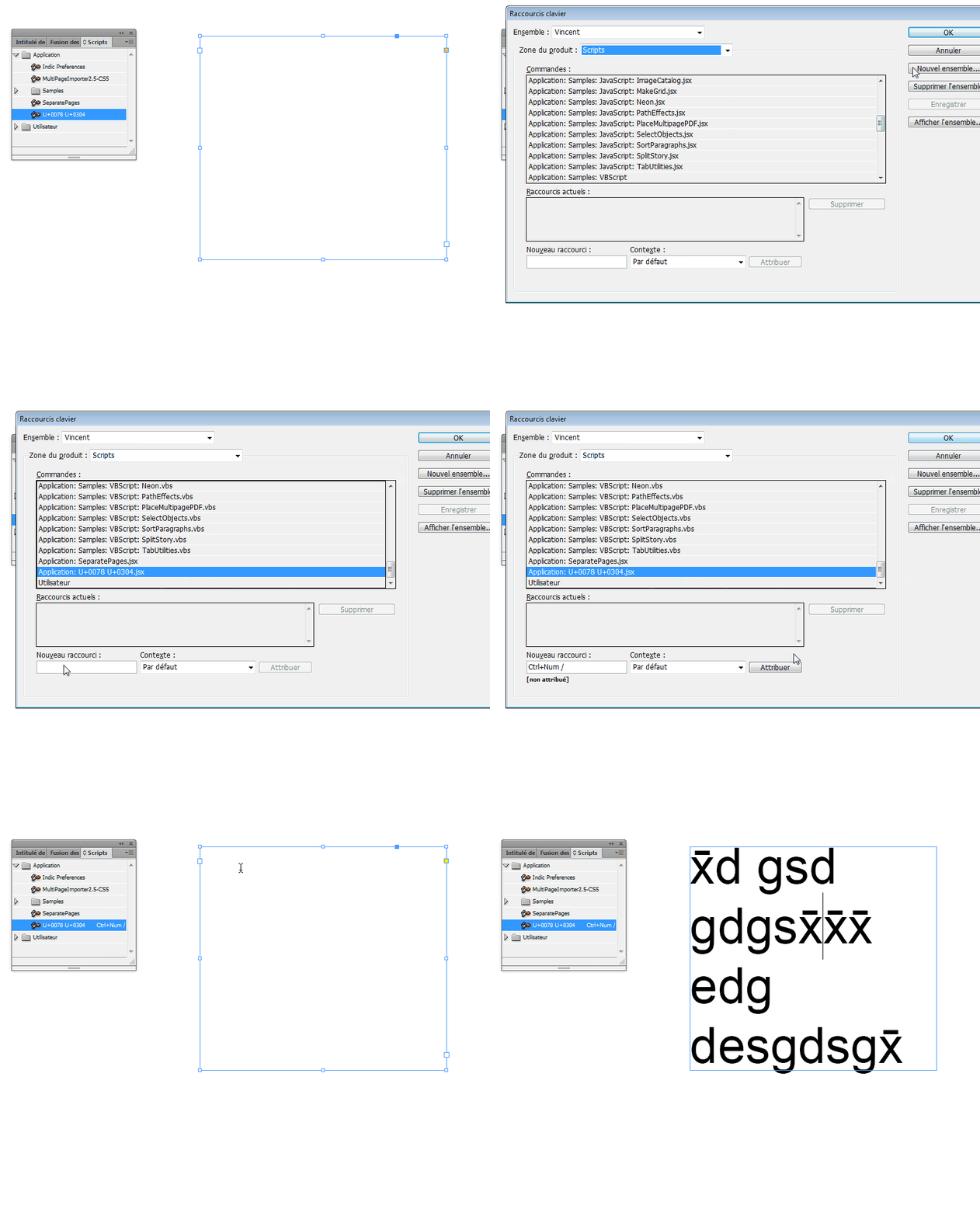
    In addition, using Rorohiko's cool (and free) script "UnicodeInjector" (https://www.rorohiko.com/wordpress/manuals/unicodeinjector-easily-insert-any-unicode-character-into-indesign) makes things so easy.

    You can even assign a shortcut (CTRL + / in my example below) to type your "combined glyph".

    See:
    5 replies

    vinny38
    Legend
    April 18, 2017

    Hi

    This spectific Glyph doesn't exist.

    You need to combine two glyphs : x and "Macron" (Unicode 0304). Of course make sure your font has this "macron" glyph.

    No need for kerning.

    For a faster workaround, IndyFont would be a great tool.

    Autocorrect could be handy too.

    vinny38
    vinny38Correct answer
    Legend
    April 18, 2017

    In addition, using Rorohiko's cool (and free) script "UnicodeInjector" (https://www.rorohiko.com/wordpress/manuals/unicodeinjector-easily-insert-any-unicode-character-into-indesign) makes things so easy.

    You can even assign a shortcut (CTRL + / in my example below) to type your "combined glyph".

    See:

    hammer0909
    Community Expert
    Community Expert
    April 18, 2017

    I've never had to use this character but I would think that maybe a math-based font in the OpenType format would definitely have it. I can't find a fond that does. That being said, if you open up the Glyphs panel in InDesign, you can search for the character by name or unicode value.

    winterm
    Legend
    April 18, 2017

    Also it can be inserted using KB command Alt+0215

    regorC
    regorCAuthor
    Participant
    April 18, 2017

    I discovered kern and did it manually which solved the problem, another suggestion or easier workaround would be appreciated.

    Roger

    winterm
    Legend
    April 18, 2017

    If you need to use specific font, and it hasn't that glyph, I'd vote for amaarora's second option. It's far more safe and robust solution. Depends on the volume of your project and workflow, though.

    winterm
    Legend
    April 18, 2017

    This?

    amaarora
    Community Manager
    Community Manager
    April 18, 2017

    Hi,

    I guess the need is for a symbol like

    I guess you first need to check if the font you have choosen has this glyph or not.

    As far as I know, this symbol this glyph isnt assigned a unicode yet.

    As a workaround you can any of the following:

    1. Enter x. Type bar - and then kern the pair to a negative value it to make it overlapping. This is what i could achieve with this method:

    2. Make a glyph using indiscripts http://www.indiscripts.com/category/projects/IndyFont

    -Aman

    winterm
    Legend
    April 18, 2017

    ha, my first post is still 'being moderated" so it's not clear what I meant.

    (that moderating thing is obviously not fast enough).

    however, it seems I misunderstood the question, so you're absolutely right.