lasercheese
Participant
January 29, 2016
Answered

XML not loading in certain tagged elements

  • January 29, 2016
  • 1 reply
  • 490 views

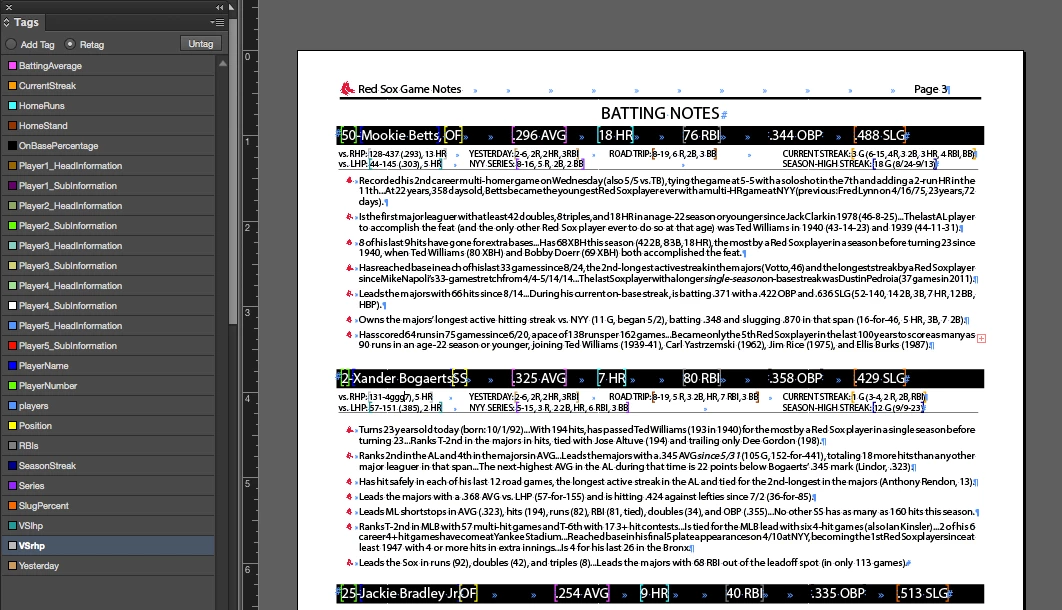
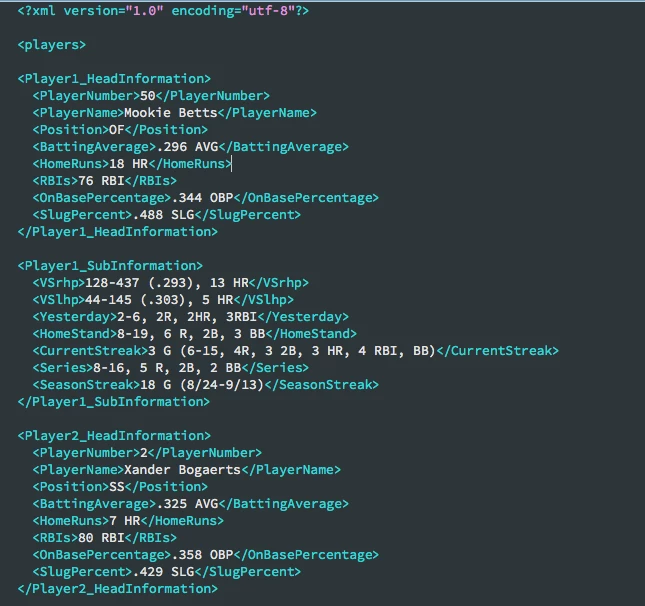
I have a document with certain elements that are tagged to match my xml document. I am loading this XML to import data,  There are text frames with type that I tagged using the story editor.  I have 2 kinds of stats for 5 red sox players in the document.  For some reason I cannot get all of them to load at the same time.  I will cut and past the info from one player to there other and it will change which text box of stats load and which do not.  It is frustrating because it seems totally random and I cannot get them all to load at the same time. Would not having a DTD be an issue?  I am not familiar with how to create one.

Any help would be appreciated.

Files here:

https://www.dropbox.com/sh/kg82blm8phnmtez/AACR8LWsHLgXpW3WxSCsLAgEa?dl=0

Partial Screenshots below:
This topic has been closed for replies.
Correct answer Loic.Aigon

Hi,

Your mistake is due to your misunderstanding of some basic rules when importing XML within InDesign. The first one is that the incoming structure MUST match the existing structure. In your XML sample, you have this :

<?xml version="1.0" encoding="UTF-8"?>
<players>
    
<Player1_HeadInformation/>
    
<Player1_SubInformation/>
    
<!--ETC.-->
</players>


But your InDesign structure is more like

<players>

<Player1_HeadInformation/>

<Player3_SubInformation/>

<Player2_HeadInformation/>

etc.


So when the xml content comes, the first node is ok. Player1_HeadInformation position is compliant. But then arrives Player1_SubInformation and the following xmlElement is Player3_SubInformation. Not the expected node. At this stage, either you choose to ignore unmatching nodes so the xml engine will continue until it finds a Player3_SubInformation node he can inject, or the engine will push the Player1_SubInformation possibly disregarding any styles properties and messing things up probably.


If you have hands onto structures, I would recommend a more generic approach like:


<?xml version="1.0" encoding="UTF-8"?>
<players>
    
<player>
        
<PlayerNumber>1</PlayerNumber>
    
</player>
    
<player>
        
<PlayerNumber>2</PlayerNumber>
    
</player>
    
<player>
        
<PlayerNumber>3</PlayerNumber>
    
</player>
</players>

Then you indesign template is like one node to be repeated:

And then whatever the players order, you are fine:

Don't forget the magic box

Here you are !

HTH

Loic

http:/www.ozalto.com

1 reply

Loic.Aigon
Loic.AigonCorrect answer
Legend
January 29, 2016

Hi,

Your mistake is due to your misunderstanding of some basic rules when importing XML within InDesign. The first one is that the incoming structure MUST match the existing structure. In your XML sample, you have this :

<?xml version="1.0" encoding="UTF-8"?>
<players>
    
<Player1_HeadInformation/>
    
<Player1_SubInformation/>
    
<!--ETC.-->
</players>


But your InDesign structure is more like

<players>

<Player1_HeadInformation/>

<Player3_SubInformation/>

<Player2_HeadInformation/>

etc.


So when the xml content comes, the first node is ok. Player1_HeadInformation position is compliant. But then arrives Player1_SubInformation and the following xmlElement is Player3_SubInformation. Not the expected node. At this stage, either you choose to ignore unmatching nodes so the xml engine will continue until it finds a Player3_SubInformation node he can inject, or the engine will push the Player1_SubInformation possibly disregarding any styles properties and messing things up probably.


If you have hands onto structures, I would recommend a more generic approach like:


<?xml version="1.0" encoding="UTF-8"?>
<players>
    
<player>
        
<PlayerNumber>1</PlayerNumber>
    
</player>
    
<player>
        
<PlayerNumber>2</PlayerNumber>
    
</player>
    
<player>
        
<PlayerNumber>3</PlayerNumber>
    
</player>
</players>

Then you indesign template is like one node to be repeated:

And then whatever the players order, you are fine:

Don't forget the magic box

Here you are !

HTH

Loic

http:/www.ozalto.com

Loic.Aigon
Legend
January 29, 2016

Also, not sure it's a scripting related issue. The indesign user forum would have a good fit too I guess.