
Participant
November 10, 2025
Answered

XML tag colors not showing in layout after mapping in InDesign 21.0

  • November 10, 2025
  • 1 reply
  • 77 views

Hi everyone,

I’m experiencing an issue with Adobe InDesign 21.0 and XML mapping. After opening my file in the new version, my tags — which previously had assigned colors in an earlier InDesign version — still appear with their colors in the Tags panel, but the colors no longer display in the layout after mapping.

In the Structure panel, I can see the mapped text and image areas, but they appear as simple text fields without the colored tags that would help me identify them easily. This makes it difficult to verify which tags are applied where.
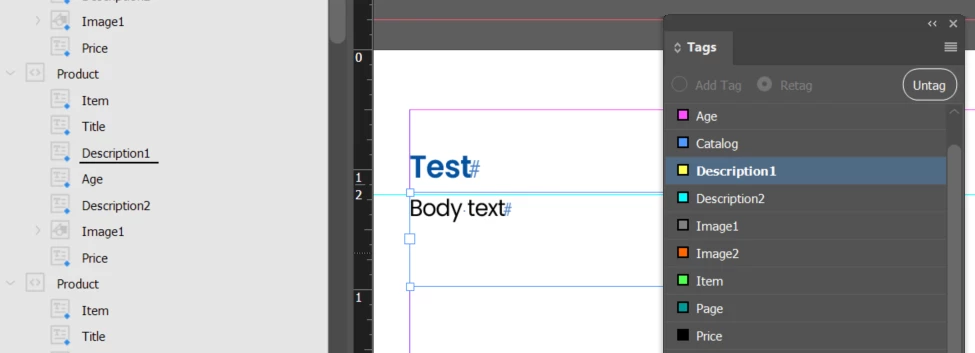
 

I even tried reassigning new colors to the tags, but nothing changed, the colors still don’t show in the layout.

Has anyone found a way to fix it?

Thanks for any guidance!

Correct answer Joel Cherney

Reports of file upgrade issues are common enough around here right now for me to ask "Have you tried going back to 20.5, exporting IDML, and then opening that IDML in 21.0?" Another step worth trying is going to View -> Structure and hiding and then re-showing the tags from there. 

1 reply

Joel Cherney
Community Expert
Joel CherneyCommunity ExpertCorrect answer
Community Expert
November 10, 2025

Reports of file upgrade issues are common enough around here right now for me to ask "Have you tried going back to 20.5, exporting IDML, and then opening that IDML in 21.0?" Another step worth trying is going to View -> Structure and hiding and then re-showing the tags from there. 

Participant
November 10, 2025

Thank you so much for your suggestion! I tried both steps and it works perfectly now.

Really appreciate your help!