Participant
October 29, 2022
Answered

Y-a-t-il une manière rapide de trouver les paragraphes qui n'ont pas de style de paragraphe?

  • October 29, 2022
  • 3 replies
  • 348 views

Lorsqu'on importe du texte dans InDesign, il peut venir mélangeant de savoir on non si nous avons oublié de mettre un style de paragraphe, surtout dans une énorme document. Y-a-t-il un outils qui nous montre clairement les paragraphes qui n'ont pas de style de paragraphe?

Merci!

This topic has been closed for replies.
Correct answer jmlevy

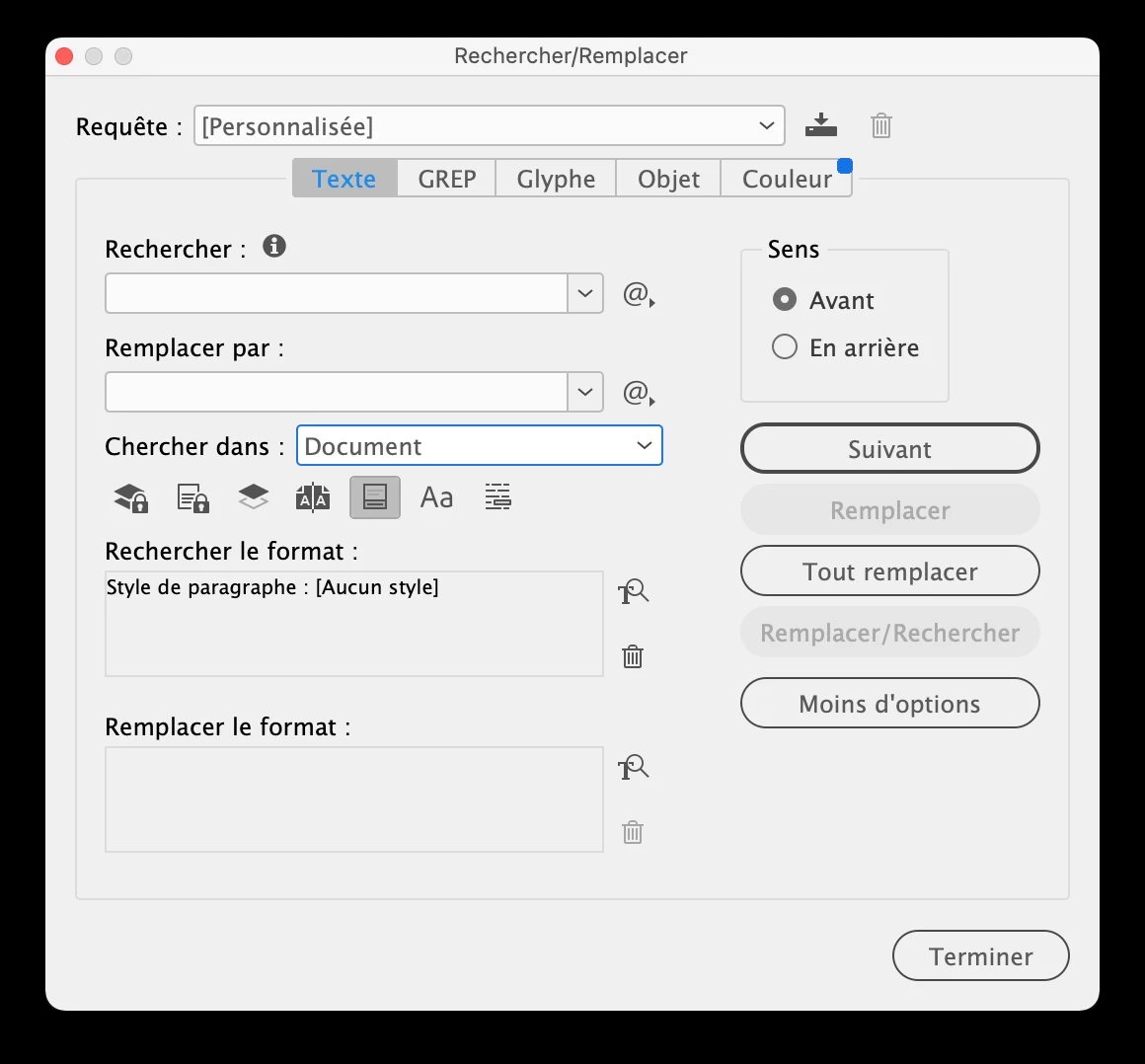
Commme le dit @Robert at ID-Tasker il suffit de rechercher les textes qui ont l'attribut « aucun style »

3 replies

jmlevy
Community Expert
jmlevyCommunity ExpertCorrect answer
Community Expert
October 29, 2022

Commme le dit @Robert at ID-Tasker il suffit de rechercher les textes qui ont l'attribut « aucun style »

Community Expert
October 29, 2022

Hi @Marie-soleil25774835qad5 ,

look into the feature Style Overrides Highlighter, that you can enable in the Paragraph Styles panel or the Character Styles panel. It's the [a+] button there. In assumption that you do override the [Basic Paragarph Style] and the [No Paragraph Style] with your own formatting, a blue shading for overrides with character formatting should show up, also a blue bar at the left edge of the text frame for overrides with paragraph formatting.


Sample from my German InDesign with Style Overrides Highlighter enabled from the Paragraph Styles panel:

Note: There are no character style overrides in the text. Just one paragraph style override with justification set to "center".


On the other hand, you could use the script StyLighter 1.4 by Marc Autret for highlighting your custom paragraph styles.

The paragraphs that are not highlighted in your document are the ones of interest for you:


StyLighter 1.4 for InDesign CS4/CS5/CS6/CC
Marc Autret, November 22, 2013
https://www.indiscripts.com/post/2013/11/stylighter-1-4-for-indesign-cs4-cs5-cs6-cc


StyLighter 1.4 is still working with the latest version of InDesign:


Note: To see the highlighting of StyLighter 1.4 you have to enable Style Overrides Highlighter, that little [a+] widget in your Paragraph Styles panel. The same widget is available in the Character Styles panel. There is no difference in functionality with both panels. Style overrides for characters and paragraphs are always shown if you enable the widget.


And that has implications if you have text with paragraph style overrides together with StyLighter 1.4 high lighting:


Note: The first paragraph of the text above is a custom one with paragraph style overrides. The blue bar at the left edge of the text frame indicates this! The second one has no paragraph style overrides and it is not highlighted with StyLighter, because the applied paragraph style is the [Basic Paragraph Style]. And so on…


Regards,
Uwe Laubender
( Adobe Community Expert )

Robert at ID-Tasker
Legend
October 29, 2022

I think you could do general Find&Change - search for [No Paragraph Style] applied and in Change set underline color or Paragraph Shading or whatever you like as a highlighter.