

Ernesto_CH
Participating Frequently
April 21, 2021
Question

Yellow box appearing above images

  • April 21, 2021
  • 3 replies
  • 1222 views

Hi everyone, 
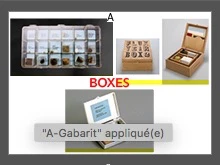
Since a few days ago, a yellow line appeared at the bottom of the images imported as you can see on the printscreen attached. I found nothing on the support website and already googled it… Does anyone know anything ? (Because of a update maybe ?)

Thanks for your upcomming answers.
 

This topic has been closed for replies.

3 replies

Participant
April 23, 2021

Hi I'm having the same issue as originally described. It's not the same as the one described in the "Export to JPG generates yellow horizontal lines", but the same as the original poster.


The yellow line only appears in work mode and does not come out in export.


Thanks,

Ashutosh_Mishra
Inspiring
April 22, 2021

Hi there,


We're sorry to hear about your experience. Product team is aware about this & reviewing the details now as per this Adobe InDesign UserVoice post.

I'd request you to upvote this post & add your comments to stay updated about this issue. We appreciate your patience.


Regards,

Ashutosh

Ernesto_CH
Participating Frequently
April 22, 2021

Thank you, I'll follow this post!

Participating Frequently
April 21, 2021

That's exactly what I have! When exporting as JPG from InDesign. iMac Pro, macOS Big Sur 11.2.3.

Hope a solution comes quickly.

Ernesto_CH
Participating Frequently
April 21, 2021

I have read here, someone had more or less the same problem as us, but there is no real explanation…

https://community.adobe.com/t5/indesign/export-indesign-to-jpg-generates-yellow-horizontal-lines-in-image/td-p/11984175