
Inspiring
August 12, 2021
Answered

Zooming in and out problem on my screen

  • August 12, 2021
  • 2 replies
  • 3220 views

Hello,

I'm using inDesign a lot lately and I have been experiencing some troubles. When I zoom in or out, particullary when I zoom in to see in more detail what I am doing, sometimes the screen pops up a color that I might or not be in use in my document. Sometimes is just a line and sometimes is the whole screen. Then when I zoom out or when I click W to preview my work, it disapears. I would like to know how to fix this, I'm running inDesign v.16.2.1 on a Mac Book Pro Big Sur v.11.4

I'm attaching a recent Screenshot I took of the error where you can see a green horizontal line acorss my work and before this line, the whole screen became that same green color. This is only happening to me when using inDesign.

I hope you guys can help me!

Thank you!
This topic has been closed for replies.
Correct answer J E L

Oh, @Muttyana I'm so sorry to hear this. And you can confirm that GPU Preview is turned off?


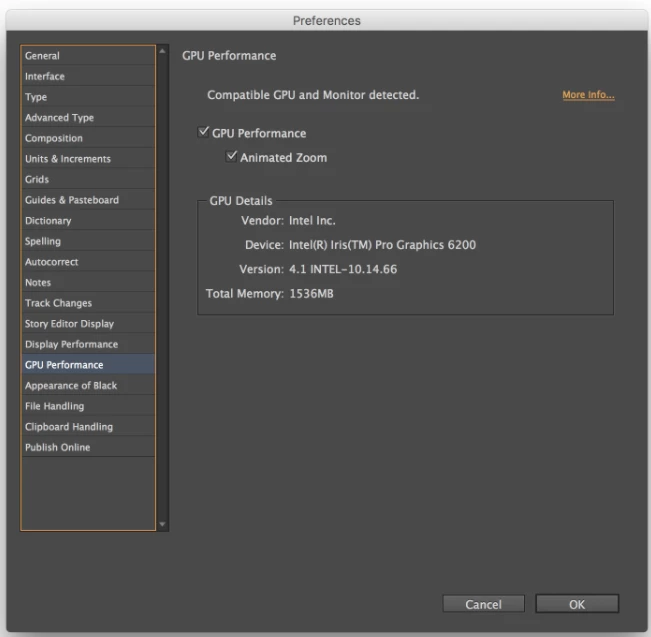
Can you show us how you have the settings for these preferences?


2 replies

J E L
Community Expert
Community Expert
August 13, 2021

@Muttyana I'd like to tell you this is beautiful work! Meanwhile, I see you are on v.16.2.1. Have you tried updating to the latest version 16.3.2 for macOS to see if the zooming issue is resolved?

MuttyanaAuthor
Inspiring
August 17, 2021

Hello Jain, thank you so much!! Yes, I'll be updating InDesign to test it as well as my computer that is been asking for an update a couple of days ago. Thank you, I'll be posting later if I see that it keeps happening 🙂

J E L
Community Expert
Community Expert
August 17, 2021

Okay, please let us know how it goes!

Community Expert
August 13, 2021

Hi Muttyana,

try to turn off GPU Preview.


Regards,
Uwe Laubender

( ACP )

MuttyanaAuthor
Inspiring
August 13, 2021

Thnak you Uwe,

However, the issue happens wether I have the GPU on or off, it's irrelevant, it happens either way.