
sung_yle
Participant
November 26, 2022
Answered

-2, -2-2, -3, -3-2, -3-2-v10, -3-2 v12

  • November 26, 2022
  • 2 replies
  • 591 views

Hi, 


I love Lightroom Classic and had been using it for years without ever looking at what it really did behind the scene.  I turst it that much. 


Then, I suddenly realize I have many .lrcat files for the same catalog!
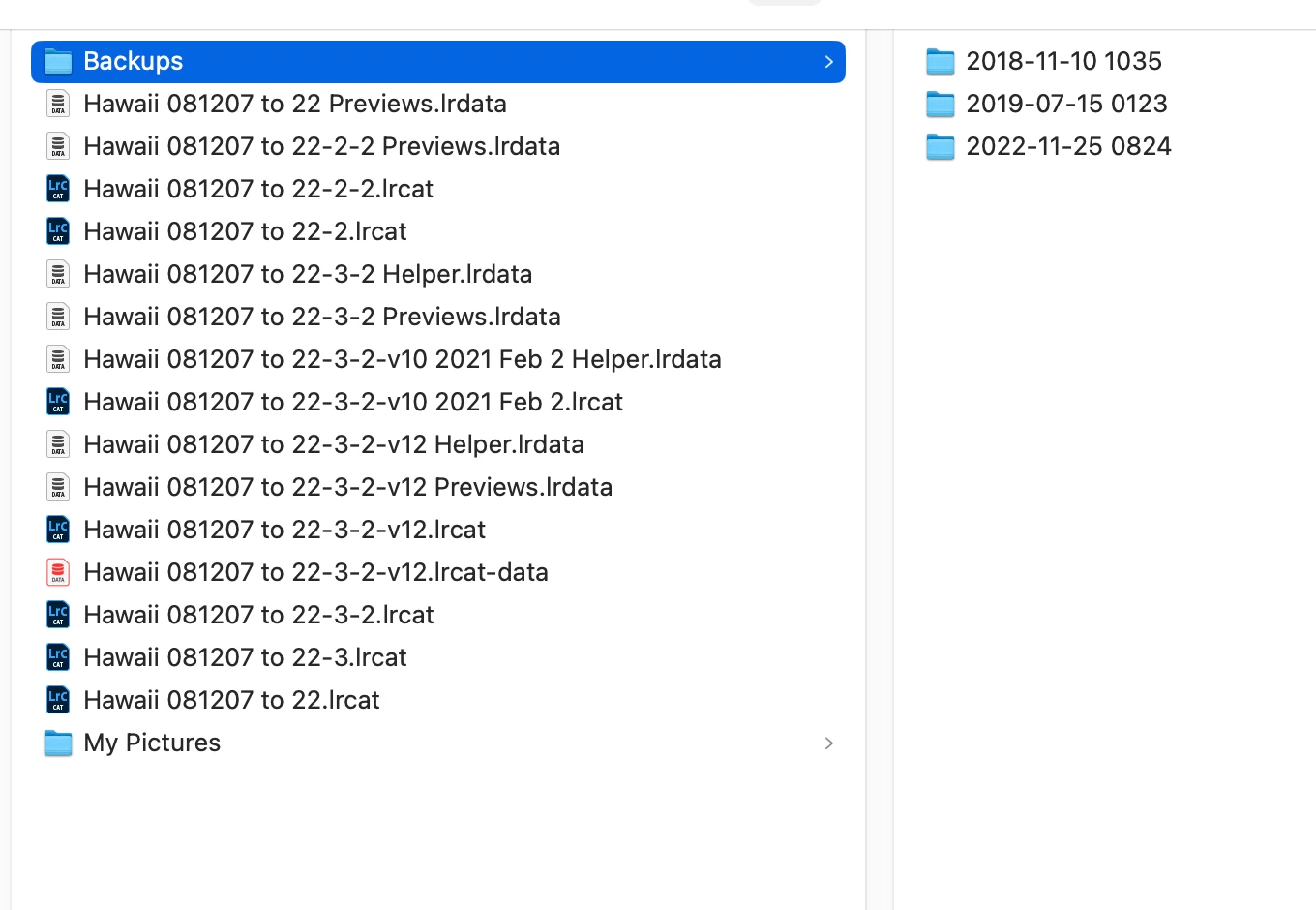
 

 I think the -v12 is the latest. 


Can I just delete everything else that is not -v12?  


Please look at the screen capture above.  What should I not delete?


Sorry to trouble you all.  Thank you in advance. 


Eddie


This topic has been closed for replies.
Correct answer Rob_Cullen

Can I just delete everything else that is not -v12?

Yes. Assuming that the -v12 catalog really is your 'latest'. Maybe better to move the unwanted files to another location until sure that -v12 is your full working catalog.

Please look at the screen capture above. What should I not delete?

Anything with -12 in the file name.

And certainly NOT the {Picture} and [Backups} folders.!

Are you creating Catalog backups on another hard-drive?


Upgrades to the LrC versions now offer you a rename dialog which is well worth looking at.

But after the fact, you can still rename a Catalog AND its companion files.

CATALOG-FIND MOVE RENAME


2 replies

Rob_Cullen
Community Expert
Rob_CullenCommunity ExpertCorrect answer
Community Expert
November 26, 2022

Can I just delete everything else that is not -v12?

Yes. Assuming that the -v12 catalog really is your 'latest'. Maybe better to move the unwanted files to another location until sure that -v12 is your full working catalog.

Please look at the screen capture above. What should I not delete?

Anything with -12 in the file name.

And certainly NOT the {Picture} and [Backups} folders.!

Are you creating Catalog backups on another hard-drive?


Upgrades to the LrC versions now offer you a rename dialog which is well worth looking at.

But after the fact, you can still rename a Catalog AND its companion files.

CATALOG-FIND MOVE RENAME


Regards. My System: Windows-11, Lightroom-Classic 15.4.1, Photoshop 27.8, ACR 18.4, Lightroom 9.4, Lr-iOS 10.4.0, Bridge 16.0.3 .
sung_yle
sung_yleAuthor
Participant
November 27, 2022

Thank you for the suggestion to 'move' instead of delete right the way.  Thank you. 

JohanElzenga
Community Expert
Community Expert
November 26, 2022

Yes, you can delete those. Every time that an updated version of Lightroom needs to upgrade the catalog, it actually creates an upgraded copy

-- Johan W. Elzenga
sung_yle
sung_yleAuthor
Participant
November 27, 2022

Thank you very much.