


Inspiring
September 30, 2026
Question

3 sec denoise and 11 sec in other catalog?

  • September 30, 2026
  • 16 replies
  • 85 views

MacBook Pro M3 Pro and MacBook Pro M5 Max MacOS 27.0.1 aka Golden Gate


I have a catalog i made for test purposes this June containing 109 Nikon Z8 non compressed photos.

When i tick the Denoise box runtime is 3 seconds, great!
However, if i make a new catalog with the same 109 photos then runtime is 11 seconds :-(
I did many test and catalogs and same happen, denoise time is 11 sec on the M5 Max and 17 sec on the M3 Pro what is not surprising.

It seems to me that the catalog who does denoise in 3 seconds have the photos only in a collection as but no photos are shown on disk. See the attached screenshot

Now i am a bit confused about why i can edit photos if the original is not on the disk but in a collection ?

Exporting the edited photo i get a warning window saying, but export works perfectly fine

So from what i understand in this case i work with smart previews instead of the original file.
What i am wondering why is the Denoise time for Smart Preview so much faster; 3 seconds instead of 11 seconds for the original file.
Is working with smart previews the suggested way to edit photos and not the original ones and will exported image quality be same?


Below what i see in the Library module.
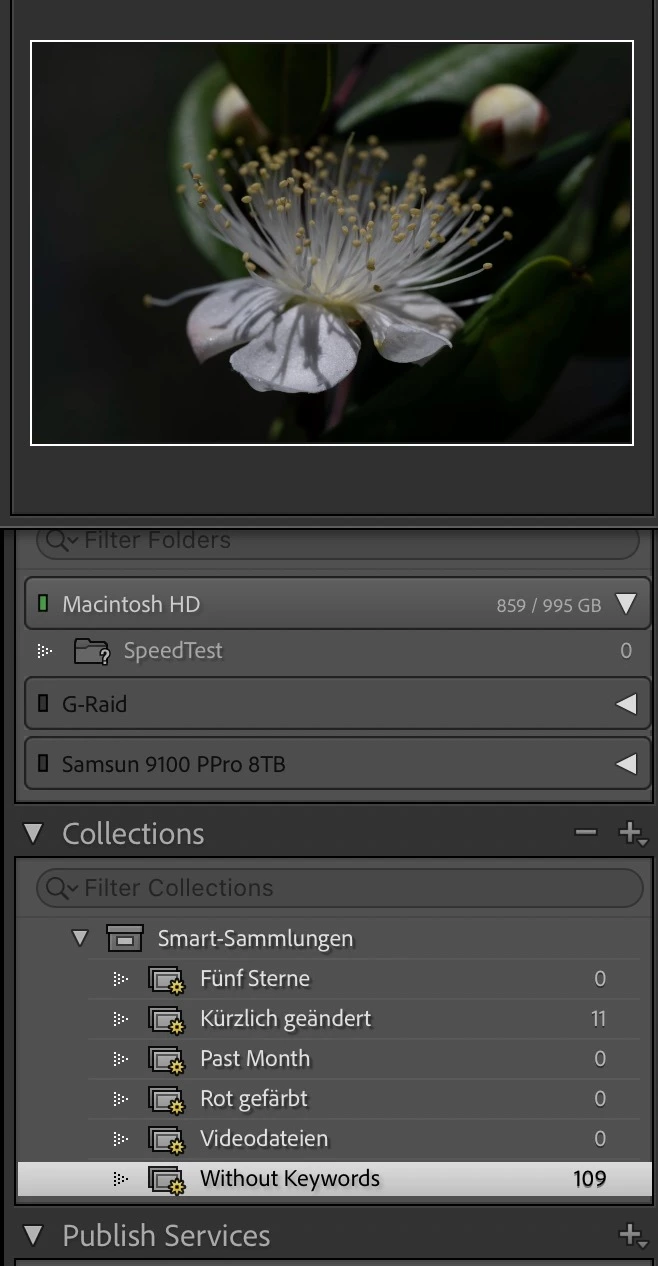
 

Thanks so much
Chris

    16 replies

    Inspiring
    September 30, 2026

    Investigating further in this problem i found Adobes LrC Help and they state in the LrC Help from May 1st 2026 to be found HERE:
     

    Supported image formats for Denoise

    • Bayer and X-Trans mosaic raw files.
    • Linear DNGs (including HDR and pano DNG images previously created inside Lightroom and Camera Raw)
    • Smart proxies (DNG proxies)
    • Monochrome raw files (such as Leica M MONOCHROM)
    • Canon sRAW/mRAW files
    • Nikon small raw files
    • Fujifilm (non X-Trans Raw files)
    • Sony ARQ
    • Pentax Pixel Shift Resolution (PSR) files
    • Foveon cameras
    • Apple ProRaw DNGs
    • Samsung Galaxy Expert Raw
    dj_paige
    Legend
    September 30, 2026

    Investigating further in this problem i found Adobes LrC Help and they state in the LrC Help from May 1st 2026 to be found HERE:
     

    Supported image formats for Denoise

    • Bayer and X-Trans mosaic raw files.
    • Linear DNGs (including HDR and pano DNG images previously created inside Lightroom and Camera Raw)
    • Smart proxies (DNG proxies)
    • Monochrome raw files (such as Leica M MONOCHROM)
    • Canon sRAW/mRAW files
    • Nikon small raw files
    • Fujifilm (non X-Trans Raw files)
    • Sony ARQ
    • Pentax Pixel Shift Resolution (PSR) files
    • Foveon cameras
    • Apple ProRaw DNGs
    • Samsung Galaxy Expert Raw


    Interesting, here Adobe doesn’t use the term “Smart Previews”. I wonder if that’s what Adobe really means (since that is the name used everywhere else). But they use the word “proxies” twice as if “Smart Proxies” are something different. I don’t know what Smart Proxies are.

    Inspiring
    September 30, 2026

    A Smart Preview is a proxy and a DNG file.
    A Proxy is a file what points on another file or in this case kind of a placeholder to edit a small copy (the small DNG file) linked to the disconnected original file.

    Adobe writes in their help file
    Smart Previews in Lightroom Classic allow you to edit images that are not physically connected to your computer. Smart Preview files are a lightweight, smaller, file format, based on the lossy DNG file format.
    They write also that Smart Previews/Smart proxies should not be used for high quality use. Honestly i don’t understand the practical use of them for photography but understand their value of gigabyte video files. Maybe useful for people with serious space restrictions and no need for high quality output and people who need to edit when the original file is not available.

    For the above use of Smart Proxie it looks to me that the writer of the article changed Smart preview to Smart proxies (DNG proxies) as a Smart Preview is a proxy and a DNG file.

    Unfortunately Adobe is some times not very clear or confusing with their naming and their help files are not always current.
    Another example is the use of Enhance here from May 2026 when later the panel was renamed to Detail, but not corrected in the Help.

    At least that is what i understood from reading about those Smart previews and the difference in processing speed.

    Also that Denoise is not using Apple Neural Engine, but GPU (if that was not forgotten to change in the help ...)

    Chris

    JohanElzenga
    Community Expert
    Community Expert
    September 30, 2026

    Did you actually check if Denoise is applied to those images that only had a smart preview? I would expect that the time difference is because the missing images were skipped. The checkbox may be enabled, but maybe that is all that happened.

    -- Johan W. Elzenga
    Inspiring
    September 30, 2026

    Yes it does, not much but there is definitively a difference

    Catalog on internal SSD
    Photos on disconnected external SSD


    No Denoise


    With Denoise


    JohanElzenga
    Community Expert
    Community Expert
    September 30, 2026

    OK, then the explanation is still simple. A smart preview is 2560 pixels on the longest side. Obviously that denoises faster than a full resolution image.

    -- Johan W. Elzenga
    dj_paige
    Legend
    September 30, 2026

    Now i am a bit confused about why i can edit photos if the original is not on the disk but in a collection ?


    Collections are not relevant here. LrC is designed to work with smart previews, but only if you have created smart previews and the original is on a disk that is not connected.

    Inspiring
    September 30, 2026

    Thanks,
    yes that is what i guessed the 109 photos shown in Collections are the Smart Previews, but i can run Denoise even if Disk/Directory is not connected and export the denoised photo, so the denoise must run on the smart preview. And thats the reason why it’s so much faster.
    Or do i am missing something?

    Chris
     

    Inspiring
    September 30, 2026

    Is working with smart previews the suggested way to edit photos and not the original ones and will exported image quality be same?

    Ok, so i found this:
    Because of their reduced resolution, they are unsuitable for critical focus checking, heavy sharpening, or high-resolution large-format printing.
    So Smart Previews are not suitable for what i do if the above is correct.

    What i am wondering why is the Denoise time for Smart Preview so much faster; 3 seconds instead of 11 seconds for the original file.

    Ok, Smart Preview is much smaller so it will denoise faster, makes sense,
    but there is time needed applying Denoise to the much bigger original file when it becomes online?

    Chris

    dj_paige
    Legend
    September 30, 2026

    Someone will correct me if I am wrong, but as far as I know, you cannot run AI Denoise on smart previews.

    Inspiring
    September 30, 2026

    Thanks dj_paige
    If not then i am back wondering why one catalog with smart previews is so much faster.
    See my previous question here:

    Chris

    JohanElzenga
    Community Expert
    Community Expert
    September 30, 2026

    You probably need to use Update AI Settings. I assume that smart previews are not denoised. The option may be checked, but denoising may not really have happened. Even if it did happen, then it will have to be applied to the original once that image is available again, but you will probably have to initiate that.

    -- Johan W. Elzenga
    Inspiring
    September 30, 2026

    I found out that Denoise run time is either 3 seconds when using smart previews and 11 seconds when using original file. That makes sense as the smart preview is much smaller than the full RAW file.

    From what i understand the edits made on a smart preview are later applied to the original file 

    Can someone explain me when the denoise applied to a smart preview is applied to the original file when it’s online again?
    I expect that it’s applied as soon the file is online and done in background, but not sure about that.

    I have no experience with smart previews other then use them for PS edits out of LrC but edit always the photos in my catalog, both on a external SSD.

    Thanks so much
    Chris