

Jon-M-Spear
Legend
February 13, 2020
Question

9.2 Update - Export User Presets missing - folder empty

  • February 13, 2020
  • 11 replies
  • 1602 views

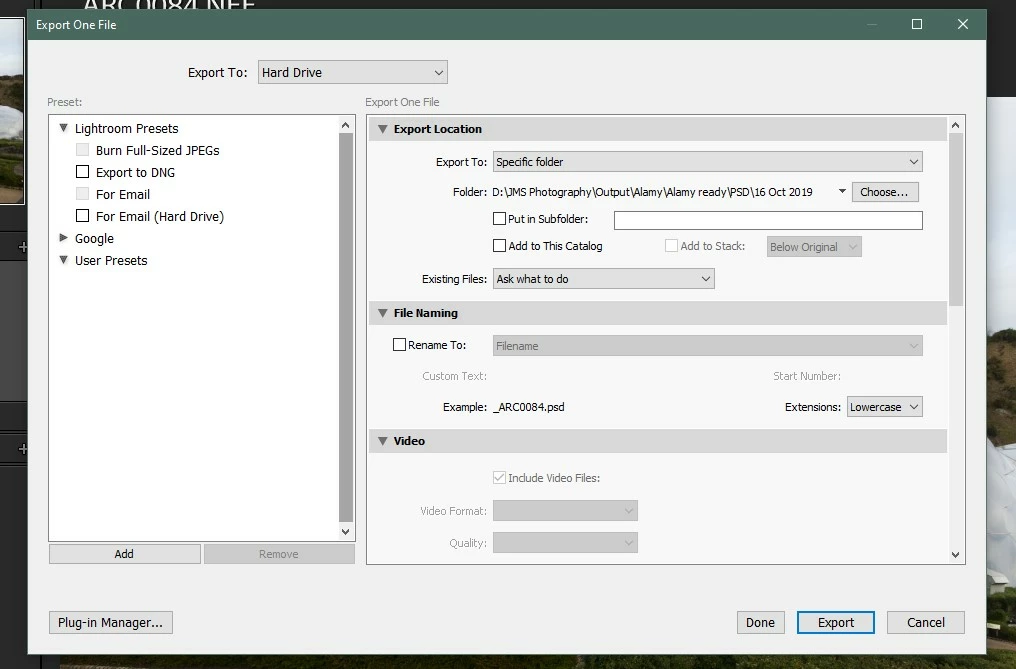
Windows 10:  My Export User Presets are no longer available since the 9.2 update.  The user export presets folder is also empty.

The export windows looks like it's reverted back to the pre batch export version.


All suggestions welcome please.  This is a potential disaster. 


Another anomoly is that my Nikon NEF files lost their file association.  It was easy to correct, but shoudn't have happened.
 

This topic has been closed for replies.

11 replies

Jon-M-Spear
Legend
February 15, 2020

Thanks for your input, peeps.  Much appreciated.


Is it just me, or is the Windows 10 Adobe User Group site as good as useless these days?  It seems to be going from strength to weakness.  Sluggish; won't keep me signed in; often freezes after clicking the 'reply' option; terrible non-chronoligical reply structure.  It's a similar experience whether I user Chrome or Edge.  


Is Adobe losing its way?  Discuss!

Participating Frequently
February 14, 2020

I encountered the same problem. This 9.2 update has created so much trouble for us.  

I also found that my export presets and print presets are gone too. Thanks to your post and it's following replies, I am able to find it. in the C:\Users\YourName\AppData\Roaming\Adobe\Lightroom\Export Presets\User Presets  folder.

GoldingD
Legend
February 14, 2020

Hmm, and as to order, yep Adobe fouled that up, a plug-in workaround: 

http://www.johnrellis.com/lightroom/fixpresets.htm


GoldingD
Legend
February 14, 2020


At LRC v7.3 Develop Presets got modified, the stoped using .lrtemplate and moved to .xmp, AND they got relocated as to service both LRC and ACR, winding up in:


Mac: /Library/Application Support/Adobe/CameraRaw/Settings

Win: C:\ProgramData\Adobe\CameraRaw\Settings


Note also, directory structure or its use got modified a bit, in that some third party presets if just copied complete with directory structure, could show up under User in the Presets Panel despite actual file location. And that Export folder went away (well, it acts odd if used)


Some links, first a few already covered


Gone missing in Presets Panel (turned off)

https://www.lightroomqueen.com/missing-default-presets-75/


With catalog (not so great)

https://www.lightroomqueen.com/store-presets-with-catalog/


If an issue with xmp vs lrtemplate (Ok, not covered)

https://helpx.adobe.com/lightroom-classic/kb/not-all-presets-are-converted.html


An Adobe how to (dated???)

https://helpx.adobe.com/lightroom-cc/kb/faq-install-presets-profiles.html


And some not covered, helpful, Poorly assumed to be common knowledge, my bad


https://www.youtube.com/watch?v=mYx899_tNP8


https://blog.thomasfitzgeraldphotography.com/blog/2018/4/managing-lightroom-presets-in-lightroom-classic-73-or-later


https://lightroomkillertips.com/managing-develop-presets-7-3-update-classic/


https://mattk.com/digging-deeper-questions-new-lightroom-profiles/


https://blogs.adobe.com/jkost/2018/06/updates-to-lightroom-classic-%C2%AD-profile-preset-management-color-labels-and-auto-stack-options.html


https://www.lightroompresets.com/blogs/pretty-presets-blog/11723609-tips-for-organizing-your-presets


Jon-M-Spear
Legend
February 14, 2020

SUCCESS!


I unchecked the Store presets with this catalog option, restarted LR and the presets reappeared.  It looks as though LR set this option whilst updating itself.  


So, interesting point: where are the presets stored?  I looked in all the usual places and did a wondows search and found nothing.


I take your point about the checkboxes on the export window.  


Thanks for your help.

Rob_Cullen
Community Expert
Community Expert
February 15, 2020

"a windows search and found nothing."

You will find a comprehensive article that lists the locations for all your Lightoom associated files, here-

https://www.lightroomqueen.com/lightroom-classic-file-locations/


And for Presets (except for Develop Presets that are in a Camera Raw location) you must remember that there is a "Default" location, and a "Store Presets with Catalog" location. This is a choice in the Preferences that you control.

Regards. My System: Windows-11, Lightroom-Classic 15.1.1, Photoshop 27.3.1, ACR 18.1.1, Lightroom 9.0, Lr-iOS 10.4.0, Bridge 16.0.2 .
Rob_Cullen
Community Expert
Community Expert
February 13, 2020

Using Windows File Explorer: Have you looked in the folder where Export Presets usually exist?

C:\Users\YourName\AppData\Roaming\Adobe\Lightroom\Export Presets\User Presets


"reverted back to the pre batch export version"

Not sure about this!- Your existing default presets are still showing the check-boxes.

Regards. My System: Windows-11, Lightroom-Classic 15.1.1, Photoshop 27.3.1, ACR 18.1.1, Lightroom 9.0, Lr-iOS 10.4.0, Bridge 16.0.2 .
GoldingD
Legend
February 13, 2020

Inquiry, did you perhaps previously store presets with catalog?


Jon-M-Spear
Legend
February 13, 2020

User created exports. They are missing. 

Jon-M-Spear
Legend
February 13, 2020

Unfortunately not. The user export folder is empty. 

GoldingD
Legend
February 13, 2020

Hmm, refering to presets to apply during an export, or user created exports