
ElwiraKotowska
Participating Frequently
August 31, 2017
Answered

A source is required to change a folder location Lightroom

  • August 31, 2017
  • 1 reply
  • 1686 views

Hi, I have a big problem and can not fine solution...

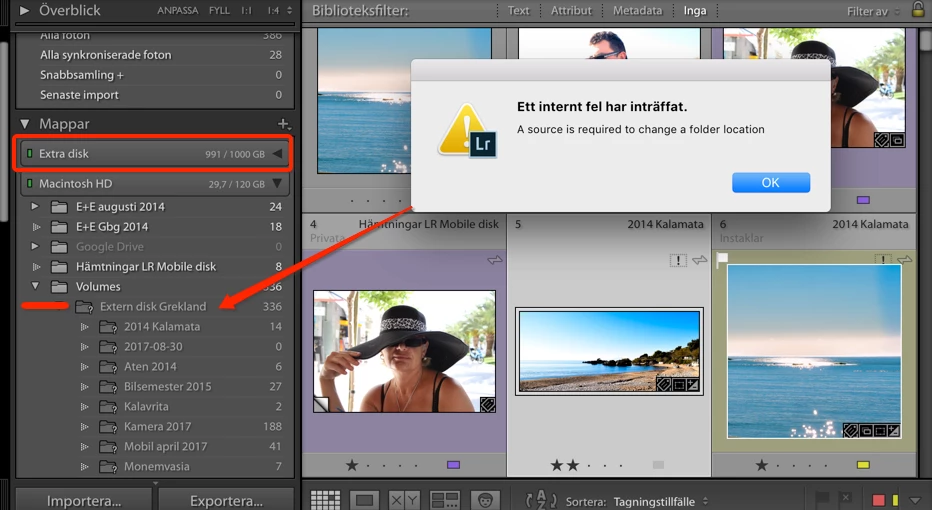
I changed name on my external data disk and Lightroom can not find my pictures. I can se the green light on my Folders (Extra disk) on "Extra disk" (look the picture below) but my folders "Extern disk Grekland" can not be found and I can read as follow: "An internal error has occurred. Source is required to change a folder location". What I must do now?
This topic has been closed for replies.
Correct answer F. McLion

You need to re-link the top-most folder to the new location:

Adobe Lightroom - Find moved or missing files and folders

1 reply

F. McLion
Community Expert
F. McLionCommunity ExpertCorrect answer
Community Expert
August 31, 2017

You need to re-link the top-most folder to the new location:

Adobe Lightroom - Find moved or missing files and folders

--- Got your issue resolved? Please label the response as 'Correct Answer' to help your fellow community members find a solution to similar problems. ---
ElwiraKotowska
Participating Frequently
August 31, 2017

Thank you so much for help, now I can continue work with Lightroom!