


Inspiring
March 14, 2025
Answered

A view to a collection does not stay in its numerical position after a visit to another collection!

  • March 14, 2025
  • 2 replies
  • 525 views

Hi! Not using much Lightroom, mostly with PS, I'm surprised that when I make collections for arranging photos in their (sub)collections, I lose the position in the original/starting collection, that is, when I'm at the number 100 in the starting collection, and I get back after visiting a (sub)collection, I'm somewhere else in the starting collection, let's say at a photo 10. Very frustrating. Scrolling and trying to remember where I was, among some 1k photos. In other words, the collections do not appear to keep their views but they jump somewhere with no sense. What is this??? Regards, Tuomas
Correct answer tuomasvirtanen.fi

[This post contains formatting and embedded images that don't appear in email. View the post in your Web browser.]


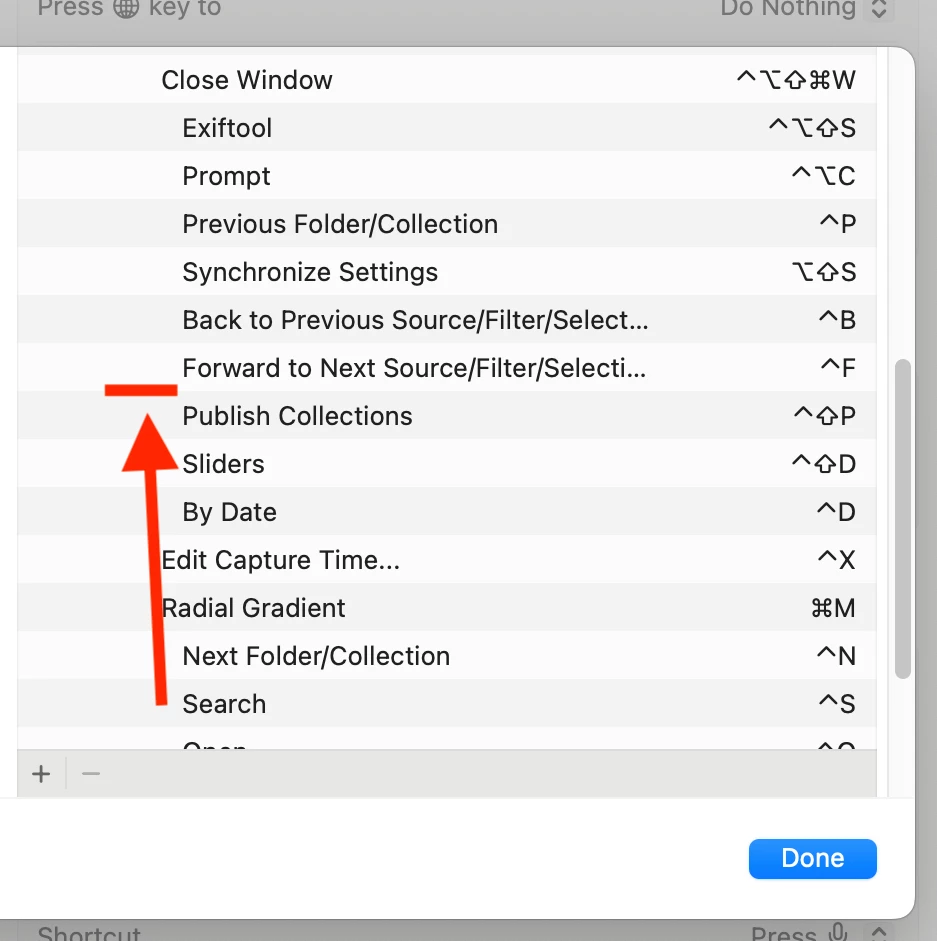
Make sure you enter three spaces and then the exact title of the command, including case:


The screenshot shows that the full name of the commands has been elided with "...", but you need to enter the full names.


OK! I just had forgotten to put those 3 empty spaces - poor me. An additional surprise to me was - and I don't know if this is really true 😁 - that I didn't succeed in making one of the two shortcuts with my Logitech K380 keyboard 🤨 which I've found earlier to work unreliably in certain contexts. Using Apple's product the other shortcut also began functioning. Thanks, John!!!

2 replies

johnrellis
Genius
March 15, 2025

You might find the Any Source plugin's Back and Forward commands useful. They go back and forward in the history of the current source (folder or collection), selection, and filter settings. So when you visit a subcollection, you can invoke the Back command to go back to the starting collection, with the photos previously selected again selected (and visible). I've got them assigned to Ctrl B and Ctrl F on my Mac.

Inspiring
March 19, 2025

OK. I need to test it! Thanks!

tuomasvirtanenNET
JohanElzenga
Community Expert
Community Expert
March 14, 2025

Yes, this is a known issue and something I asked Adobe to change. Unfortunately they never did. Usually you return to the first image however, not some random image.


-- Johan W. Elzenga