Participant
December 8, 2017
Question

ACR not up to date with Lightroom - no option up upgrade

  • December 8, 2017
  • 1 reply
  • 446 views

I have creative cloud photoshop/lightroom. CC app on my mac says everything is up to date. When I open a file from LR to PS, I get a message  below.
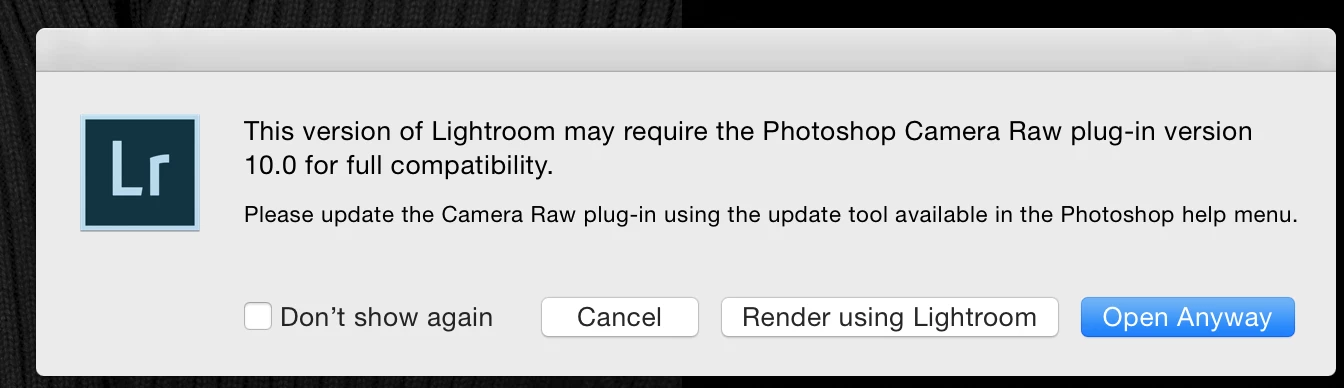
How do I update ACR if it says it is up to date. BTW, the ACR version says 9.12.1

Thank you!!

Scott

    This topic has been closed for replies.

    1 reply

    DdeGannes
    Community Expert
    Community Expert
    December 8, 2017

    That prompt is telling you that the Adobe Camera Raw plugin in Photoshop is not up to date. You have to update that from Photoshop itself as the prompt advises or through the Adobe Creative Cloud app. see the screen capture.

    Lightroom application has its own version of ACR built into the application.

    See the screen capture.

    Regards, Denis: iMac 27” mid-2015, macOS 11.7.10 Big Sur; 2TB SSD, 24 GB Ram, GPU 2 GB; LrC 12.5,; Lr 6.5, PS 24.7,; ACR 15.5,; (also Laptop Win 11, ver 24H2, LrC 15.3; PS 27.0; ) Camera Oly OM-D E-M1.
    Participant
    December 8, 2017

    Thanks for the quick response. I tried that, but when I click on the updates dropdown within PS, it just brings me back to CC app. Where do I go inside PS to update ACR?

    thx!!

    JoeKostoss
    Community Expert
    Community Expert
    December 8, 2017

    In the above post #1 by @DdeGannes you don't go into PS, it is "Camera Raw CC" that needs updating; the last item on the list.