

Schlimpitz
Participant
May 28, 2026
Answered

Adaptive presets related to portraits or subject no longer work
  • May 28, 2026
  • 3 replies
  • 77 views

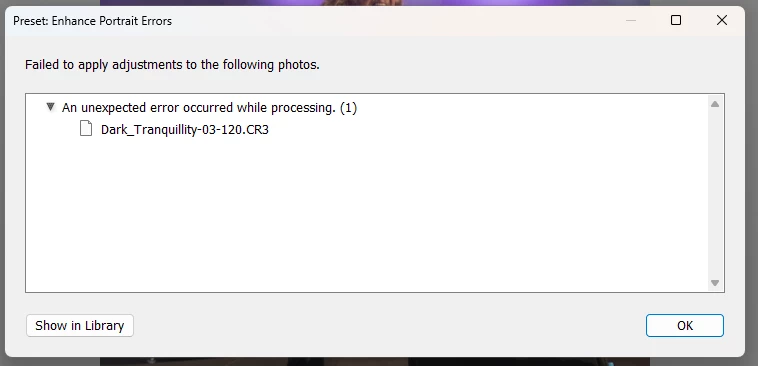
I get this error message every time i try to apply an adaptive preset to an image.

All the portrait ones do no work, same for subject and blur background

Once you try to apply the preset, the error message pops up after 2 seconds. so it is not running and running to find something and then times out. Error Message pops up nearly immediately


Categories not affected are the sky presets and the landscape presets.

LRC Version : 15.3


Any idea how to solve this?


Thanks


Jay

    Correct answer Sameer K

    Hey, ​@colbytong. Welcome to the Lightroom Community. Thanks for adding the system info.

    In your System Information, the catalog is located at C:\Users\tachu\OneDrive\Pictures\Lightroom\Lightroom Catalog.lrcat. Please check if moving the catalog to a different folder that does not sync with the cloud helps at all.


    Thanks!
    Sameer K

    3 replies

    colbytong
    Participant
    June 21, 2026

    I’m having the exact same issue. Here is my LR system info.

    Sameer K
    Community Manager
    Sameer KCommunity ManagerCorrect answer
    Community Manager
    June 23, 2026

    Hey, ​@colbytong. Welcome to the Lightroom Community. Thanks for adding the system info.

    In your System Information, the catalog is located at C:\Users\tachu\OneDrive\Pictures\Lightroom\Lightroom Catalog.lrcat. Please check if moving the catalog to a different folder that does not sync with the cloud helps at all.


    Thanks!
    Sameer K

    colbytong
    Participant
    June 24, 2026

    That worked. Thanks!

    Schlimpitz
    Participant
    June 16, 2026

    Is there a solution to this already?


    Sameer K
    Community Manager
    Community Manager
    June 8, 2026

    Hey, @Schlimpitz. Welcome to the Lightroom Classic Community. Sorry for the delay in reaching your post.

    I'll help you figure this out. Please share the system info from Lightroom Classic from Help > System info > Copy and paste into a text document > Upload and attach here. 


    Where do you keep your Lightroom Classic catalog? Does the issue occur randomly, or after you've applied specific edits, or several edits, to the image, such as Lens Corrections, Denoise, and Masks?


    Thanks!
    Sameer K
    (Type '@' and type my name to mention me when you reply)

    Schlimpitz
    Participant
    June 10, 2026

    @Sameer K 


    Hi Sameer, thanks for the answer

    Here’s the file


    The issue happens all the time, no matter when i apply those changes.

    This actually used to work before


    Thanks

    Jay

    Sameer K
    Community Manager
    Community Manager
    June 23, 2026

    Hey, ​@Schlimpitz. Thanks for adding the sytem info. Please update Lightroom Classic to v15.4.1 and check if the issue exists. 

    Thanks!
    Sameer K