
Inspiring
December 27, 2025
Answered

"Add to Collection" option missing upon Import

  • December 27, 2025
  • 1 reply
  • 131 views

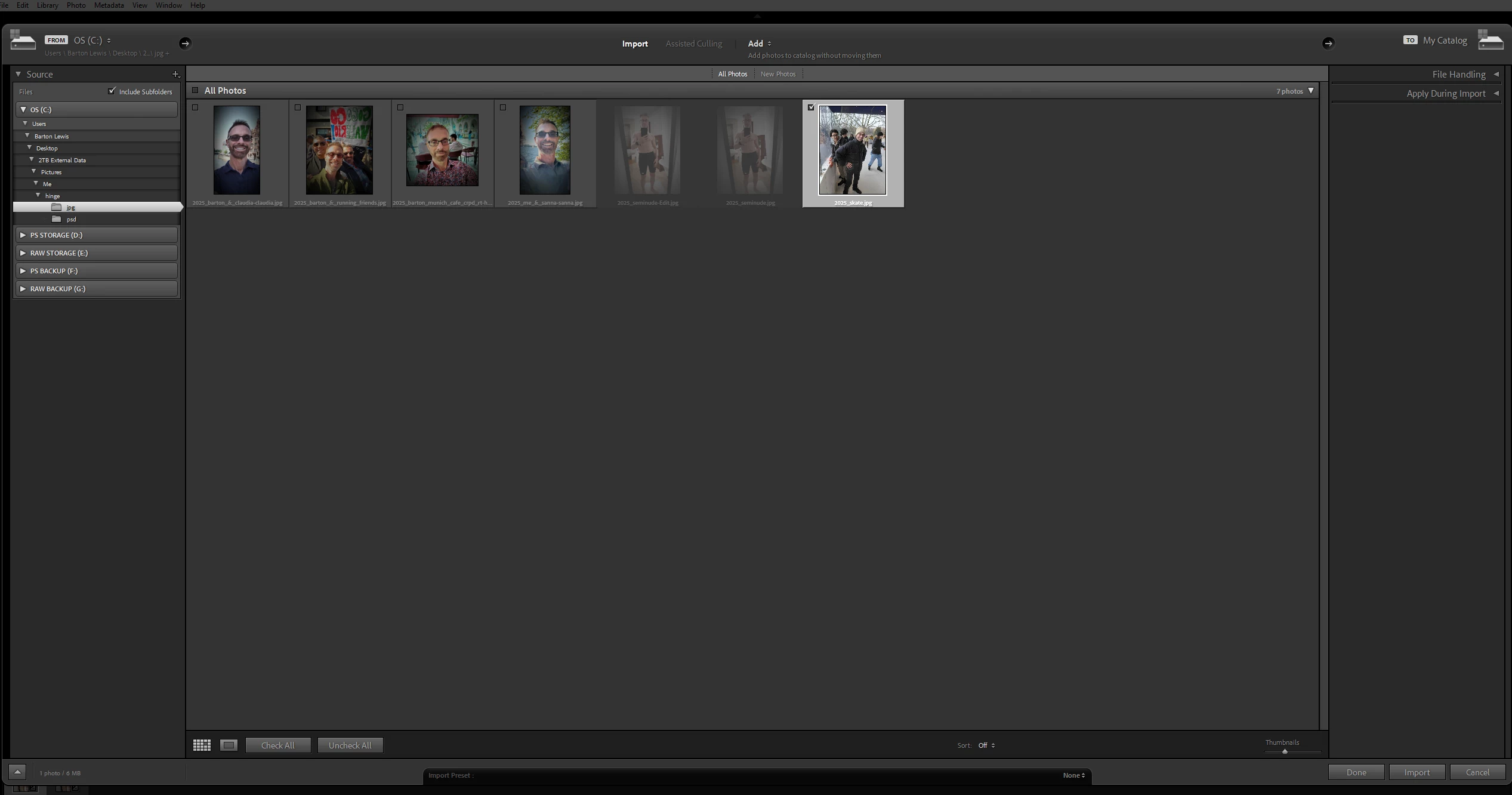
I have a new computer and had to install my Creative Cloud apps.  All's fine exept in LR when I used to import an image there was an "Add to Collection" option on the rightmost panel.  Your Collections would show and you could put a check mark in the box next to the Collection you wanted to add it to.  I don't see it now.  Does anybody know where it went?  Thanks!  
 

871813iC27F98EA9FBAFF5E.png


Correct answer JohanElzenga

Add to collection is in the 'File Handling' panel. You have collapsed all panels, that is why you do not see it. Click on the small triangle to expand the panel.


1 reply

JohanElzenga
Community Expert
JohanElzengaCommunity ExpertCorrect answer
Community Expert
December 27, 2025

Add to collection is in the 'File Handling' panel. You have collapsed all panels, that is why you do not see it. Click on the small triangle to expand the panel.


-- Johan W. Elzenga
Inspiring
December 29, 2025

I thought I had selected that before and did not see it., I guess I overlooked.  Thank you.