Answered
Adding Root Level Drive in LR Classic on a Mac
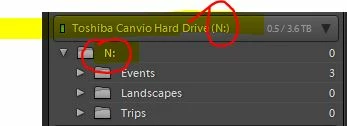
The image above is a screen grab from my PC showing a drive N folder with three subfolders. Having the N folder allows me to right mouse click to create new folders and other steps. With this setup, I can easily make a new Wildlife folder and move files into it.
I am now using an iMac Pro and still getting my feet wet and tweaking some of the defaults. Is there a way on a Mac to insert the drive letter folder similar to the PC?
On the Mac, I have a 24TB RAID drive showing in the tab, with the three subfolders.
Any help would be appreciated.
 AdChoices