
Inspiring
November 4, 2021
Answered

Adjustment brush need help

  • November 4, 2021
  • 1 reply
  • 786 views

The new LR11 brush is killing my workflow. Previously if I needed an adjustment brush (which I do on every image, all day, every day) I would just click the brush icon and it would pop up, already working with whatever the previous settings were. So it was a simple "1 click" to get working. With the new "improved" LR, it's now a 5 step process. 1) click new mask button 2) click brush icon 3) click on list of my brush presets 4) find my preferred preset in a list 5) slect the brush I need.

I need to get back to a one click option, this new workflow is killing me. Any ideas??

Signed,

Frustrated
This topic has been closed for replies.
Correct answer Per Berntsen

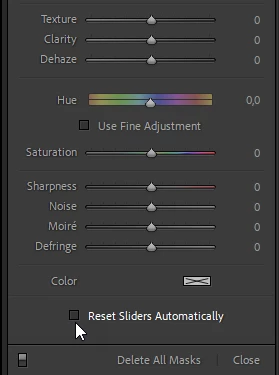
First, make sure that Reset Sliders Automatically at the bottom of the adjustment panel for the brush is unchecked.

This will make the settings you have made stick.

To create a new brush, press K, which will open the Masking panel with a new brush.

When you're done, press K (or Esc) twice to close the panel.


1 reply

Per Berntsen
Community Expert
Per BerntsenCommunity ExpertCorrect answer
Community Expert
November 4, 2021

First, make sure that Reset Sliders Automatically at the bottom of the adjustment panel for the brush is unchecked.

This will make the settings you have made stick.

To create a new brush, press K, which will open the Masking panel with a new brush.

When you're done, press K (or Esc) twice to close the panel.


Inspiring
November 4, 2021

Awesome! Thanks, that reduces the process a bunch, now I'm down to 2 clicks! Appreciate your comment.