
steshaw20168843
Participant
November 7, 2017
Answered

Adjustment brush not working

  • November 7, 2017
  • 4 replies
  • 3448 views

About a week ago my adjustment brush stopped working. I assumed it was because of needing to update as it was around the time the update was released. I went out of town for a week, came back and it's still not working. Updates are complete. Everything else within developer seems to be working. I can bring the adjustment brush up and manipulate settings and it even leaves the working dots but it does not change the image at all, not the slightest. I'm at a loss and really needing to get some work done. Please help!
This topic has been closed for replies.
Correct answer JP Hess

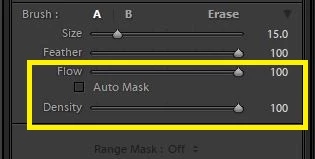
Have you double checked the flow and density settings?

4 replies

JP Hess
Inspiring
November 17, 2019

If you are referring to Lightroom Desktop on a computer, it would be the same issue. If you are referring to Lightroom on a mobile device such as a phone or tablet, I cannot help you with such an issue because I don't edit on those devices. Sorry.

Participant
November 17, 2019

Any ideas if I have the same issue for the Mobile Lightroom?

steshaw20168843
Participant
November 7, 2017

Perfect! Thank you so much!

JP Hess
JP HessCorrect answer
Inspiring
November 7, 2017

Have you double checked the flow and density settings?