
Answered
Adobe Camera RAW support for DJI Mavic 3 Pro
Please add Adobe Camera RAW support for DJI Mavic 3 Pro! I spend thousands of dollars on a drone that currently only essentially shoots jpegs!
Thanks

Please add Adobe Camera RAW support for DJI Mavic 3 Pro! I spend thousands of dollars on a drone that currently only essentially shoots jpegs!
Thanks
"any DNG will import into lightroom but if not supported will just be the same as a Jpeg"
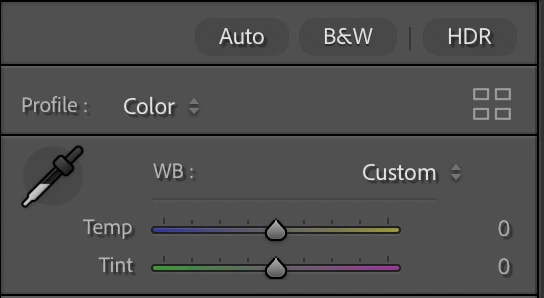
Sorry, but that is simply not true. If the DNG file contains raw data (and the DJI DNG does), then it will behave like any other raw file in Lightroom, not like a jpeg (except for the issue with the profiles that we already discussed). You can check this in the following way. If you edit a jpeg file in Lightroom, then you will see that the white balance shows Temperature at zero (and the slider only goes from -100 to +100), not in degrees Kelvin. That is because JPEGs have a 'baked in' white balance, so in Lightroom you can only add a color change to that:
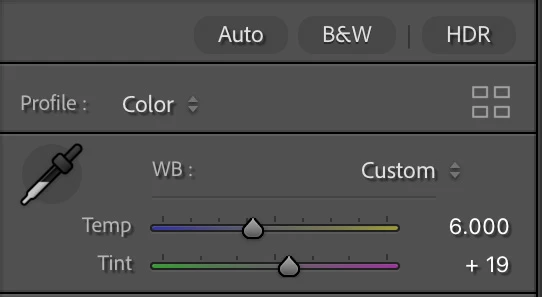
If you edit a DJI DNG however, you can set the Temperture in degrees Kelvin, like with any other raw file. That is because raw files do not have a white balance yet; you set the white balance in the raw converter:
Of course there are more differences. A jpeg is only 8 bits, so you don't have any significant headroom in the highlights. What is gone, is gone. The raw data in the DNG are in a higher bitdepth and do have some headroom. A highlight that may seem blown initially, can often still be recovered. That is the whole idea about shooting in raw rather than jpeg, and that idea is still valid with the DJI files.
Again, I'm pissed too that there is no full support including all the Adobe profiles, but please do not make nonsense claims to make it sound much worse than it is. DJI DNG files are raw files, profile support or no profile support.
"Adobe DNG converter will NOT make the files out of the M3P work as native RAW files."
You clearly have not understood a thing about what I said about DNG converter. I was talking about converting (unsupported) proprietary raw files to DNG. You will have to do that if Lightroom does not support them. Trying to convert a DJI DNG to another DNG is useless. I don't think the DNG Converter will let you do that, but if it does, you'll simply get the same file again (except perhaps with a different compression).
I'm going to stop this discussion, because it's becoming senseless. You are free to have your own opinions, but not your own facts. Have a nice day.
The three cameras opn the Mavic 3 Pro are now offcially supported and ACR provides full support.
https://helpx.adobe.com/camera-raw/kb/camera-raw-plug-supported-cameras.html
Thank you Adobe!
Already have an account? Login
Enter your E-mail address. We'll send you an e-mail with instructions to reset your password.
 AdChoices