after import, all photos not showing up
I am new to Lightroom and for the first time have imported my photos from several years of work. After what I thought was a successful import of a few thousand photos, however, not all my photos are available despite the fact that Lightroom did not indicate any errors from the import process.
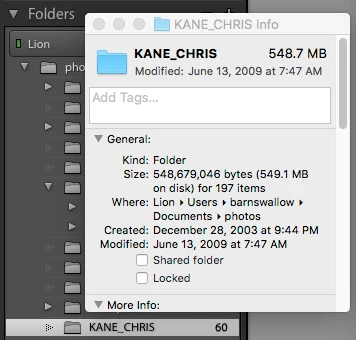
For example, one folder (KANE_CHRIS) in Lightroom indicates "60" photos, but when I right-click and get info on that folder in Lightroom, the info dialog box that appears indicates "197 items." Please see screenshot. I also checked my old version of Bridge, and all 197 photos (all .jpg) are in fact all visible there, so I am confused as to what is going on in Lightroom. I tried to import the photos again from the same folder in the finder and Lightroom indicates thinks the photos have already been imported and wouldn't let me proceed.
What do I need to do to see all 197 photos? How do I ensure that no other photos are missing from other folders?
Any ideas would be appreciated. Thank you.
 AdChoices