Participant
May 24, 2023
Question

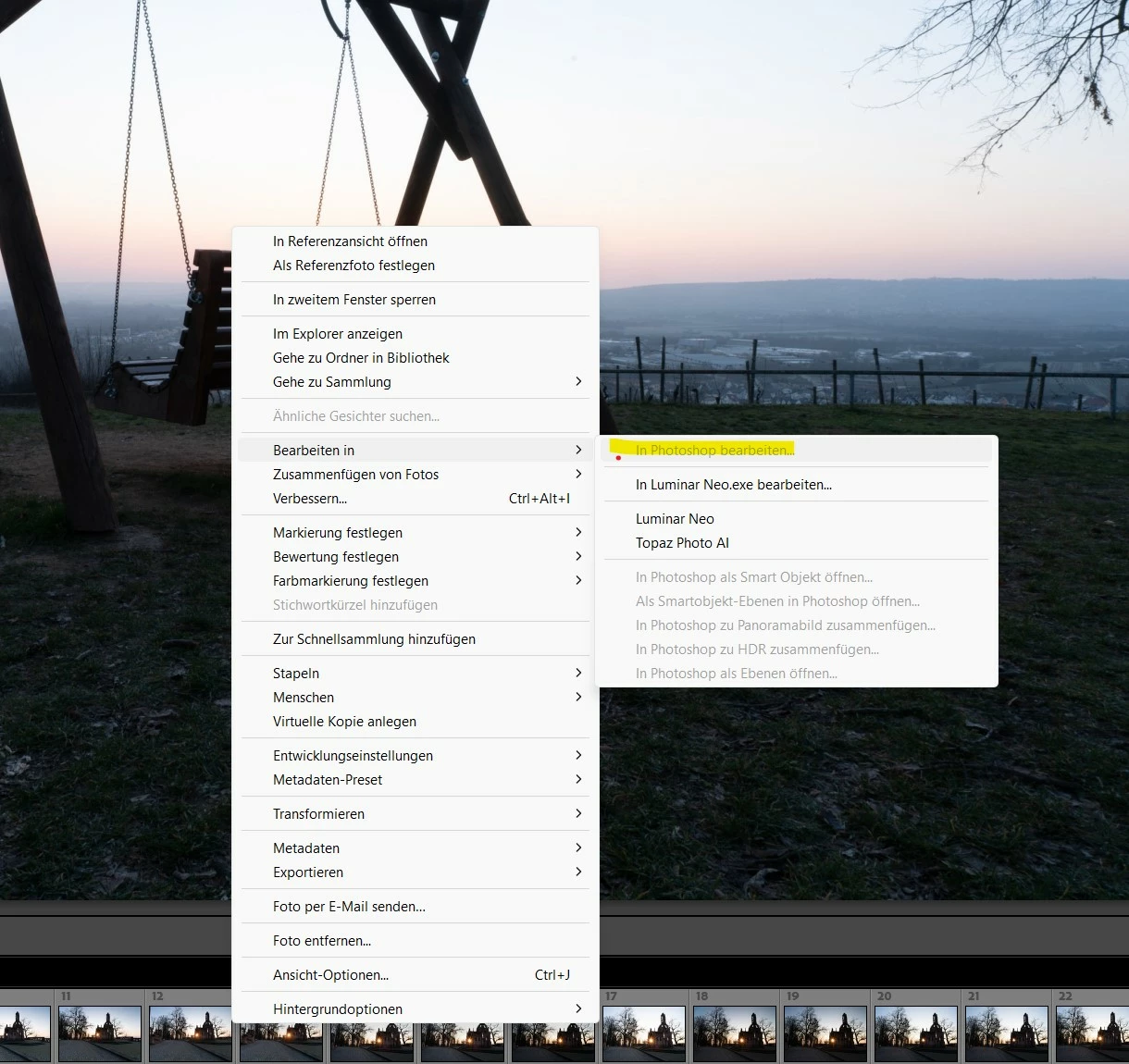
after PS update to 24.5 is no more possible to send a Picture from lrc to ps

  • May 24, 2023
  • 2 replies
  • 309 views

This topic has been closed for replies.

2 replies

Participant
May 24, 2023

Thanks Axel for the quick answer, but noting change please look at the screenshot

Community Expert
May 24, 2023

In a first step try to deinstall and reinstall Photoshop using the Creative Desktop Client. When asked, keep the preferences

If this doesn't help, try is this:

  1. Use the Adobe Creative Cloud application to uninstall both Photoshop and Lightroom Classic, and when asked, keep preferences. 
  2. Install Photoshop first, then Lightroom Classic. The order is what is very important here.


My System: Intel i7-8700K - 64GB RAM - NVidia Geforce RTX 3060 - Windows 11 Pro 25H2 -- LR-Classic 15 - Photoshop 27 - Nik Collection 9 - PureRAW 6 - Topaz Photo AI
Participant
May 24, 2023

Hi Axel,


thanks after uninstall and reinstall of PS now it's working

many thanks 

Roland

Community Expert
May 24, 2023

You are sure you've selected a picture?

Do you work with SmartPreviews? If yes, make sure thar the original file is available.


Please try is to reset the preferences to the default settings.

Reset Procedure:

  • Close Lightroom.
  • Windows: Hold down [Alt]+[Shift] while restarting Lightroom.
    Mac: Hold down [Opt]+[Shift] while restarting Lightroom.
  • Overwrite the Preferences when prompted by the dialog.
  • Close Lightroom.
  • Restart Lightroom.


It's recommended to backup your preferences before you reset the preferences to the default settings: 

https://helpx.adobe.com/lightroom-classic/kb/preference-file-and-other-file-locations.html


My System: Intel i7-8700K - 64GB RAM - NVidia Geforce RTX 3060 - Windows 11 Pro 25H2 -- LR-Classic 15 - Photoshop 27 - Nik Collection 9 - PureRAW 6 - Topaz Photo AI
Community Expert
May 24, 2023

wrong message!!


My System: Intel i7-8700K - 64GB RAM - NVidia Geforce RTX 3060 - Windows 11 Pro 25H2 -- LR-Classic 15 - Photoshop 27 - Nik Collection 9 - PureRAW 6 - Topaz Photo AI