

GilmourB
Inspiring
October 27, 2022
Answered

After Synchronizing a LR Folder, LR should return the user to the same Folder

  • October 27, 2022
  • 1 reply
  • 338 views

After Synchronizing a LR Folder, LR should return the user to the same Folder. Currently LR deselects the active Folder and the user must re-navigate to the working Folder.


This will speed up the workflow. I usually have dozens of Folders (sessions) each with 3-5 sub-folders, within the catalog so scrolling through them to get back to the working Folder (session) is a tedious time consuming process.

Upvote if you want LR to be more user friendly and faster to use.


Corporate photographer based in Calgary, Canada and Oviedo, Spain. Making portraits, architectural, industrial and advertising photography for national and global brands.
This topic has been closed for replies.
Correct answer Bob Somrak

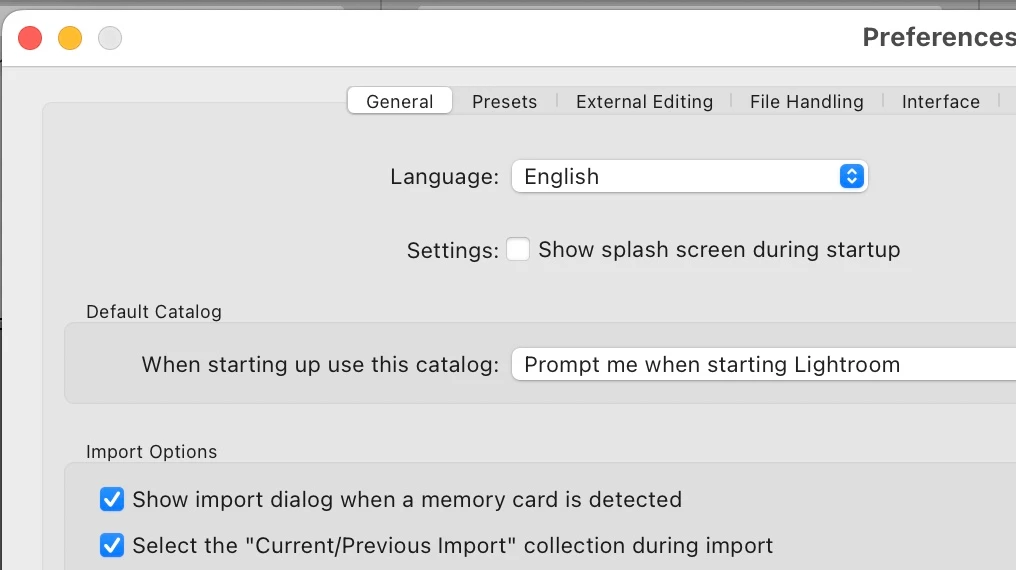
In preferences uncheck select the "Select the current/pre ......."  setting.


1 reply

Bob Somrak
Bob SomrakCorrect answer
Legend
October 27, 2022

In preferences uncheck select the "Select the current/pre ......."  setting.


M4 Pro Mac Mini. 48GB
kevinl47489758
Participant
June 6, 2024

Thank you SO much! When I finally figured out the right question to ask it took me right to Bob Somrak's correct answer. Even when I saw the answer it didn't make sense, but it worked! This will save hours of scrolling to get back to the folder I was working in. Could Adobe have made this a more confusing selection? Maybe...