Participant
August 15, 2026
Question

After the August update, I can no longer CROP. In DEVELOP the crop icon yields a grid overlay and I can use the cursor to move the margin. But releasing the cursor yelds NO PHOTO SECLECTED and the image is deleted from the catalog!!

  • August 15, 2026
  • 1 reply
  • 11 views

This behavior occured in the last week, after the latest upadate of Lightroom Classic.  Other approaches yielded the same deletion of the selected image.

    1 reply

    johnrellis
    Legend
    August 15, 2026

    [View this post in your web browser. It contains formatting and images that don't appear in email.]


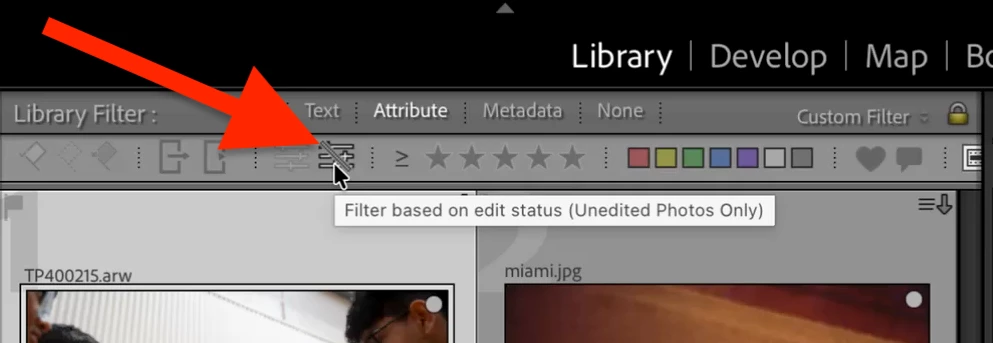
    It sounds like you’ve enabled the Unedited Photos Only filter:


    As soon as you make any edit, including a crop, the photo is no longer unedited and LR hides it from view (it’s not removed from the catalog).


    Toggle that button or do the menu command Library > Enable Filters to disable filtering.  (See the menu command for its keyboard shortcut.)