



AI Denoise not working Lightroom Classic
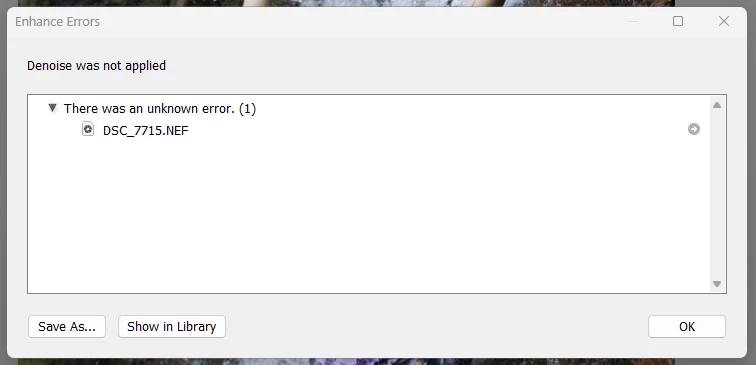
First time I wanted to try Denoise, it wouldn't work as is was trying to save with the same filename.
Seems to be the case as I got a dialog box with "Save As" and then offered to save as .TXT
Restarted LR and was able to Denoise one picture.
Ended up with a similar error when trying another picture (after the second LR restart).
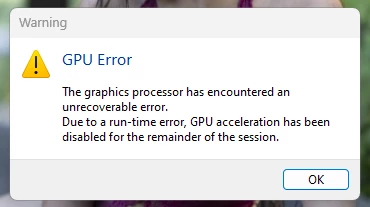
This time, with an additional error message about the GPU.
Anyone with insight into this issue?
Note that it did work well for one time (and pretty quickly too).
Lightroom Classic version: 12.5 [ 202308091523-68a7abd6 ]
License: Creative Cloud
Language setting: en
Operating system: Windows 10 - Home Premium Edition
Version: 10.0.22621
Application architecture: x64
System architecture: x64
Logical processor count: 16
Processor speed: 3.6GHz
SqLite Version: 3.36.0
CPU Utilisation: 0.0%
Built-in memory: 32652.7 MB
Dedicated GPU memory used by Lightroom: 2973.0MB / 5968.0MB (49%)
Real memory available to Lightroom: 32652.7 MB
Real memory used by Lightroom: 4863.7 MB (14.8%)
Virtual memory used by Lightroom: 7601.0 MB
GDI objects count: 880
USER objects count: 2474
Process handles count: 4216
Memory cache size: 215.6MB
Internal Camera Raw version: 15.5 [ 1595 ]
Maximum thread count used by Camera Raw: 5
Camera Raw SIMD optimization: SSE2,AVX,AVX2
Camera Raw virtual memory: 1452MB / 16326MB (8%)
Camera Raw real memory: 1515MB / 32652MB (4%)
System DPI setting: 96 DPI
Desktop composition enabled: Yes
Standard Preview Size: 1440 pixels
Displays: 1) 2560x1440
Input types: Multitouch: No, Integrated touch: No, Integrated pen: Yes, External touch: No, External pen: Yes, Keyboard: No
Graphics Processor Info:
DirectX: NVIDIA GeForce RTX 2060 (31.0.15.3699)
Init State: GPU for Image Processing supported by default
User Preference: GPU for Image Processing Enabled
Application folder: C:\Program Files\Adobe\Adobe Lightroom Classic
Library Path: C:\Users\User\Pictures\Lightroom\Lightroom Catalog-v12.lrcat
Settings Folder: C:\Users\User\AppData\Roaming\Adobe\Lightroom
Installed Plugins:
1) ColorChecker Passport
2) Flickr
3) Loupedeck2
4) Nikon Tether Plugin
5) ON1 Effects 2023
6) ON1 HDR 2023
7) ON1 NoNoise AI 2023
😎 ON1 Photo RAW 2023
Windows11 SysInfo:
System Information report written at: 10/07/23 16:20:16
System Name: SYLVAIN-I9-TOWE
[System Summary (C:\Users\User\Documents\SystemInfoW11.nfo)]
Item Value
OS Name Microsoft Windows 11 Home
Version 10.0.22621 Build 22621
Other OS Description Not Available
OS Manufacturer Microsoft Corporation
System Name SYLVAIN-I9-TOWE
System Manufacturer System manufacturer
System Model System Product Name
System Type x64-based PC
System SKU ASUS_MB_CNL
Processor Intel(R) Core(TM) i9-9900K CPU @ 3.60GHz, 3600 Mhz, 8 Core(s), 16 Logical Processor(s)
BIOS Version/Date American Megatrends Inc. 3006, 2021-10-12
SMBIOS Version 3.2
Embedded Controller Version 255.255
BIOS Mode UEFI
BaseBoard Manufacturer ASUSTeK COMPUTER INC.
BaseBoard Product PRIME Z390-P
BaseBoard Version Rev X.0x
Platform Role Desktop
Secure Boot State Off
PCR7 Configuration Elevation Required to View
Windows Directory C:\WINDOWS
System Directory C:\WINDOWS\system32
Boot Device \Device\HarddiskVolume5
Locale Canada
Hardware Abstraction Layer Version = "10.0.22621.1413"
Username SYLVAIN-I9-TOWE\User
Time Zone Eastern Summer Time
Installed Physical Memory (RAM) 32.0 GB
Total Physical Memory 31.9 GB
Available Physical Memory 13.2 GB
Total Virtual Memory 36.5 GB
Available Virtual Memory 9.38 GB
Page File Space 4.66 GB
Page File C:\pagefile.sys
Kernel DMA Protection Off
Virtualisation-based security Not enabled
Windows Defender Application Control policy Enforced
Windows Defender Application Control user mode policy Off
Device Encryption Support Elevation Required to View
Hyper-V - VM Monitor Mode Extensions Yes
Hyper-V - Second Level Address Translation Extensions Yes
Hyper-V - Virtualisation Enabled in Firmware No
Hyper-V - Data Execution Protection Yes
 AdChoices