Inspiring
September 10, 2025
Answered

AI denoise sometimes it does not apply

  • September 10, 2025
  • 3 replies
  • 1221 views

Version of the app:

LrC 14.5.1


Platform and OS version:

Windows 11 24H2 x64


Basic steps to reproduce the problem:

When using the AI denoise sometimes it does not apply or does not consider the already done desonise.

It got to the point where I was not able to tell if denoise was actually applied without manual one-by-one inspection of each picture. From what I understood it seems to happen if I apply ai denoise on some pictures, then if i synchronize the settings with the ai denoise aswell including both already denoised and non denoised pictures. It already starts wrong since if the selected pictures has a different denoise strenght applied it does recompute the ai denose from scratch instead of just synching the value but it looks like sometimes it does recompute it but also does not apply it even if it looks checked on the develop panel.

Moving the slider manually or setting the value sometimes fixed it but most of time it didn't and sometimes the slider did not move and when typing in the box it instantly deselected itself. Note that it was not grayed out. Syncing the settings again did not fix the problem. Cleaning both video and camera raw's cache did not fix the problem. Restarting did not fix the problem and updating the ai edit status was also completely useless. The noise was still clearly in the image, both luminance and color noise, and did also show exactly in the same way in the exported jpg files. The only way I could "fix" this was to completely delete the preview folder of the catalog and regenerate the denoise from scratch


Expected result and actual result:

To just generate the denose if it is not already present and just synchronize the strenght and to actually apply the denoise and allow me to change the strenght. Also the AI status update button to be effective.
Correct answer johnrellis

With your 12 sample pics, I too observed that syncing Denoise from the first to the succeeding 11 worked correctly. I then changed the Denoise slider of the first pic and synced that to the rest, and that worked correctly too.  To actually see the noise, I applied a Tone Curve. Take a look at the attached screen recording to see if you consider those results correct (I edited out most of the two minutes of Denoise being synced initially to the the other 11 pics.)


[This post contains formatting and embedded images that don't appear in email. View the post in your Web browser.]


Unfortunately, Adobe developers won't pay much attention unless this can be replicated by others (especially them). Your screen recording suggests that there were other edits applied to the problem photos, which might help trigger the problem.


I observed two screwy things in your screenshot and screen recording, to which you alluded:


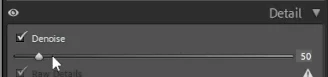
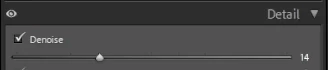
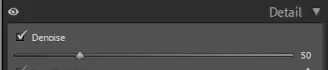
1. The position of the slider doesn't correspond with the numeric value:


Often when the user interface is acting up, resetting LR's preferences fixes it:

https://www.lightroomqueen.com/articles-page/how-do-i-reset-lightrooms-preferences/

LR sometimes soils its preferences file, and resetting it can fix all sorts of wonky behavior. That article explains how to restore the old preferences if resetting doesn't help.


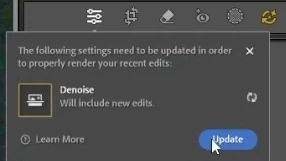
2. The AI Edit Status button is yellow, but when you click on it, it doesn't show any other settings that might affect Denoise:


Then nothing happens when you click on Update.  


There are many reports here of AI settings needing constant updating and updates not taking effect. The catalog's .lrcat-data file stores the results of AI settings, and if it gets corrupted for some reason, or if there is a permissions issue, that could cause these symptoms.  When the file gets corrupted, the only remedy is to delete it and let LR rebuild it, as described here:

https://community.adobe.com/t5/lightroom-classic-discussions/p-ai-masks-require-updating-and-or-disappear/m-p/15514958#M414181


While most of the AI commands will be correctly recomputed, there will be new variations computed for Generative AI Remove, which you'll have to review and adjust individually, if necessary.


Alternatively, you could create a new catalog (which will create a new .lrcat-data file) and see if the issue occurs again.


3. Have you used the Imagen AI service at some point? It had a nasty bug that permanently corrupted the .lrcat-data file.


3 replies

dj_paige
Legend
September 25, 2025

I downloaded all 12 of your photos, and then in one batch operation I denoised them all without any problem at all.


You can tell which files have been denoised by searching in the Filter Bar under Metadata. Performing this search, all 12 of your photos are selected.


Please clearly state what GPU you are using, and the driver NUMBER (we need the NUMBER and not words like "latest" or "up-to-date").

Inspiring
September 26, 2025

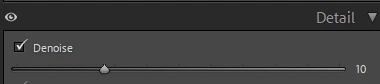
As you can see denoise it is clearly checked and if I filter by metadata it shows this picture as denoised. It was also clearly the same situation I have shown in the video I uploaded previously where I also had a different denoise strenght. Note that even at strenght 1 in a 100 color noise does not show up when it works correctly so it is a clear indicator it is just not working. 


I am using an NVIDIA GeForce RTX 3080 driver version 581.29 studio driver which came out the same day I made the post


dj_paige
Legend
September 26, 2025

What camera was used to take these pictures?


Could your problem be this situation?


I don't know anything about a previously uploaded video.

Inspiring
September 11, 2025

UPDATE: 
I updated my Nvidia drivers to the latest version and regenerated both the previews and the ai denoise but this time it did not work. I still have noise and I have no solution to fix this, I am stuck

dj_paige
Legend
September 11, 2025
quote

UPDATE: 
I updated my Nvidia drivers to the latest version


By @simone_zini97


Did you install the Studio version of the NVidia drivers? If you are using the Game-ready driver, that could be the cause of your problem.

Inspiring
September 11, 2025

Yes, I always had the studio drivers

Inspiring
September 10, 2025

Edit: I forgot to mention that to fix it I did not just delete the previews folder but also removed the ai denose on all the pictures and reapplied it so I am not sure which was the fix