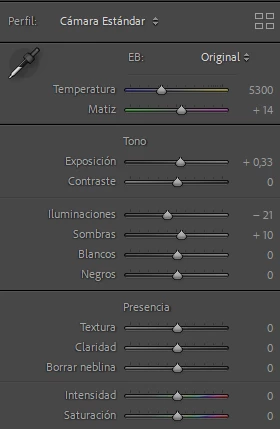
It happens that when importing photographs both in Lightroom Classic and in the Lightroom app, adjustments are applied to the development, as can be seen in the image the Exposure, Lighting and Shadows adjustments. I'm not applying any presets on the import.
How can I prevent this from happening and the photo from being imported without adjustments?
By @4Maderas-Sebasti�n
This is most likely settings from the camera, like for instance Nikon's Picture styles.
In the past, camera settings were written in a proprietary format that LrC didn't understand and ignored.
Some cameras now write these settings in XMP, which LrC understands and honors, if the camera profile is set to Camera Settings in Preferences > Presets >Raw defaults.
All the Nikon Z cameras do this, and also some other mirrorless cameras.
To stop this from happening, you have several options.
- Change the camera profile to Adobe Default in Preferences > Presets >Raw defaults
- Turn off all camera settings (like Picture styles), and keep using Camera Standard
- Set the sliders like you want them on an image in Develop, and create a Develop preset that can be applied automatically when you import images from this camera. You can create presets for several cameras.
See https://helpx.adobe.com/lightroom-classic/help/raw-defaults.html





 AdChoices