Participant
December 3, 2022
Answered

Am I safe to delete old Lr catalogues?

  • December 3, 2022
  • 2 replies
  • 6496 views

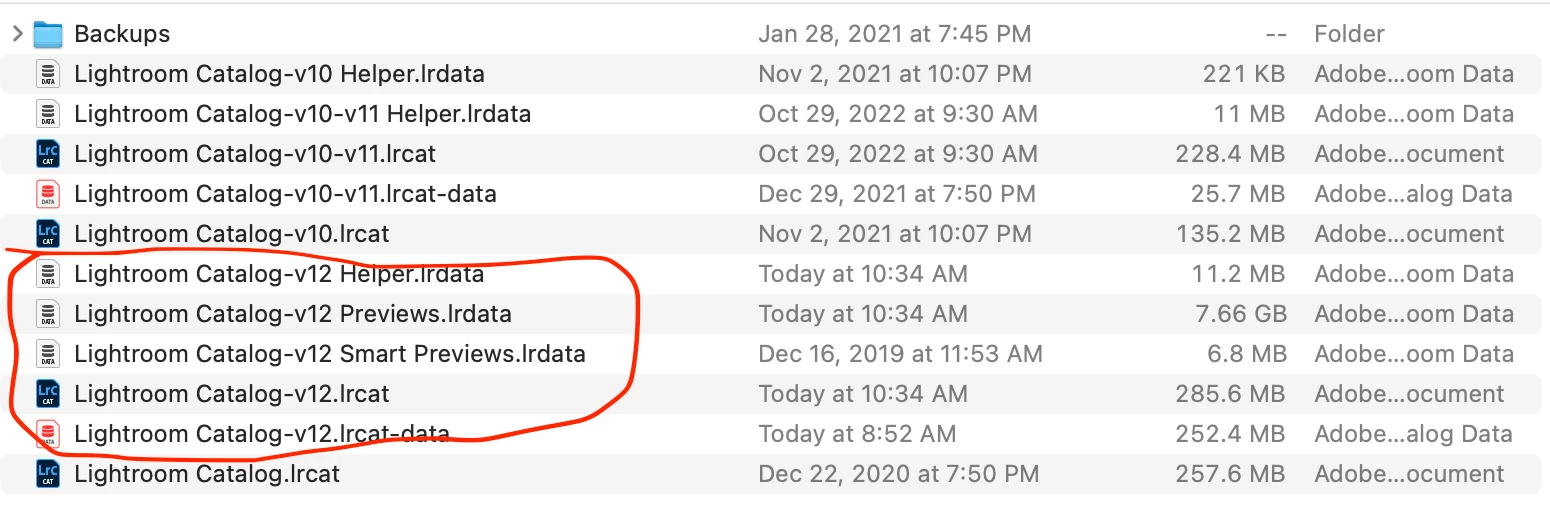
I'd like to save space on my laptop.  I've got Lightroom lrcat, Lrcat v10, lrcat v11 and lrcat v12.  Am I save to delete all but those pertaining to lrcat v12?
This topic has been closed for replies.
Correct answer Jill_C

Yes, but move them first to another folder, then open your most recent catalog and make sure it works to be certain that you didn't accidentally delete a needed file. Then you can delete the older catalog files.

2 replies

TheDigitalDog
Inspiring
December 3, 2022

The short answer is yes (you can in terms of the V10/11 labeled data files) but as mentioned, ensure all is well in the current version of LR with the V12 catalog first. 


Author “Color Management for Photographers" & "Photoshop CC Color Management/pluralsight"
Jill_C
Community Expert
Jill_CCommunity ExpertCorrect answer
Community Expert
December 3, 2022

Yes, but move them first to another folder, then open your most recent catalog and make sure it works to be certain that you didn't accidentally delete a needed file. Then you can delete the older catalog files.

Jill C., Forum Volunteer
Adam81224Author
Participant
December 3, 2022

Thanks Jill, confirming you'd put the catalogue on the bottom of the list Lighroom Catalogue.lrcat (the oldest one) into the file with the Lightroom v10 and v10-v11 once I've confirmed v12 is intact?  


Jill_C
Community Expert
Community Expert
December 4, 2022

Yes, that's what I'd do. I think you can safely consider it obsolete because of the date it was last used.

Jill C., Forum Volunteer
