Tony W
Participating Frequently
April 21, 2026
Answered

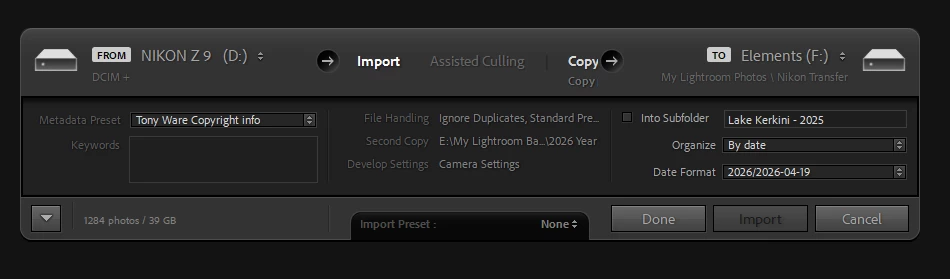
Am now on 15.3. My import new images has changed and keeps freezing, looks like my import preferences

  • April 21, 2026
  • 5 replies
  • 91 views

Even if changes are made to this screen you cannot move on, PC restart is only way out of screen.

I can no longer import images!

    Correct answer Arnold-Norway

    Thanks for the system information. It reveals two subjects to focus on,
    1. GPU driver. The current AMD RX driver was released February 26. 2026. If yours is older, consider utpdating it directly from AMD web page.
    2. The Library folder. It looks like the Library folder is in a OneDrive subfolder. That could be the major problem. OneDrive is Microsoft sync service, that syncronize data and provide access to the same data for a user accross mutiple devices logged in to the same Microsoft account. For Lightroom Classic this a big problem, because the catalog folder files are changed constantly. Copying open files leads to poor performance and data loss/corrupted files. 
    You may stop OneDrive in Task Manager, or move the Library folder outside OneDrive.

    You may also try to reset Preferences > General in Lightroom Classic.. Press the Alt/Opt key, to view two more buttons in the lower part of the screen. Click the one in the middle; Reset Settings, and start over.
    I hope this will help you solve the issue.

    5 replies

    annf83473815
    Participant
    April 22, 2026

    Arnold, restoring the full import dialog has done the trick. Thank you so much . 👍👏

    Arnold-Norway
    Arnold-NorwayCorrect answer
    Inspiring
    April 22, 2026

    Thanks for the system information. It reveals two subjects to focus on,
    1. GPU driver. The current AMD RX driver was released February 26. 2026. If yours is older, consider utpdating it directly from AMD web page.
    2. The Library folder. It looks like the Library folder is in a OneDrive subfolder. That could be the major problem. OneDrive is Microsoft sync service, that syncronize data and provide access to the same data for a user accross mutiple devices logged in to the same Microsoft account. For Lightroom Classic this a big problem, because the catalog folder files are changed constantly. Copying open files leads to poor performance and data loss/corrupted files. 
    You may stop OneDrive in Task Manager, or move the Library folder outside OneDrive.

    You may also try to reset Preferences > General in Lightroom Classic.. Press the Alt/Opt key, to view two more buttons in the lower part of the screen. Click the one in the middle; Reset Settings, and start over.
    I hope this will help you solve the issue.

    RegardsArnold Hoddevik
    Tony W
    Tony WAuthor
    Participating Frequently
    April 22, 2026

    Hi ​@Arnold-Norway 

    Just replied to ​@dj_paige the AMD Driver was definitely the problem.  It should automatically update but did not.

    Your other observations I was not aware of and I will rectify the way OneDrive works (another new addition to how my system works) I thought it was a good way to have my catalogs back up.  Not.

    Thank you

    @Tony W  

    annf83473815
    Participant
    April 22, 2026

    I have the exact same problem Tony. Did you get a resolution ?

    Tony W
    Tony WAuthor
    Participating Frequently
    April 22, 2026

    No resolution yet, no offence I am so glad it is not just me.

    I have ​@CMass and ​@Arnold-Norway looking at it. 

    This is the first time I have used Community so am learning how this works.

    Tony W
    Tony WAuthor
    Participating Frequently
    April 22, 2026

    Hi ​@annf83473815 

    It was my GPU Driver not automatically updating, should have been.  Now seems to be ok.

    Follow this thread for some other useful information, will definitely use this community in the future. 

    dj_paige
    Legend
    April 21, 2026

    Does clicking on Cancel or Done do anything?


    Is the whole computer frozen? Or do other programs work properly?


    Tony W
    Tony WAuthor
    Participating Frequently
    April 21, 2026

    Cancel/Done sometimes works, the revert arrow bottom left does not work.  Mostly I have to do a PC restart because this screens ends up frozen.  Computer and everything generally is perfect, Just Lightroom Import.

    dj_paige
    Legend
    April 22, 2026

    Frozen computer is almost always either a bad/old GPU driver or some sort of hardware malfunction.


    First make sure you GPU driver is up-to-date (don’t just say that you know it is up-to-date, confirm that you have the latest). If you have an NVidia GPU, make sure you are using the latest Studio driver and not the Game Ready driver.


    If that doesn’t work, run diagnostic programs on all of your hardware, including the cooling system.


    Arnold-Norway
    Inspiring
    April 21, 2026

    What is your system information from then Help menu > System information in Lightroom Classic (from the top to just past plugins)?
    Is your F-disc available?
    Do you normally use the mini version of the Import Window? You know you can restore to the full size Import Window by clicking the button with downpointing arrow in the lower, left corner of the Import window.
    Did you try to create a new, empty catalog, and import to? If not, please try that. (Lightroom Classic, File menu, New catalog.)

    RegardsArnold Hoddevik
    Tony W
    Tony WAuthor
    Participating Frequently
    April 21, 2026

    The restore button does not work, the Done/Cancel sometimes works. Mostly I just have to do a Computer restart.  All other apps I use are ok.  Just LR Classic Import.  I think I will try creating a New Catalogue but doubt that will sort it.  Checked the integrity of my existing one in use.