
Participant
April 19, 2018
Answered

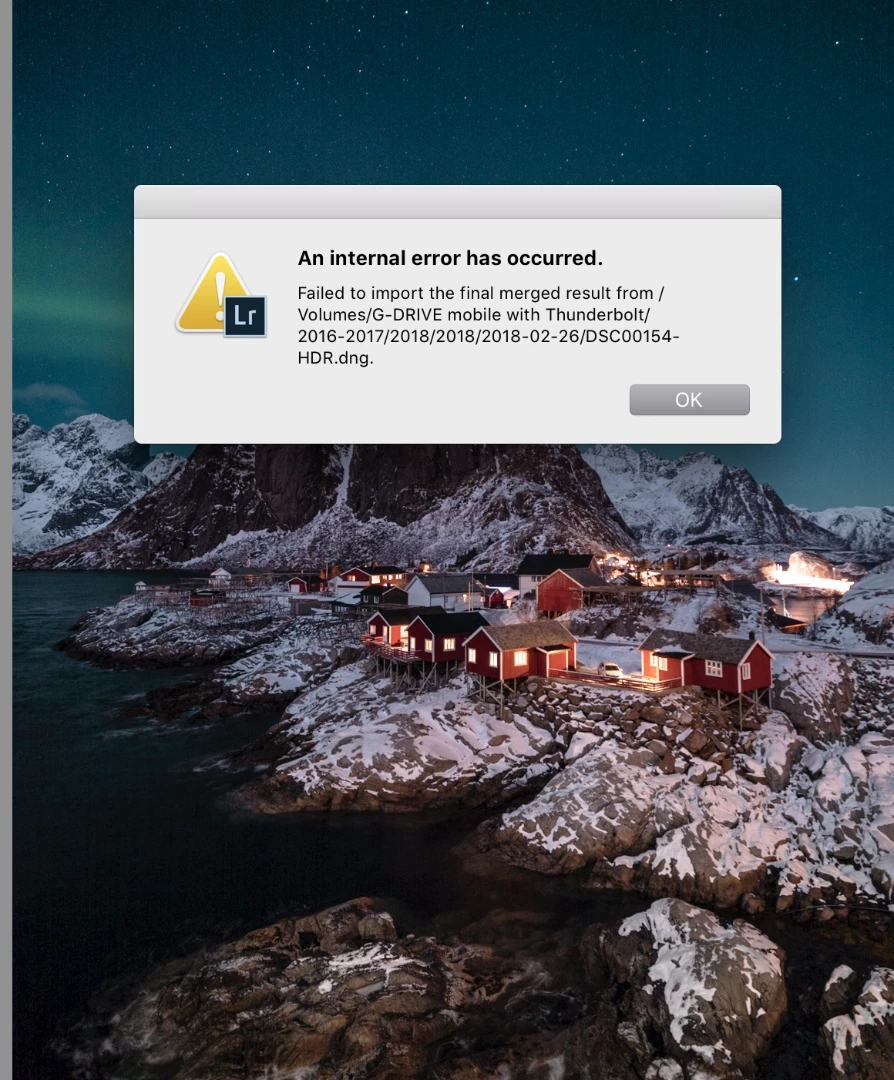
An internal error has occured Issue

  • April 19, 2018
  • 1 reply
  • 1805 views

Hey all, I get this message "Failed to import the final merged result from /Volumes/G-DRIVE mobile with Thunderbolt/2016-2017/2018/2018/2018-02-26/DSC00154-HDR.dng."  I have an external drive with all my photos and I have given my self permissions read and write. I still cannon merge any hdr photos in the light room app though. I'll get the preview and every thing and still it will come to that error. Any advice on what to do next?

I just got a new imac so i transferred every thing over

Mac (Retina 5K, 27-inch, 2017)

4.2 GHz Intel Core i7

40 GB 2400 MHz DDR4

Radeon Pro 580 8192 MB
    This topic has been closed for replies.
    Correct answer Sahil.Chawla

    It seems, that there is a permissions issue with the Thunderbolt drive, would suggest you to get in touch with apple so that they can fix the permissions.

    1 reply

    Sahil.Chawla
    Adobe Employee
    Adobe Employee
    April 20, 2018

    Hi Neilb,

    Could you try copying a few images to the desktop and then try importing them in Lightroom and let us know if it helps?

    Also, could you please let us know which version of Lightroom you're working on?

    Regards,
    Sahil

    Participant
    April 24, 2018

    Hey Sahil, So I did that and it worked perfectly. Any ideas on how to work around this?

    Sahil.Chawla
    Adobe Employee
    Sahil.ChawlaCorrect answer
    Adobe Employee
    April 25, 2018

    It seems, that there is a permissions issue with the Thunderbolt drive, would suggest you to get in touch with apple so that they can fix the permissions.