Solution! Well maybe for me at least.
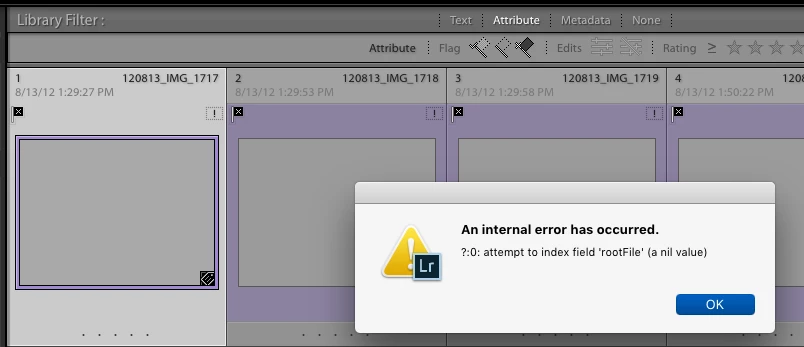
I think I figured it out. the catalog was holding 2 records (thumbnails, file info) for a single image file. When I deleted _only one_ of them, the delete command worked, & both references went away.
When I tried to delete both records, the dreaded internal error msg came up & it stopped doing anything.
Background: I am running a 'stock' Mac Pro (late 2013), Mac OS 10.13.6. With LightRoom Classic CC 7.4, with Camera Raw 10.4, again as installed. No additional plug-ins.
I am collecting & coagulating over 100,000 images from multiple sources -- old catalogs, old image file collections. Mostly RAW, with many jpg & a few tiff's.
A number of catalog references turned up missing. Some to the point of having little or no catalog file information. At first, I thought these 'file missing' images were causing the 'nil reference' error. (they may still do that.)
So I went through & tried to locate all the missing files. This seemed to help.
But THEN I found that some sound catalog image records still woudn't delete or remove. Some image records appeared twice in a single subfolder. How could this be? I could make the machine find them, but then it would refuse to let me delete (or remove) them - nil error again. when I tried, it also turned them into lost images as well.
then I got bright, or lucky. When I deleted a single one of these 'doubles', both went away. So I went through the whole stack, deleting every second reference to the offending images. (It happens that I didn't want them in any case, so deletion was called for.). This cleared things up considerable, and I haven't seen the nil error msg since then.
One not-so-minor issue: If I removed one of the doubles, both disappeared. If I really want the image file in the catalog, I have to add or import it back in.
OK, LR gurus, can you figure out what _really_ happened inside, get the right terms on it, and help us all stay away from those 'nil errors'? They aren't 'nil' when you hit one.

 AdChoices