coustoulin
Inspiring
August 1, 2026
Question

Analyse des photos ?

  • August 1, 2026
  • 1 reply
  • 27 views

Bonjour,

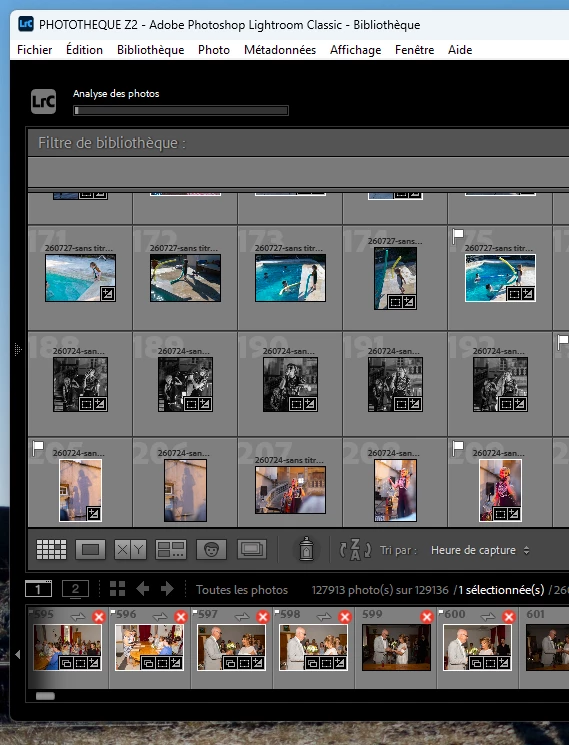
Je constate pour la première fois que mon LRC m’affiche “analyse des photos” et que progressivement sur chaque vignette il apparait une croix rouge.


Qu’est-ce que ça veut dire ?


    1 reply

    Anshul_Saini
    Community Manager
    Community Manager
    September 4, 2026

    Hi ​@coustoulin,
     

    Great question, no need to worry! What you're seeing is a feature called Assisted Culling, which was introduced in recent versions of Lightroom Classic. Here's what's happening:

    • Lightroom Classic is using AI to automatically evaluate your photos and help you identify your best shots. This is the Assisted Culling feature running in the background. It analyzes images for things like sharpness, focus (especially eye focus), exposure, and composition.

    • The red X that appears on thumbnails is a Reject flag. Assisted Culling automatically sorts your photos into two groups:

      ✅ Green check = Select (the AI considers this a good/keeper photo)

      ❌ Red X = Reject (the AI considers this a lower-quality photo — e.g., blurry, eyes closed, duplicate)
      These are suggestions only; Assisted Culling does not delete your photos. You always have the final say and can override any pick or reject.


    If you didn't intend to turn this on, Assisted Culling may have started automatically. You can stop or disable it at any time from Edit > Catalog Settings > Click the Metadata tab > Find the Assisted Culling section > Uncheck the analysis options to disable it for this catalog.


    If you want to clear the reject flags on your photos, go to the Library module, select the photos with the red X, and press U on your keyboard to unflag them (this removes both Pick and Reject flags).
     

    You can find full details on how Assisted Culling works, including how to customize it, in these help articles:
    https://helpx.adobe.com/lightroom-classic/desktop/organize-photos-in-lightroom-classic/assisted-culling.html

    https://helpx.adobe.com/lightroom-classic/desktop/import-photos/assisted-culling-at-import.html

    Hope that clears things up! Feel free to let us know if you have any other questions.
     

    Best regards,
    Anshul Saini
