
Participant
July 9, 2022
Question

Annoying Preview In Develop Module In Lightroom Classic on Windows 11

  • July 9, 2022
  • 1 reply
  • 155 views

Hi,


I have an annoying issue on Lightroom and I can't resolve :
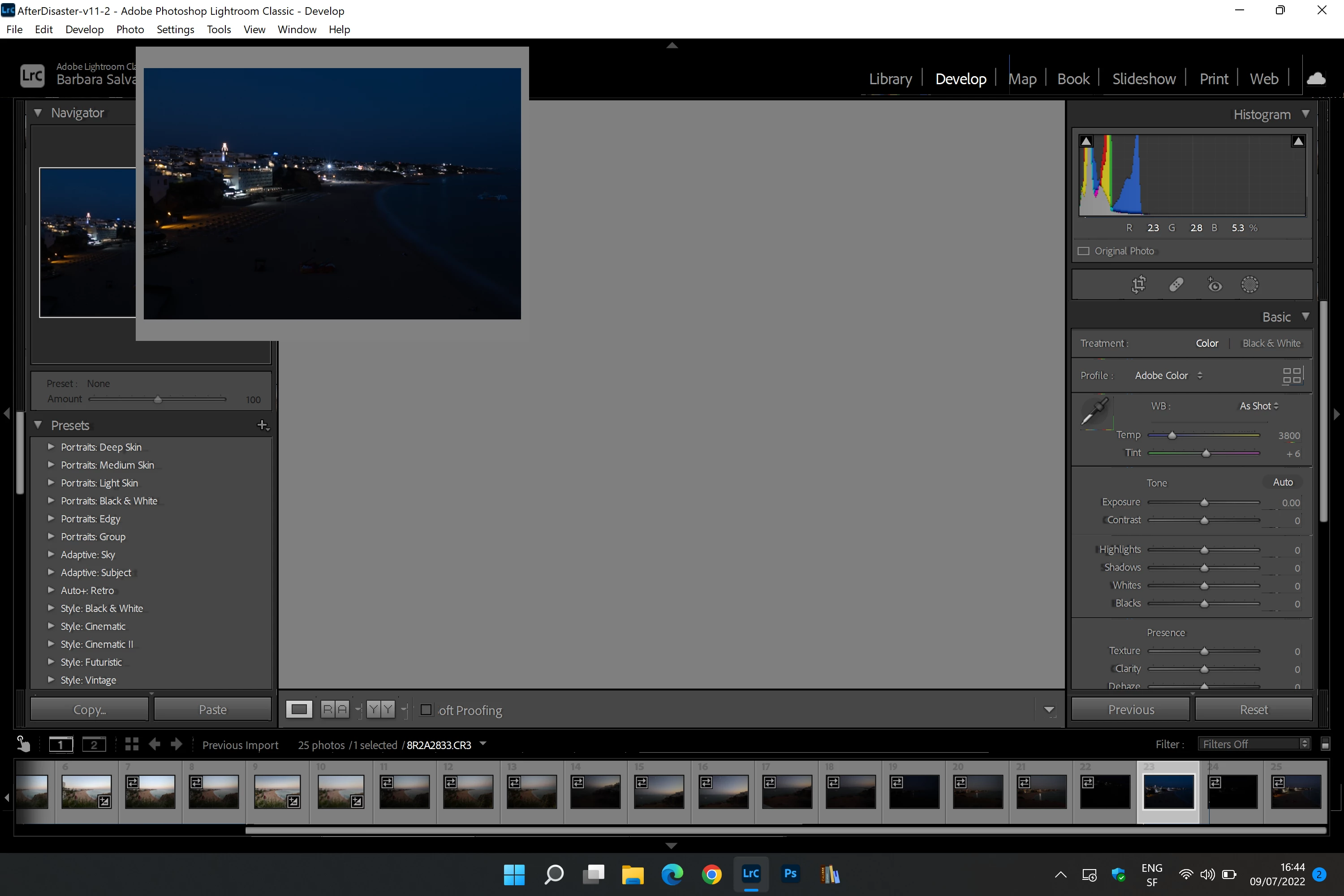
In Development mode, images are shown only in a small window, and the largest one is grayed out.


{Thread title updated by moderator}

This topic has been closed for replies.

1 reply

Sameer K
Community Manager
Community Manager
July 13, 2022

Hi Alice,


Thanks for reaching out. We are sorry for the trouble with Lightroom Classic. I'd be to help you figure this out.


Could you please share the specific version of Lightroom Classic from Help > About Lightroom Classic? Does this only happen when you open CR3 files, or do JPEGS behave similarly? Do you work with a multi-monitor setup? Have you tried any troubleshooting steps?


Please go to Lightroom Classic > Edit > Preferences > Performance > Use Graphics Processor > Set it to Off if it is on Custom or Auto. If this shows you any differences, please check this article to troubleshoot the GPU further: https://helpx.adobe.com/lightroom-classic/kb/troubleshoot-gpu.html


Let us know if this helps,

Thanks!

Sameer K

johnrellis
Legend
July 14, 2022

In particular, you're probably running an old, buggy graphics driver, and you need to update it by going directly to the manufacturer's web site, as described in solution 4 of the article Sameer linked to:

https://helpx.adobe.com/lightroom-classic/kb/troubleshoot-gpu.html#solution-4

Alice263Author
Participant
July 14, 2022
My drivers are the last, and also the Lightroom version.
I have resolved by disable the graphic processor from the preferences.

My notebook is often connected to an Eizo screen, then perhaps there are
some differences of color management profile.