Participating Frequently
April 13, 2022
Question

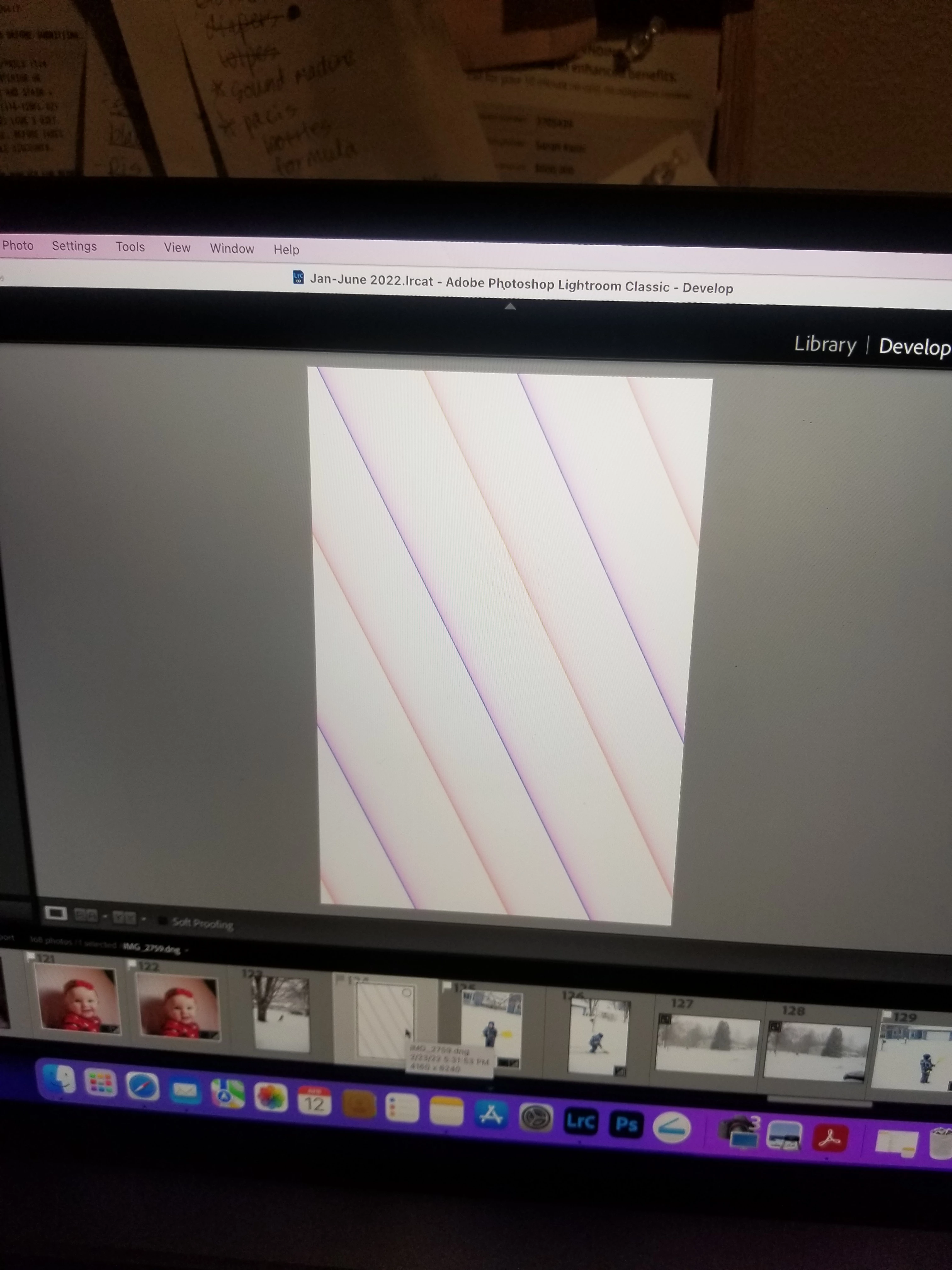
Anyone know what causes this in lightroom in develop mode?
  • April 13, 2022
  • 3 replies
  • 491 views

{Moved from Lightroom Cloud to Lightroom Classic Forum by Moderator}

This topic has been closed for replies.

3 replies

TheDigitalDog
Inspiring
April 13, 2022

One or multiple such images?

If you see this on many, try disabling GPU in preferences, better? If turning OFF GPU works, it's a GPU bug and you need to contact the manufacturer or find out if there's an updated driver for it. On the Mac, that's part of the OS update(s) so if this is the latest OS version, you may need to roll back a release.
Also see: https://helpx.adobe.com/photoshop/kb/acr-gpu-faq.html
Also see: https://community.adobe.com/t5/photoshop-ecosystem-bugs/weird-ps-bug-psd-file-looks-messed-up/idi-p/12780573

Author “Color Management for Photographers" & "Photoshop CC Color Management/pluralsight"
Participating Frequently
April 19, 2022

3-4 images out of 170-ish

I am unable to find the GPU in lightroom preferences.... would I need to look in photoshop? Also what exactly would disabling the GPU do? I believe my Mac just did an update. 

Thank you,

Sarah

Rob_Cullen
Community Expert
Community Expert
April 19, 2022

find the GPU in lightroom preferences....

Preferences > Performance Tab > Uses Graphics Processor:  Context menu: Set to Off.  Restart LrC.


3-4 images out of 170-ish

IMO- Then more likely to be corrupt image files as mentioned by @Ian Lyons above.


Regards. My System: Windows-11, Lightroom-Classic 15.1.1, Photoshop 27.3.1, ACR 18.1.1, Lightroom 9.0, Lr-iOS 10.4.0, Bridge 16.0.2 .
Ian Lyons
Community Expert
Community Expert
April 13, 2022

Typically, it indicates that the file is damaged. This can happen as a result of a damaged SD card, card reader, cable of even in camera. 

dj_paige
Legend
April 13, 2022

Could also be a bad GPU driver, try turning off the Graphics Processor use within Lightroom Classic


Preferences->Performance->Use Graphics Processor

LinSims
Community Expert
Community Expert
April 13, 2022

Let me move this to the Lightroom forum for you, which is the appropriate forum for your question.

The Using the Community forum is for help in using the Adobe Support Community forums, not for help with specific programs, installation issues, or account issues such as subscription questions or billing problems, or generalized questions about Creative Cloud services.

* Product questions should be posted in the associated product community.
* Installation questions should be posted in the Download & Install community.
* Account issues, including subscription questions or billing problems, should be posted in the Account, Payment, & Plan community.
* Questions about the Creative Cloud desktop app or general questions about apps in the Creative Cloud should be posted to the Creative Cloud Services community.

Participating Frequently
April 13, 2022
Ok, Thank you!

Sarah