
Known Participant
May 6, 2022
Answered

Apple M1 questions

  • May 6, 2022
  • 2 replies
  • 426 views

Hi all,

I just got a new Mac Studio yesterday, and while i've had a lot of macs - this is my first M1.

I set up this machine from sratch yesterday and downloaded the most recent versions of LR Classic and PS via the creative cloud app.

In the beginning of the install, i had to download Rosetta.

I had thought LR Classic and PS are now natvie to M1.

How do i know if i am running these applications natively or via Rosetta?

Is there a preference i need to check to make these run natively ?


Thanks
This topic has been closed for replies.
Correct answer Ian Lyons

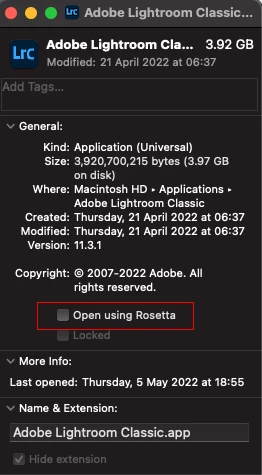
Re your second question (I forgot to answer it). Open the 'Get Info' panel for LrC and make sure 'Open using Rosetta' is unchecked as shown in below screenshot.


2 replies

Ian Lyons
Community Expert
Ian LyonsCommunity ExpertCorrect answer
Community Expert
May 6, 2022

Re your second question (I forgot to answer it). Open the 'Get Info' panel for LrC and make sure 'Open using Rosetta' is unchecked as shown in below screenshot.


Known Participant
May 6, 2022

Thank you - exactly what i was looking for.


Thanks


Ian Lyons
Community Expert
Community Expert
May 6, 2022

Rosetta is required by the Creative Cloud (CC) App, and neither LrC or Ps can run until you sign into your account using the CC App.