
Participant
December 29, 2022
Answered

appliquer un filtre à toutes mes photos

  • December 29, 2022
  • 1 reply
  • 688 views

J'aimerai appliqué un filtre à toutes mes photos

lorsque je clique droit et que je clique sur "appliquer à l'importation" ça ne marche pas sur toutes les photos (même si elles sont toutes séléctionner). Comment faire
This topic has been closed for replies.
Correct answer Sean McCormack

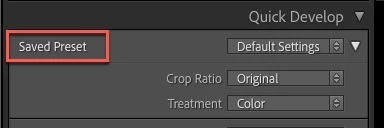
In Grid, go to Quick Develop, from there use the Saved Preset dropdown menu to apply a preset to all selected photos. 


Be aware that presets like B&W sometimes use profiles for the conversion and if the preset uses a camera specific profile, it will only apply correctly to images from that camera. 

1 reply

Ranjisha Sengupta
Legend
December 29, 2022

Hi there,


Thanks for reaching out.

Which version of the application are you using? Does it apply to only particular file formats? 

You are using the procedure mentioned here: https://helpx.adobe.com/lightroom-classic/help/finding-photos-catalog.html, right? Where are the images located?

We're here to help, just need some info.


Regards,

Ranjisha

Participant
December 29, 2022

Je pense que je me suis mal exprimée. quand je parle de filtre je parle en fait des paramètres prédefinis. Par exemple si je veux appliquer le paramètre prédéfinis N&B pour mettre toutes mes photos en noir et blanc il faut que je l'applique individuellement à chaque photo. n'y-a-t-il pas de façon de le faire plus rapidement ?

Sean McCormack
Community Expert
Sean McCormackCommunity ExpertCorrect answer
Community Expert
December 29, 2022

In Grid, go to Quick Develop, from there use the Saved Preset dropdown menu to apply a preset to all selected photos. 


Be aware that presets like B&W sometimes use profiles for the conversion and if the preset uses a camera specific profile, it will only apply correctly to images from that camera. 

Sean McCormack. Author of 'Essential Development 3'. Magazine Writer. Former Official Fuji X-Photographer.