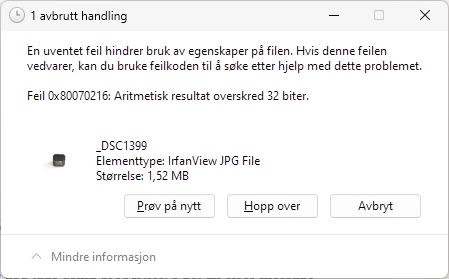
The evidence indicates you're tripping over a bug in File Explorer. Other programs can view and add tags and star ratings to the problem file -- it's just File Explorer that has a problem.
You can work around the File Explorer bug by unchecking the option Catalog Settings > Metadata > Include Develop Settings In Metadata Inside JPEG, TIFF, PNG, And PSD Files.
DETAILS
Other programs can modify the exported files' metadata without problem: Photoshop, Mac Preview, Geosetter, the Exiftool utility.
By default, LR exports all the develop settings in the XMP section of a JPEG. This includes the "dabs" (points) of brush strokes used in the healing tool, which can be relatively voluminous. The sample file you posted has one stroke with 106 dabs, and a second stroke with 1330 dabs.
When I copy those develop settings to a photo in the catalog and export it as a JPEG, I see the same symptoms as you when I try to add tag or a star rating in File Explorer's Properties panel, getting the error "Arithmetic results exceeds 32 bits". But if I use tweezers to remove 405 dabs from the brush strokes and re-export the JPEG, File Explorer works properly. If I remove 404 dabs and export, the bug still occurs.
The size of the JPEG APP1 segment that stores that problem JPEG's XMP metadata is 64,710 bytes, pretty close to the maximum of 65,502. When the total amount of XMP metadata exceeds the maximum, the modifying program must add a second segment, which is a little tricky. It appears that File Explorer is getting confused trying to add the second segment to contain the newly added tag and star rating.
If I add 5,000 dabs in a healing brush stroke to a photo, the exported JPEG already contains multiple segments, and File Explorer can add tags and star ratings without problem.

 AdChoices