Known Participant
June 4, 2026
Question

Arrow keys with dual monitor - not working sometimes

  • June 4, 2026
  • 1 reply
  • 15 views

Hello!

I’m currently with the latest Lightroom Classic, and a gallery with a ton of photos to cull and edit. I have two monitors. On my main monitor, I do the edits and see the photo full screen. On the left monitor, I browse the grid view, select, reject and set my filters to sort the photos.

Now, I like to use some keyboard shorcuts, not many, but the main ones are the arrow keys to cycle through my photos. Sometimes, tough, they do not move through the photos.

I found a simple workaround but this seems a bug of some sort.

I pick the Windows task bar, and move back to Lightroom window. And the arrow keys are working again. After a while, maybe with some edits, or alt-tab, I still don’t know what triggers it not to work, they stop working. So I go back again to Windows task bar, and make Lightroom Classic active again.

Altough this little workaround works, I would like to know if this is a known bug. I found other threads with similar issues, but they were very old and closed for answers (7+ years).

My system specs, if it helps:

Windows 11, i5 12400F, 32 GB DDR4, Geforce RTX 3050 8 GB, a few sata hard drives for storage, but Adobe apps are installed in an NVMe drive. Lightroom Classic 15.3 with Adobe Cloud subscription (always updated).

Thank you!

    1 reply

    Conrad_C
    Community Expert
    Community Expert
    June 4, 2026

    (Not sure if this applies to Windows, I’m on a Mac, but…)


    If it’s about the arrow keys, sometimes it’s about what part of the UI has keyboard focus. For example, if I just typed the number into a value field like for Exposure, that might now have keyboard focus so the arrow keys operate in that field and won’t navigate images.


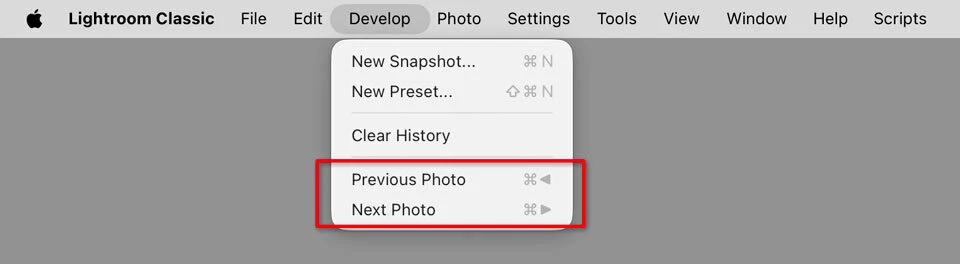
    What always works are the keyboard shortcuts specifically reserved for the Previous Photo and Next Photo menu commands. These always work regardless of what has focus, so if just the arrow keys aren’t working, add the Control key in Windows (the picture below shows adding the Command key on macOS) and it will always go to the previous/next image.


    For this reason, when I want to map a control surface to previous/next image (for example, I have one with a dial on it), I map it to Command + left arrow and Command + right arrow so that it always works.


    Because you said you have two displays, there’s another possible cause (which again, I am not sure if it’s a Mac-only problem): When I have the Secondary Display window open, it seems like it can sometimes steal keyboard focus, especially when first opened. When this happens, no single-key shortcut works until I set focus back to the main application window. In other words, Lightroom Classic stops responding to the arrow keys and other single-key shortcuts such as E, G, and D. To fix this, I have to either move my hand back to the mouse so I can click on the main application window, or I switch to another application and back to Lightroom Classic which is similar to what you said. This problem with Secondary Display has been around for a long time.