


Carlo28103132nwx2
Participating Frequently
March 31, 2026
Question

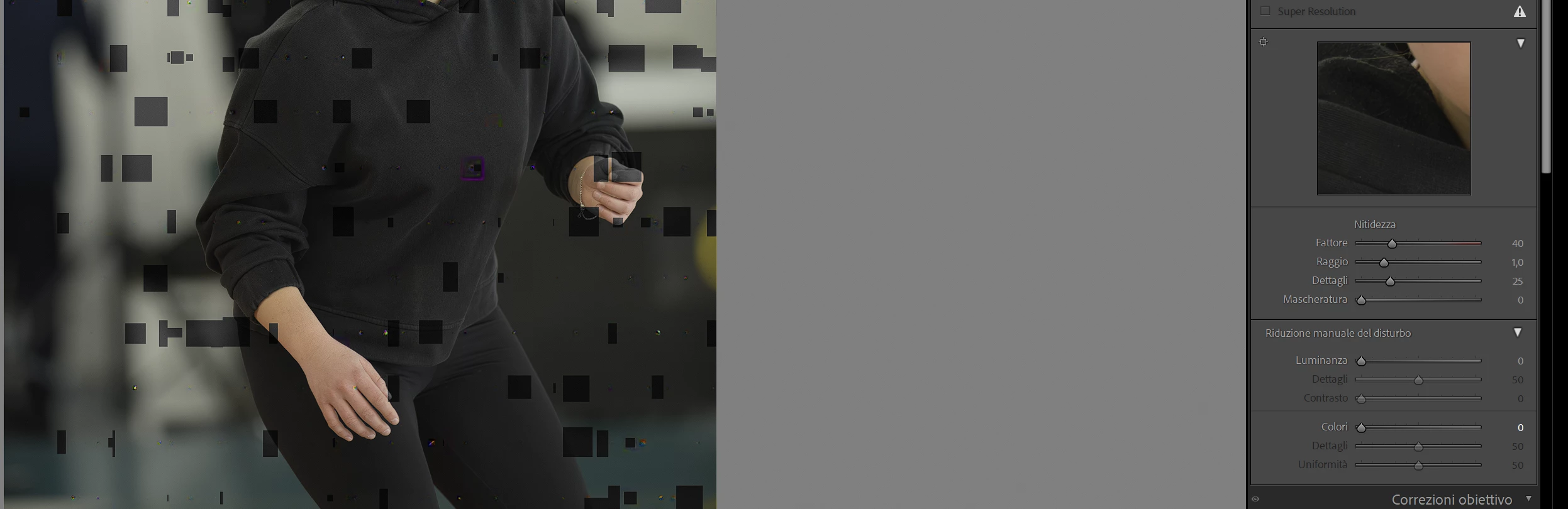
Artefatti con riduzione disturbo

  • March 31, 2026
  • 3 replies
  • 95 views

Quando utilizzo la funzione di riduzione disturbo, si generano degli artefatti sulla foto, come nell’immagine che segue. Non capisco il motivo

 

    3 replies

    johnrellis
    Legend
    April 2, 2026

    [View this post in your web browser. It contains formatting and images that don't appear in email.]


    @Carlo28103132nwx2 in safe mode the problem disappears. 


    So that clearly points the finger at the GPU.


    Looking at the links dj_paige posted, I think you do have the latest driver installed for the RX 6800 XT (it’s an RDNA 2 GPU).


    My only suggestion is to try an older driver from several months ago, perhaps 25.11.1 from 2025-11-13:

    https://www.amd.com/en/support/downloads/previous-drivers.html/graphics/radeon-rx/radeon-rx-6000-series/amd-radeon-rx-6800-xt.html


    Carlo28103132nwx2
    Participating Frequently
    April 3, 2026

    Purtroppo il downgrade non ha risolto il problema? Altri suggerimenti?. Grazie per l’aiuto

    dj_paige
    Legend
    April 3, 2026

    My next thought is to test to see if the GPU is malfunctioning

    https://www.guidingtech.com/how-to-check-gpu-health-on-windows/

    johnrellis
    Legend
    April 2, 2026

    [View this post in your web browser. It contains formatting and images that don't appear in email.]


    @Carlo28103132nwx2, you can quickly rule out whether the GPU (or its driver) is the cause of these symptoms. To determine whether the issue is with the GPU, start Windows in Safe Mode With Networking, which will disable LR's use of the GPU -- does the problem still occur? 
    https://support.microsoft.com/en-us/windows/windows-startup-settings-1af6ec8c-4d4a-4b23-adb7-e76eef0b847f 


    Denoise could take a very long time to run (perhaps up to 30 mins), but if the artifacts go away, then this strongly indicates a problem with the GPU.    


    This is just a diagnostic step, not a permanent workaround. For reasons known only to Adobe, LR's AI commands don't obey the setting of Preferences > Performance > Use Graphics Processor, even though it's trivial to implement.  And the steps described here for disabling the use of the GPU by some of the AI commands don’t work for all AI commands, including Denoise:

    https://helpx.adobe.com/camera-raw/kb/acr-gpu-faq.html#lens-blur


    Carlo28103132nwx2
    Participating Frequently
    April 2, 2026

    Ciao, ho provato come hai detto ed in effetti in modalità provvisoria il problema sparisce. Hai qualche consiglio su quale possa essere il problema relativo alla GPU? E’ risolvibile o devo cambiarla? Esiste un software di diagnostica per capire dove sia il problema?Grazie

    dj_paige
    Legend
    March 31, 2026

    If you are on Windows, update the to the latest GPU driver; please make sure that if it is an NVidia GPU that you are using the most recent Studio (not Game Ready) driver.

    Carlo28103132nwx2
    Participating Frequently
    March 31, 2026

    Sono su windows, utilizzo una scheda grafica AMD (Rx 6800 XT) e ho i driver più recenti

    dj_paige
    Legend
    March 31, 2026

    Please go to Help->System Info in Lightroom Classic and provide us with the information shown there.