


Participant
October 18, 2017
Question

Astrophotography photos too grainy even at 100% luminance. How to fix?

  • October 18, 2017
  • 2 replies
  • 2144 views

Hello all! At first I was so confused when my exported photos from my first attempts at astrophotography looked completely different from what I was seeing in lightroom. After doing some research I now understand that the only truly accurate view is 1:1, and when I compare my exported photos with lightroom in this way i see that they are the same. But, I like what i see in the fit view and even when i set the luminance all the way up to 100% the image looks way too grainy and its not what I want. I want the finished export to look the way i see it in the fit view. How can i accomplish this?  Any suggestions?

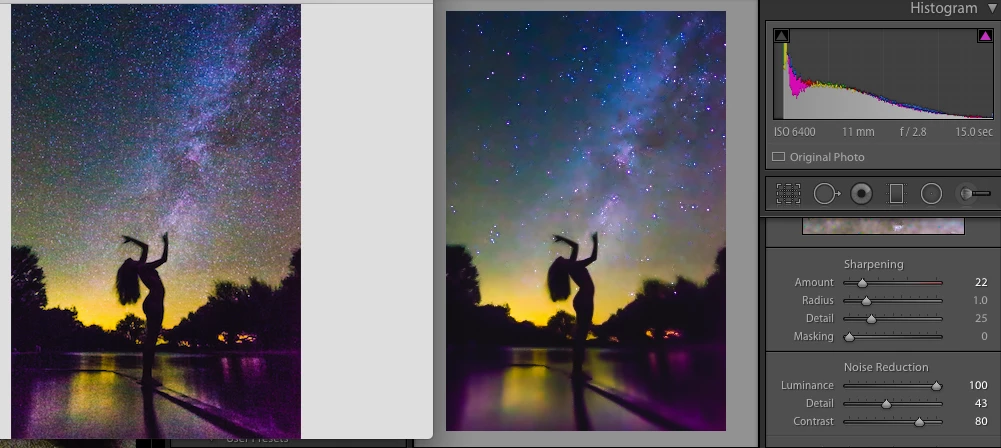
Thank you so much! (this is a screenshot of the exported image on the left, and what it looks like in lightroom in "fit" zoom view.)
This topic has been closed for replies.

2 replies

bitm07
Inspiring
October 18, 2017

Acceptable astro photography noise levels at 1 to 1 with a Canon rebel t3i and presumably a kit lens that has a maximum aperture of f3.5, good luck. Even with a full frame camera and a fast aperture astro lens, noise levels are far from ideal.


F. McLion
Community Expert
Community Expert
October 18, 2017

You are shooting with ISO6400 ... what do you expect regarding noise?

What camera are you using?

Luminance noise reduction of 100% renders your image totally blurry - that can not be what you want, right.

--- Got your issue resolved? Please label the response as 'Correct Answer' to help your fellow community members find a solution to similar problems. ---
Participant
October 18, 2017

Thank you for responding! This is my first attempt at astrophotography self

portraits, so I am definitely inexperienced in this arena and I don't have

expectations, just desires! It seems to me tho, that if I decreased the

ISO, I would need to increase my exposure time, which would make my

silhouette even more blurry.

This was a 15 second exposure. I'm using a canon rebel t3i, and a tokina 11-16 f2.8 lens

I definitely welcome advice on what I could do differently in the future,

but since I'm not able to reshoot at this particular location right away,

I'd like to do what I can with what I have here.

Do you think the image on the left looks blurry? In the screen shot I

included, I bumped the luminance to 100% to show how grainy it still

appears even at that setting. to be clear, the two images in the screenshot

are the same file, same settings, the image on the left is the exported

photo with luminance at 100%, and the image on the right is what the same

photo looks like in Lightroom when I view it as "fit" to screen.  Ideally I

liked the way it looked in Lightroom when luminance was lower but since it

appears totally different when I export, or when viewed in 1:1, I was

attempting to fix that by bumping it up all the way, which still appears

too grainy.

Thank you so much for your time and interest in helping me, I'm so

appreciative!!

Todd Shaner
Legend
October 18, 2017

I own a Canon T3i (600D) and a 5D MKII full-frame. The T3i performs quite well for a crop sensor camera when compared to the similar megapixel full-frame 5D MKII. Much of what you call grain appears to be stars. There should be no need to use Luminance Noise Reduction settings higher than 50. Try readjusting the Detail panel settings at 1:1 view. Here's suggested settings that might work well.