ralphlouzon
Inspiring
December 9, 2022
Answered

Auto advance issue on French keyboard

  • December 9, 2022
  • 1 reply
  • 680 views

On french AZERTY keyboards (and others I guess) you have to hold the Shift key to access to numbers.

So even if you set Auto Advance to OFF, it is impossible to both use the P key and a put a note to a picture without going to the next picture, in Develop (on way) or Library modules (the other way).

Annoying for those like me who don't want Auto advance at all!


Hope this is quite clear.

Thanks

This topic has been closed for replies.
Correct answer johnrellis

[This post contains formatting and embedded images that don't appear in email. View the post in your Web browser.]


To test my understanding: You've got an AZERTY keyboard, and you'd like to be able to assign a star rating to a photo without auto advancing to the next photo.  And you'd like to be able to flag a photo as "pick" without auto advancing.


There are two possible workarounds:


- If you have a numeric keypad, use the the numbers 0-5 on the keypad instead.  There have been bugs reported with the color-label shortcuts 6-9 no longer working on AZERTY keypads, but I found a post that seemed to indicate that 0-5 worked for assigning star ratings.


- Use the Any Shortcut plugin to reassign the shortcuts for ratings to use the unshifted keys corresponding to the numbers on the AZERTY keyboard:
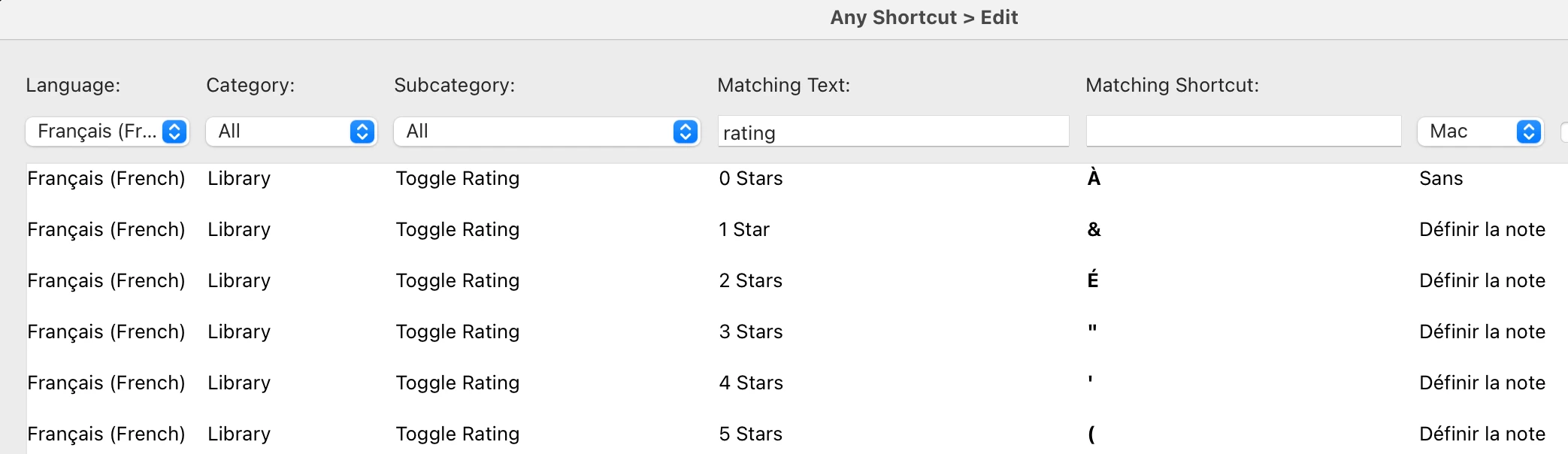
 

I've only partially tested this -- I don't have an AZERTY keyboard. But the plugin has a free trial.



1 reply

johnrellis
johnrellisCorrect answer
Legend
December 9, 2022

[This post contains formatting and embedded images that don't appear in email. View the post in your Web browser.]


To test my understanding: You've got an AZERTY keyboard, and you'd like to be able to assign a star rating to a photo without auto advancing to the next photo.  And you'd like to be able to flag a photo as "pick" without auto advancing.


There are two possible workarounds:


- If you have a numeric keypad, use the the numbers 0-5 on the keypad instead.  There have been bugs reported with the color-label shortcuts 6-9 no longer working on AZERTY keypads, but I found a post that seemed to indicate that 0-5 worked for assigning star ratings.


- Use the Any Shortcut plugin to reassign the shortcuts for ratings to use the unshifted keys corresponding to the numbers on the AZERTY keyboard:


I've only partially tested this -- I don't have an AZERTY keyboard. But the plugin has a free trial.


johnrellis
Legend
December 9, 2022

Also, to help others here, please let us know if you try either of these workarounds.

ralphlouzon
Inspiring
December 10, 2022

Any Shorcut plugin seems to be adequat to solve this issue, thanks.

The upper line of the keyboard is now set to &é"'(§è!çà instead of 1234567890 and it does the job, no more impetuous jump to the next picture.