Participant
May 7, 2018
Question

Auto exposure broken after update to the latest version

  • May 7, 2018
  • 8 replies
  • 1339 views

Hi,

I updated my lightroom classic today (to version 7.3.1), and autoexposure button seems to be completely broken now! The screenshot below was taken after I pressed the "auto" button above "exposure" slider. It used to produce balanced images before, now it just shifts the historgam deeply to the left, producing a shit picture. Any advice how to fix that?
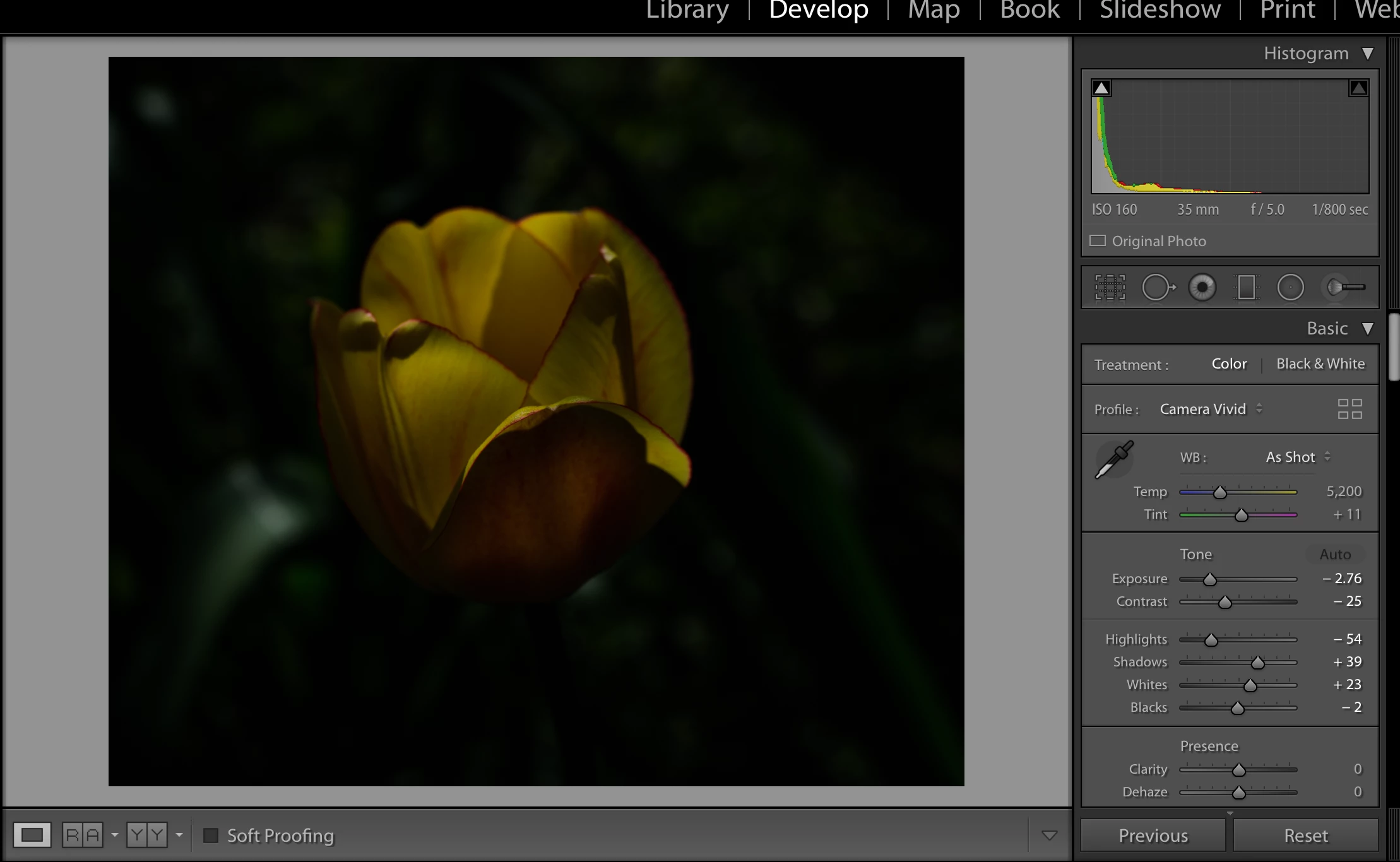
    This topic has been closed for replies.

    8 replies

    JoeKostoss
    Community Expert
    Community Expert
    May 14, 2018

    This often happens when the image has relatively large areas of white that is clipped such as can happen while shooting in dappled bright sunlight using a + exposure compensation.  The auto tries to darken the clipped areas using a 1 or 2 stop exposure reduction which darkens the entire image.

    Todd Shaner
    Legend
    May 14, 2018

    Joe, it's also happening with very normal images that have no highlight clipping. Check out the image file at the link I provided in my reply above. It is actually slightly under-exposed with no bright specular areas.  The image data is shifted left to lower 1/3 of the Histogram. It happens to varying degrees with the 'Camera' named profiles, but not at all with the 'Adobe' named profiles.  Gotta be a bug!

    JP Hess
    Inspiring
    May 14, 2018

    Personally, I hope they don't change the Auto adjustment. I have been going through a set of about 1500 images from a trip to Alaska taken about 10 years ago, comparing the new Lightroom with what I had available then. For the vast majority of those images that Auto adjustment has done a remarkable job. Occasionally I find that I have had to undo it and go a different direction, but the Auto adjustment has saved me countless hours of time. But then maybe I'm just not as picky as some of you.

    ageminmo
    Participant
    May 14, 2018

    I also have the same problem.I thought it is the combination of my camera body and third party lens but also having the same problem for my 4 other cameras.

    cmgap
    Community Expert
    Community Expert
    May 8, 2018

    Are you willing to share that image via Dropbox? What camera/lens was used for this image?

    Todd Shaner
    Legend
    May 14, 2018

    This has been reported in the Photoshop Family Forum. I've replied with a link to an image file that clearly demonstrates the issue. The image is a closeup of a yellow flower on a dark background. It appears to be due to an AI algorithm failure of the Tone panel Auto function when using 'Camera Standard' or 'Camera Landscape' profiles. Adobe Standard profile does not exhibit the issue. It's not clear what's triggering the gross under-exposure in specific images since other similar pictures I checked don't exhibit the issue.

    Option to revert to older "Auto" | Photoshop Family Customer Community

    cmgap
    Community Expert
    Community Expert
    May 7, 2018

    What happens if you reset the photo and try again?

    Jim Wilde
    Community Expert
    Community Expert
    May 8, 2018

    If it's the same "problem" that I encountered, resetting and repeating the steps in the same order will produce the same result. A "better" result, i.e. not so under-exposed, would probably be obtained by applying the camera-matching profile ​after ​applying Auto Settings.

    Legend
    May 7, 2018

    Re trshaner - is this happening across the board? Anything different about this image like extreme underexposure to begin with?

    Bob Somrak
    Legend
    May 7, 2018

    Show us screen clips of your other develop sliders, especially the tone curve.  AUTO does not override any settings except a few in basic. 

    M4 Pro Mac Mini. 48GB
    Todd Shaner
    Legend
    May 7, 2018

    That's not normal or even remotely close. Is this happening with other subject types (people, landscape, architectural)? How about when using Adobe Standard camera profile?

    Jim Wilde
    Community Expert
    Community Expert
    May 7, 2018

    I had something similar happen last week (coincidentally it was a picture of a flower), where I found a full two-stop exposure difference when using Auto Settings with the camera matching "Camera Natural" profile, compared with using Auto when the default Adobe Color profile was used. I do sometimes see an more under-exposured result when using Auto Settings with some of the camera matching profiles, versus the default. Sometimes I prefer one over the other, but not always the same one....as Johan said, Auto Settings isn't magic, and sometimes it gets things wrong.

    JohanElzenga
    Community Expert
    Community Expert
    May 7, 2018

    Fix it yourself manually. Auto Tone is greatly improved, and works much better for most images. But it isn't magic and will still sometimes give poor results.

    -- Johan W. Elzenga