
Participant
November 8, 2025
Answered

Auto Import with Development Setting DeNoise

  • November 8, 2025
  • 1 reply
  • 82 views

In Lightroom Classic (Release 15.0) on Mac I want to apply a preset with DeNoise and a Subject Mask (inverted) during Auto Import.

My goal is to create a workflow, where I can Auto Import RAW files, and have DeNoise applied during import, such that the image is ready for further editing, when I turn to the computer.

The preset works fine, when I apply it to an already imported image.

I have selected the preset in "Auto Ingest Setting | Development Setting"

I can see that the auto imported images has an invalid mask added, although Lightroom can do Subject detection on it
If I apply a "simple" preset, like a a black & white preset it work fine

It seems like a bug to me
Correct answer johnrellis

[This post contains formatting and embedded images that don't appear in email. View the post in your Web browser.]


When LR applies a preset on import containing AI settings, it applies the settings to the imported photos but doesn't compute the AI results of those settings.  (There should be an option to do that, but there isn't.)


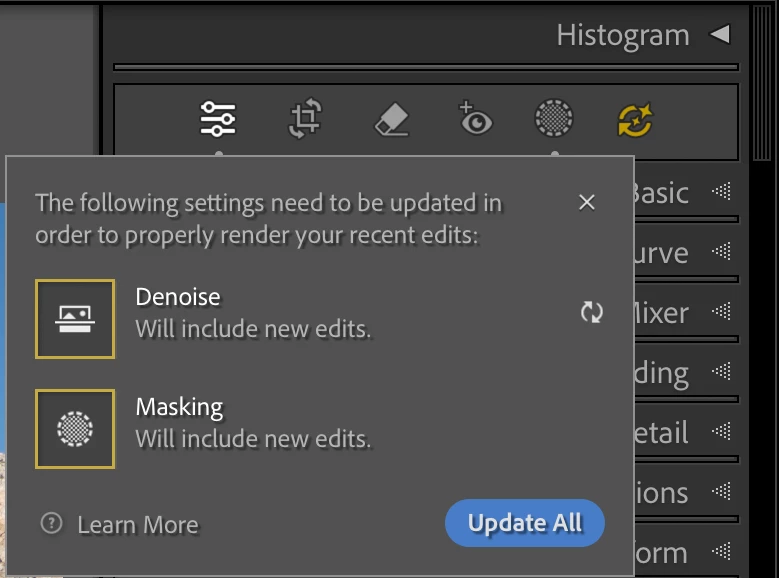
After the auto import completes, edit one of the Photos in Develop and observe that the AI Edit Status button is yellow, and if you click on it, you'll see that LR has applied the Denoise and Masking settings but it hasn't computed the results of those settings:


If you click Update All, it will then compute the results of the Denoise and Subject mask.


You can select a batch of photos (e.g. the special collection Previous Import) and do Photo > Develop Settings > Update AI Settings, and all the selected photos will be updated.  Any selected photos that don't need updating will be quickly skipped.

1 reply

Participant
November 8, 2025

In the Development module the Denoise checkmark is checked, but the Denoise is clearly not applied

johnrellis
johnrellisCorrect answer
Legend
November 8, 2025

[This post contains formatting and embedded images that don't appear in email. View the post in your Web browser.]


When LR applies a preset on import containing AI settings, it applies the settings to the imported photos but doesn't compute the AI results of those settings.  (There should be an option to do that, but there isn't.)


After the auto import completes, edit one of the Photos in Develop and observe that the AI Edit Status button is yellow, and if you click on it, you'll see that LR has applied the Denoise and Masking settings but it hasn't computed the results of those settings:


If you click Update All, it will then compute the results of the Denoise and Subject mask.


You can select a batch of photos (e.g. the special collection Previous Import) and do Photo > Develop Settings > Update AI Settings, and all the selected photos will be updated.  Any selected photos that don't need updating will be quickly skipped.