
Participant
May 24, 2023
Answered

Auto Masking

  • May 24, 2023
  • 1 reply
  • 303 views

I use masks regularly but there seems to have been a sudden change over the last week that whenever I select the "create new mask" function - whether that be a linear gradient or select people or whatever - the sliders for the Curve preset and Clarity automatically set themselves. The Curve preset goes from linear to medium contrast and the Clarity goes to 0. This results in me having to reset the Curve and Clarity every time I create a mask, unless I actually want those auto mask settings! Why are masks suddenly automated? Can anyone shed any light on this?
This topic has been closed for replies.
Correct answer AxelMatt

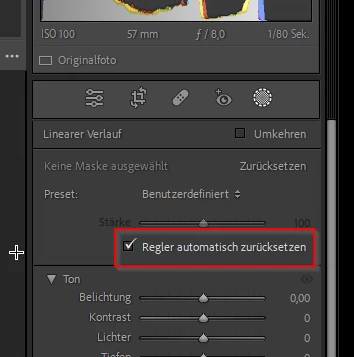
Check if the option "Reset Sliders Automatically" ("Regler automatisch zurücksetzen" in Screenshot) at the top of the mask panel is set.

(Screenshot is from a German version of Lightroom)


Then the sliders should be reset to the default settings on creating a new mask.


1 reply

AxelMatt
Community Expert
AxelMattCommunity ExpertCorrect answer
Community Expert
May 24, 2023

Check if the option "Reset Sliders Automatically" ("Regler automatisch zurücksetzen" in Screenshot) at the top of the mask panel is set.

(Screenshot is from a German version of Lightroom)


Then the sliders should be reset to the default settings on creating a new mask.


My System: Intel i7-8700K - 64GB RAM - NVidia Geforce RTX 3060 - Windows 11 Pro 25H2 -- LR-Classic 15 - Photoshop 27 - Nik Collection 8 - PureRAW 6 - Topaz Photo AI
Participant
May 24, 2023

Wow, so easy when you know how! I've always missed that little feature. Thank you. All done!